Virtual Keyboard for Google Chrome™ icon

Virtual Keyboard for Google Chrome™ Chrome Extension Analysis

Automation & Workflow Efficiency

Chrome extension ID: ecjkcanpimnagobhegghdeeiagffoidk

This is a browser-based virtual keyboard designed to allow users to input text via mouse clicks. It provides an interface for multi-language character entry directly within the Chrome environment.

Version:3.0.1
Size:178KiB
Last updated:

Overview

Installs

20K+

Rating

3.2

293 reviews

Languages

39 locales

Includes Deutsch, English, Filipino, Indonesia...

Market analysis

Review-backed positioning, friction, and market signals for this Chrome extension.

Backed by review samples

Macro category

Automation & Workflow Efficiency

Pricing friction

Low review signal

Complaint intensity

High review signal

Listing & review signals
Observed signals from store listing text and review samples.

Listing positioning

The extension positions itself as a simple, 100% free solution for users needing an on-screen virtual keyboard. It highlights support for over 50 languages and ease of use as its primary value proposition.

Inferred product pattern

Basic utility extension with significant stability and feature execution issues.

Review-backed pain points

The primary pain point is the failure of the application to initialize, with users reporting that the 'start' button is unresponsive. Users also report significant usability issues, such as missing basic keys like 'Enter' and confusing language selection workflows.

Observed feature gaps

Lack of expected keyboard functionality (no Enter key), failure to actually support advertised languages (e.g., Japanese), and inconsistent software performance.

Tags
Virtual KeyboardAccessibilityLanguage ToolsInput Utility
Target users

- Users with physical keyboards issues

- Multilingual typists

- Users requiring accessibility input tools

Primary use cases

- Typing in foreign languages

- On-screen character selection via mouse

Positive themes

- None observed in recent high-rating samples

Negative themes

- Complete failure to launch/start

- Missing essential keys like Enter

- Poor UI/UX requiring excessive clicks

- Inaccurate language support claims

- Privacy concerns regarding permissions

Observed friction

- Performance complaints detected

- Privacy complaints detected

- No pricing friction; the product is marketed as free.

Evidence boundary: Extracted from 279 user reviews indicating widespread technical failures, broken UI components, and unfulfilled language support promises. Reviews are overwhelmingly negative, potentially indicating a recent update caused widespread breakage.
Complaint summaries
Review-backed complaint signals grouped by operational area.

Support

No direct support complaints, but users express frustration with the lack of functionality and perceived privacy risks.

Reliability

High incidence of reports stating the extension fails to open or respond to interactions.

Privacy

Users expressed suspicion regarding requested privacy permissions.

Access & pricing

- Free usage observed

- No account requirement observed

- Free plan or free usage claimed

Store listing facts

Listing assets

- Screenshots: 1

- Videos: 0

- Languages: 39

Trust signals

- Developer contact

- Official website

Store metadata

- Version: 3.0.1

- Size: 178KiB

- Last updated:

Store description excerpt
Short excerpt from the public Chrome Web Store listing; full copy is available on the official store page.
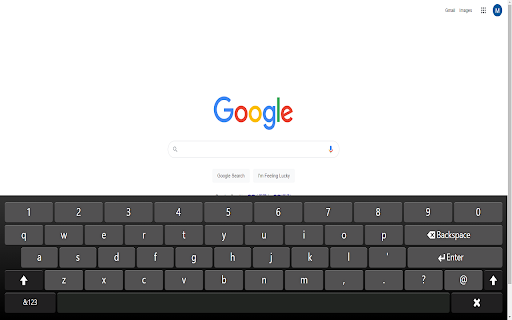
Want to use a virtual keyboard today to type in foreign language characters? Begin using this virtual keyboard now. It is 100% free and allows you to type in over 50+ languages. To begin using this keyboard, here is what you need to do. 1) Click on the extension icon 2) The virtual keyboard will popup. 3) Use the mouse to click on the characters you want to input Its that easy to use. With over 50+ languages supported, you can type quickly and easily in any language you want today. Disclaimer: Please note this extension is NOT made by Google and is made by an independent development team. All copyrights belong to their respective owners. Google doesn’t endorse or sponsor this extension. Virtual Keyboard for Google Chrome™ is not owned by, is not licensed by and is not a subsidiary of Google Inc.

Listing SEO keywords

Search intent keywords
Keyword signals for evaluating how users may discover, compare, or search for this extension category.

Core discovery

virtual keyboard chromeon-screen keyboard extensionforeign language input tool

Comparison

best virtual keyboard for chromealternative to windows on-screen keyboard

Problem

virtual keyboard not workingextension start button brokencannot type in language

Alternative

chrome accessibility toolsmultilingual keyboard extension

Similar extensions

Jump to related discovery paths:

FAQ

What is Virtual Keyboard for Google Chrome™ mainly used for?
This is a browser-based virtual keyboard designed to allow users to input text via mouse clicks. It provides an interface for multi-language character entry directly within the Chrome environment.
What market signals stand out?
Visible niche traction with moderate review base. Last known update: 06/25/2024.
What should builders compare before entering this space?
Compare install concentration, rating quality, update recency, screenshots, developer portfolio, listing claims, and review-backed friction signals.
Is this page review-backed?
Backed by review samples. This page combines store metadata with selected review signals, while raw store metrics remain visible for comparison.

Screenshots

Virtual Keyboard for Google Chrome™ screenshot

Links

Recommended Chrome extensions

Related listings from the same category, trending peers, and the same publisher portfolio.

Browse workflow