Translate Selected Text icon

Translate Selected Text Chrome Extension Analysis

Automation & Workflow Efficiency

Chrome extension ID: fbimffnjoeobhjhochngikepgfejjmgj

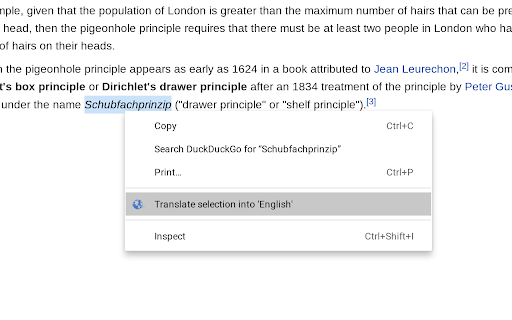
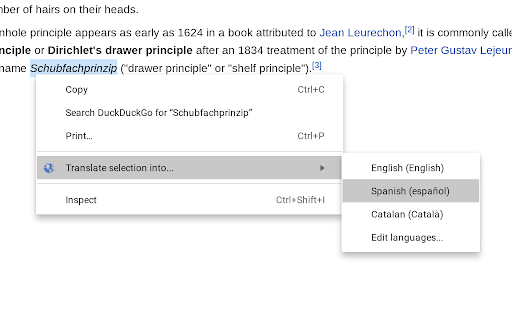
Translate Selected Text allows users to highlight text on a webpage and initiate a translation through the browser's context menu. The tool is designed to minimize permission requirements by redirecting the user to the Google Translate website to perform the actual translation.

Version:3.0.0-stable
Size:1.24MiB
Last updated:

Overview

Installs

100K+

Rating

3.8

770 reviews

Languages

31 locales

Includes Deutsch, English, Filipino, Indonesia...

Market analysis

Review-backed positioning, friction, and market signals for this Chrome extension.

Backed by review samples

Macro category

Automation & Workflow Efficiency

Pricing friction

Low review signal

Complaint intensity

Moderate review signal

Listing & review signals
Observed signals from store listing text and review samples.

Listing positioning

The extension positions itself as a privacy-focused, lightweight utility that translates selected text via Google Translate. It highlights its permission-conscious design, emphasizing that it does not monitor web activity or inject code into every page.

Inferred product pattern

Minimalist utility that prioritizes privacy over feature-rich UI by acting as a browser-side shortcut to an existing web service.

Review-backed pain points

The primary pain point is the user experience of being redirected to a new tab instead of having the translation appear as an in-page tooltip or overlay.

Observed feature gaps

Missing in-page translation overlay, lack of dedicated keyboard shortcuts for trigger, and absence of an intuitive hover-trigger mechanism.

Tags
TranslationText SelectionProductivityOpen SourceGoogle Translate
Target users

- Privacy-conscious users

- Frequent web researchers

Primary use cases

- Translating specific text snippets

- Looking up foreign language vocabulary

Positive themes

- Functional as a simple redirect tool

- Appreciated privacy/no-permission approach

Negative themes

- Forced tab-switching/redirects

- Lack of in-page popup/modal translation

- Cumbersome interaction flow (right-click menu)

Observed friction

- None; the extension is free.

Evidence boundary: Extracted from Chrome Web Store metadata and public user reviews regarding feature preference and UX friction. Reviews capture a strong preference for in-page UI, which the developer explicitly excludes to maintain low permissions; this creates a persistent gap between user expectation and developer design philosophy.
Complaint summaries
Review-backed complaint signals grouped by operational area.

Support

No specific support complaints; users express product design frustrations rather than service issues.

Reliability

Users report dissatisfaction with the redirect-based performance model, but not with technical downtime.

Privacy

No privacy complaints; the extension is actually praised for its low-permission footprint.

Access & pricing

- Free usage observed

- No account requirement observed

- Free plan or free usage claimed

Store listing facts

Listing assets

- Screenshots: 3

- Videos: 0

- Languages: 31

Trust signals

- Privacy policy

- Developer contact

- Official website

Store metadata

- Version: 3.0.0-stable

- Size: 1.24MiB

- Last updated:

Store description excerpt
Short excerpt from the public Chrome Web Store listing; full copy is available on the official store page.
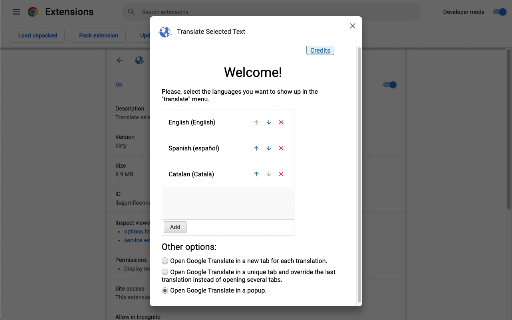
This extension allows you to translate the text selection using Google Translate whenever you want. When the extension is installed select some text from a website, right click and select to which language you want to translate the selected text. ** FAQ: ** Q: Why choose this extension and not another one? A: I designed this extension so that it didn't prompt the user for permissions. This way the final user knows that the extension doesn't have the permission to access the content of web pages and monitor the user activity on the Internet (other extensions of this type prompt for this permission). This extension has access only to the content of the selected text when the user clicks the extension context menu and it is used to create a Google Translate app with the text autocompleted. You can configure from the options page which languages you want to show in the context menu. ** Open…

Listing SEO keywords

Search intent keywords
Keyword signals for evaluating how users may discover, compare, or search for this extension category.

Core discovery

translate selected textgoogle translate chrome extensionquick translation tool

Comparison

in-page translatorbrowser translation sidebar

Problem

too many tabsright click translation slow

Alternative

deepl extensiongoogle translate hover

Similar extensions

Jump to related discovery paths:

FAQ

What is Translate Selected Text mainly used for?
Translate Selected Text allows users to highlight text on a webpage and initiate a translation through the browser's context menu. The tool is designed to minimize permission requirements by redirecting the user to the Google Translate website to perform the actual translation.
What market signals stand out?
Established adoption with moderate review base. Last known update: 06/02/2024.
What should builders compare before entering this space?
Compare install concentration, rating quality, update recency, screenshots, developer portfolio, listing claims, and review-backed friction signals.
Is this page review-backed?
Backed by review samples. This page combines store metadata with selected review signals, while raw store metrics remain visible for comparison.

Screenshots

Translate Selected Text screenshot

Links

Recommended Chrome extensions

Related listings from the same category, trending peers, and the same publisher portfolio.

Browse education
Report Webpages icon

Report Webpages

Adrià Vilanova Martínez (avm99963)

Quickly report webpages clicking in the extension icon in the Omnibox

Installs

384

Rating

4.2

Translate for Chrome -Translator, Dictionary icon

Translate for Chrome -Translator, Dictionary

Translator App.

Translate words, phrases or text on any webpage. Full page translator and dictionary, text to speech (TTS) using Google Translate.

Installs

600K+

Rating

4.7

オクリンクプラス Webページスクリーンショット機能 icon

オクリンクプラス Webページスクリーンショット機能

ベネッセコーポレーション

オクリンクプラスのカードにWebページのスクリーンショットを挿入し、リンクを埋め込むことができます!

Installs

500K+

Rating

3.0

GPTZero: AI Detection & Writing Replay icon

GPTZero: AI Detection & Writing Replay

chrome-extension-publisher

Bring AI detection, citation checks, live essay feedback, and writing replays directly into Google Docs and your workflow.

Installs

400K+

Rating

4.7

Google Meet Attendance List icon

Google Meet Attendance List

MeetList

Easiest way to save the attendance list for your meetings or lectures

Installs

400K+

Rating

4.7

Cite This For Me: Web Citer icon

Cite This For Me: Web Citer

Chegg Writing Tools

Automatically create website citations in the APA, MLA, Chicago, or Harvard referencing styles at the click of a button.

Installs

400K+

Rating

3.8

Trancy - AI Translator & Dual Subtitles icon

Trancy - AI Translator & Dual Subtitles

Trancy

Trancy provides bilingual subtitle for platforms like YouTube, Disney+, as well as AI translator for websites.

Installs

300K+

Rating

4.7

Assessment Lock (Vretta) icon

Assessment Lock (Vretta)

google-web-store-admin

Assessment Security extension for e-Assessments running on ChromeOS

Installs

300K+

Rating

1.9

edpuzzle icon

edpuzzle

Edpuzzle

Import your favorite educational YouTube video into Edpuzzle with a click!

Installs

300K+

Rating

4.2

Certificate Enrollment for ChromeOS icon

Certificate Enrollment for ChromeOS

google.com

Request a certificate for your device.

Installs

300K+

Rating

4.4