GitZip for github icon

GitZip for github Chrome Extension Analysis

Developer & Designer Tools

Chrome extension ID: ffabmkklhbepgcgfonabamgnfafbdlkn

GitZip is a Chrome extension that enables selective downloading of GitHub sub-directories and files. It provides a visual selection interface and context menu integration to package specific repository contents into a ZIP file for download.

Developer:Kino Lien
Version:1.0.5
Size:365KiB
Last updated:

Overview

Installs

100K+

Rating

4.1

188 reviews

Languages

1 locales

Includes English

Market analysis

Review-backed positioning, friction, and market signals for this Chrome extension.

Backed by review samples

Macro category

Developer & Designer Tools

Pricing friction

Low review signal

Complaint intensity

Moderate review signal

Listing & review signals
Observed signals from store listing text and review samples.

Listing positioning

The product positions itself as a time-saving utility that allows users to download only specific files or folders from a GitHub repository as a ZIP archive. It emphasizes avoiding the need to download entire projects for a few necessary files through a checkbox-based selection system.

Inferred product pattern

Single-purpose developer utility targeting a specific workflow inefficiency on a major third-party platform.

Review-backed pain points

Users report that the extension often fails to trigger downloads even after providing an API token. There are significant concerns regarding the level of authorization required for GitHub repositories, with some users perceiving the tool as a security risk.

Observed feature gaps

Lack of a direct download button on folders (requires double-clicking), suboptimal ZIP structure where files are not contained within a parent folder, and a lack of clear onboarding instructions.

Tags
GitHub UtilityRepository DownloaderDeveloper ToolZip Downloader
Target users

- Software Developers

- Open Source Contributors

- Technical Users

- Data Scientists

Primary use cases

- Downloading specific sub-folders from GitHub

- Avoiding full repository cloning

- Quickly archiving specific files from a remote repo

Positive themes

- High utility for selective downloads

- Lightweight performance with no permanent background process

- Convenience of the checkbox selection interface

Negative themes

- Intermittent download failures

- Security concerns regarding GitHub token permissions

- Poor user interface clarity

- Poor English grammar in presentation causing trust issues

Observed friction

- Performance complaints detected

- Privacy complaints detected

- No pricing friction observed as the tool is primarily free with an optional donation link.

Evidence boundary: Analysis based on the store listing and a sample of 10 high-information/low-rating reviews. The review sample is a small subset of the total 188 reviews; some feedback is provided in non-English languages.
Complaint summaries
Review-backed complaint signals grouped by operational area.

Support

Users noted a lack of clear instructions, making the initial setup and usage difficult.

Reliability

Multiple reports of the tool being 'unusable' or failing to function despite correct configuration of API tokens.

Privacy

Some users expressed strong distrust over the required authorizations to GitHub repositories, labeling the extension as a potential virus.

Access & pricing

- Free usage observed

- Login needed for core features

- Free plan or free usage claimed

Store listing facts

Listing assets

- Screenshots: 5

- Videos: 0

- Languages: 1

Trust signals

- Developer contact

- Official website

Store metadata

- Version: 1.0.5

- Size: 365KiB

- Last updated:

Store description excerpt
Short excerpt from the public Chrome Web Store listing; full copy is available on the official store page.
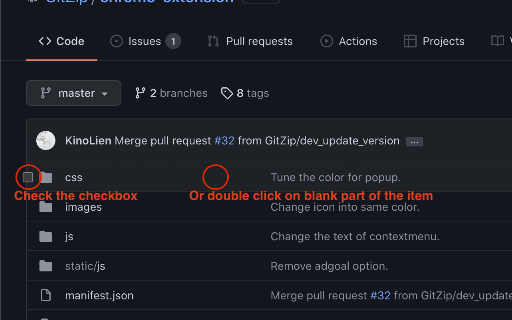
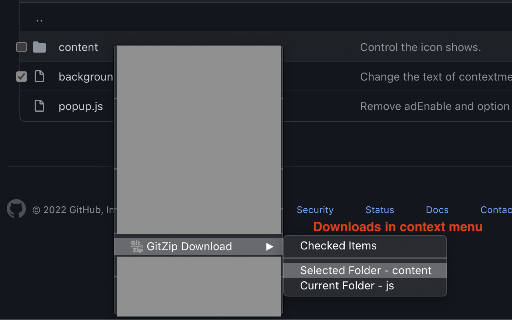
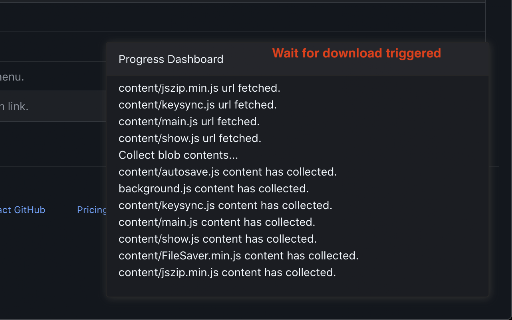
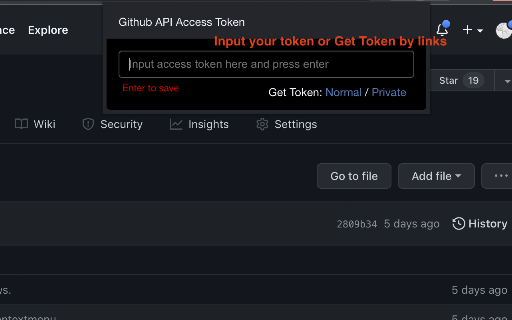
Why GitZip: - You DO NOT have to download the whole project just for those few files/folders you need. Usage: 1. Browse any Github repository page. 2. Two ways to download: 2.1. Choose the items: 2.1.1. In default, you can double click on items or check the checkbox on the front of items. 2.1.2. Click download button at the bottom-right of the page. 2.2. In context menu: 2.2.1. Click "GitZip Download" > "Whole Repository" or "Current Folder". 2.2.2. Move the mouse cursor on the item and click "GitZip Download" > "Selected Folder/File". 2.2.3. Click "GitZip Download" > "Checked Items" after doing 2-1-1. 3. See the progress dashboard and wait for browser trigger download. 4. Get the ZIP file. Options: "How to select" for item selecting behaviour and "theme" for dark or light themes. Get Token: - If you see the "Rate Limit" warning message on progress dashboard, you should get the Github A…

Listing SEO keywords

Search intent keywords
Keyword signals for evaluating how users may discover, compare, or search for this extension category.

Core discovery

download github folder zipgithub directory downloaderextract github subfolder

Comparison

GitZip vs DownGitbest github folder downloader

Problem

download specific folder from githubgithub rate limit zip download

Alternative

GitZip alternativesGitHub folder download tool

Similar extensions

Jump to related discovery paths:

FAQ

What is GitZip for github mainly used for?
GitZip is a Chrome extension that enables selective downloading of GitHub sub-directories and files. It provides a visual selection interface and context menu integration to package specific repository contents into a ZIP file for download.
What market signals stand out?
Established adoption with moderate review base. Last known update: 05/06/2026.
What should builders compare before entering this space?
Compare install concentration, rating quality, update recency, screenshots, developer portfolio, listing claims, and review-backed friction signals.
Is this page review-backed?
Backed by review samples. This page combines store metadata with selected review signals, while raw store metrics remain visible for comparison.

Screenshots

GitZip for github screenshot

Links

Website: gitzip.org

Recommended Chrome extensions

Related listings from the same category, trending peers, and the same publisher portfolio.

Browse developer
Color Picker for Chrome™ icon

Color Picker for Chrome™

colorpicker08

HEX, RGB Color picker, Advanched Eyedropper, Find color code on any page

Installs

700K+

Rating

4.0

Get cookies.txt LOCALLY icon

Get cookies.txt LOCALLY

kairi003

Get cookies.txt, NEVER send information outside with open-source

Installs

700K+

Rating

4.8

Postman Interceptor icon

Postman Interceptor

Postman

Capture requests from any website and send them to Postman Client.

Installs

700K+

Rating

4.3

Window Resizer icon

Window Resizer

Ionuț Botizan

Resize the browser window to emulate various screen resolutions.

Installs

700K+

Rating

4.3

Tag Assistant Companion icon

Tag Assistant Companion

Google

The Tag Assistant Companion extension works with Tag Assistant to help troubleshoot installation of gtag.js and Google Tag Manager.

Installs

600K+

Rating

3.1

Talend API Tester - Free Edition icon

Talend API Tester - Free Edition

Qlik

Visually interact with REST, SOAP and HTTP APIs.

Installs

600K+

Rating

4.8

TikTok Pixel Helper icon

TikTok Pixel Helper

TikTok For Business

The TikTok Pixel Helper is a plug-in that monitors whether your TikTok Pixel is functioning properly.

Installs

600K+

Rating

2.6

Assinatura Digital no Navegador icon

Assinatura Digital no Navegador

bry-suporte-apps

Esta extensão é projetada para ser utilizada em conjunto com outras soluções e não funciona de forma isolada para a assinatura.

Installs

600K+

Rating

2.4

Google Analytics Debugger icon

Google Analytics Debugger

Google Analytics

Prints useful information to the JavaScript console by enabling the debug version of the Google Analytics Javascript.

Installs

600K+

Rating

4.2

Detailed SEO Extension icon

Detailed SEO Extension

ahrefsseotoolbar

Get SEO insights at the click of a button to any website you're currently on. Built by full-time SEO's for daily analysis.

Installs

500K+

Rating

4.9