Audio Equalizer and Amplifier icon

Audio Equalizer and Amplifier Chrome Extension Analysis

Niche Lifestyle & Gaming Hacks

Chrome extension ID: fgjoaiofojbppcbaghehnpofkbhhclfl

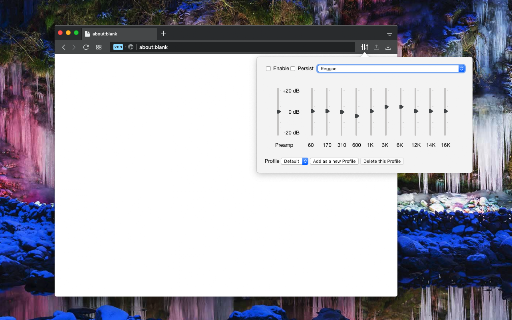
An audio management extension for Chrome that allows users to adjust frequency levels, volume, and bass for all video and audio elements on web pages. It features multiple presets and user-defined profiles for different listening needs.

Developer:lunu.bounir
Version:0.2.3
Size:77.79KiB
Last updated:

Overview

Installs

20K+

Rating

4.4

79 reviews

Languages

11 locales

Includes Deutsch, English, Nederlands, español...

Market analysis

Review-backed positioning, friction, and market signals for this Chrome extension.

Backed by review samples

Macro category

Niche Lifestyle & Gaming Hacks

Pricing friction

Low review signal

Complaint intensity

High review signal

Listing & review signals
Observed signals from store listing text and review samples.

Listing positioning

The product is positioned as a global control tool for audio equalization, volume, and bass boosting across all web-based media. It highlights the ability to use specific frequency ranges and presets to customize the listening experience.

Inferred product pattern

A specialized audio utility extension that provides deep frequency control but suffers from significant version compatibility and stability issues.

Review-backed pain points

Users report the extension frequently breaks after browser updates, causes audio stuttering, and triggers high CPU loads that freeze the browser, especially during Google Meet sessions.

Observed feature gaps

Users expressed a desire for more advanced audio processing features such as dynamic EQ or compression similar to professional DAW plugins.

Tags
Audio EqualizerVolume BoosterBass BoostSound Control
Target users

- Audiophiles

- YouTube viewers

- Chromebook users

- Users with low-quality audio hardware

Primary use cases

- Boosting low volume on web videos

- Customizing audio frequency profiles

- Enhancing bass for specific genres

Positive themes

- Compatibility with other audio routing extensions like AudioPick

- Ability to enhance audio for cheap monitor speakers

Negative themes

- Total failure to function after Chrome updates

- Incompatibility with specific sites like YouTube and Bandcamp

- Severe performance issues including 100% CPU usage and browser freezing

Observed friction

- Performance complaints detected

- No pricing friction observed in the provided data.

Evidence boundary: Data extracted from the Chrome Web Store listing and multiple user reviews detailing functionality and technical bugs. The review sample is relatively small and shows a high concentration of recent reports regarding broken functionality after updates.
Complaint summaries
Review-backed complaint signals grouped by operational area.

Support

No specific complaints regarding support responsiveness, though users are directed to GitHub for bug reports.

Reliability

Significant reliability issues reported, including the extension becoming non-functional after Chrome updates and causing system-level performance degradation.

Privacy

No privacy or security complaints were observed.

Access & pricing

- No clear monetization signal

- No account requirement observed

- No clear pricing signal

Store listing facts

Listing assets

- Screenshots: 3

- Videos: 0

- Languages: 11

Trust signals

- Privacy policy

- Developer contact

- Official website

Store metadata

- Version: 0.2.3

- Size: 77.79KiB

- Last updated:

Store description excerpt
Short excerpt from the public Chrome Web Store listing; full copy is available on the official store page.
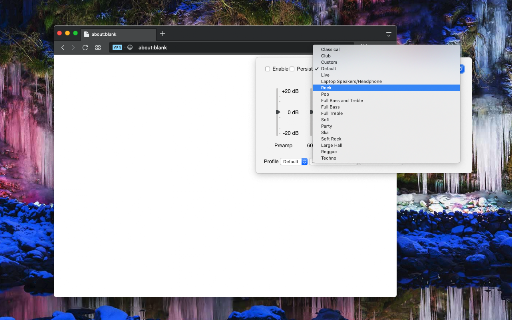
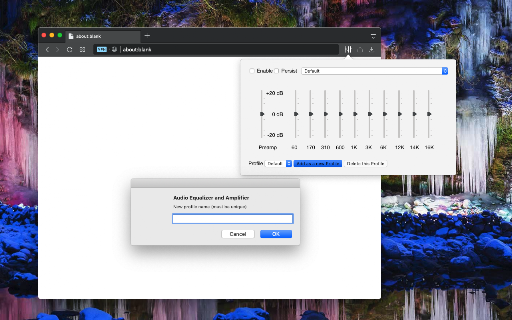
A tool for boosting or reducing (attenuating) the levels of different frequencies of media elements in web pages. The most basic type of equalization is the bass control on the old home audio equipment to control low frequencies and the treble control to adjust high frequencies. Since there are only two controls, the adjustment is for a fairly wide range of frequencies. In this extension, however, you can adjust a wide set of frequency ranges (60, 170, 310, 600, 1K, 3K, 6K, 12K, 14K, 16K) similar to the well-known VLC player. The extension adds a toolbar button to your browser to control audio equalization simply from its popup window. There are about 12 presets to select from or you can adjust your frequency levels. The extension offers profiling to keep user selections in different profiles. This extension supports pre-amplification for each profile as well. You have a global volume c…

Listing SEO keywords

Search intent keywords
Keyword signals for evaluating how users may discover, compare, or search for this extension category.

Core discovery

Audio Equalizer ExtensionChrome Volume BoosterBass Boost ChromeWeb Audio Equalizer

Comparison

VLC player audioDAW pluginsAudioPick

Problem

Chrome audio not workingYouTube volume too lowChrome browser freezingAudio stuttering

Alternative

Volume control extensionAudio enhancer

Similar extensions

Jump to related discovery paths:

FAQ

What is Audio Equalizer and Amplifier mainly used for?
An audio management extension for Chrome that allows users to adjust frequency levels, volume, and bass for all video and audio elements on web pages. It features multiple presets and user-defined profiles for different listening needs.
What market signals stand out?
Visible niche traction with limited review base. Last known update: 12/02/2025.
What should builders compare before entering this space?
Compare install concentration, rating quality, update recency, screenshots, developer portfolio, listing claims, and review-backed friction signals.
Is this page review-backed?
Backed by review samples. This page combines store metadata with selected review signals, while raw store metrics remain visible for comparison.

Screenshots

Audio Equalizer and Amplifier screenshot

Links

Recommended Chrome extensions

Related listings from the same category, trending peers, and the same publisher portfolio.

Browse workflow