
YouTube Time Manager Chrome Extension Analysis
Niche Lifestyle & Gaming HacksChrome extension ID: fpoooibdndpjcnoodfionoeakeojdjaj
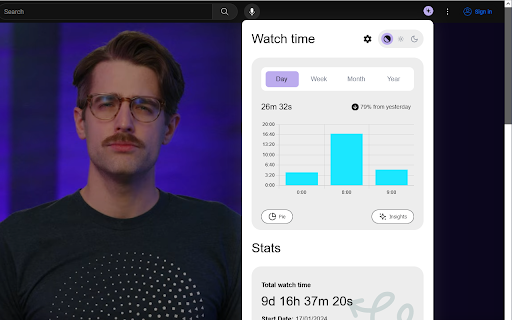
YouTube Time Manager is a browser extension that tracks and visualizes a user's time spent on YouTube. It provides statistical views through pie charts and lists, allowing users to monitor their consumption habits across various channels and video categories.
Overview
Installs
8K+
Rating
★ 3.8
56 reviews
Languages
1 locales
Includes English (United States)
Market analysis
Review-backed positioning, friction, and market signals for this Chrome extension.
Macro category
Niche Lifestyle & Gaming Hacks
Pricing friction
Low review signal
Complaint intensity
Moderate review signal
Listing positioning
The extension positions itself as a tool for gaining meaningful insights into YouTube watch time. It focuses on providing detailed breakdowns of usage by channel, category, and specific timeframes like days, weeks, or months.
Inferred product pattern
A niche browser utility that tracks user behavior on YouTube to provide personal consumption analytics.
Review-backed pain points
Users report significant issues with data accuracy, the loss of long-term tracking data following updates, and high system resource usage (CPU/disk). There is also frustration regarding the inability to manually clear data or exclude specific channels.
Observed feature gaps
Lack of a manual reset/clear button for watch time, absence of a channel exclusion/filtering feature, and unreliable JSON history import functionality.
- YouTube consumers
- Digital wellbeing enthusiasts
- Productivity seekers
- Monitoring total YouTube watch time
- Analyzing time spent per channel
- Tracking daily or weekly video consumption patterns
- Simple and easy-to-understand interface
- Useful time-period breakdowns
- Automatic timer pausing when videos are paused
- Inaccurate time tracking during network lag
- Loss of historical data after extension updates
- High CPU and disk resource consumption
- Difficulty importing watch history via JSON
- Performance complaints detected
- No specific pricing complaints, although one user mentioned annoying ad injections.
Support
No direct support complaints, but users expressed frustration with technical bugs and data loss.
Reliability
Significant reliability issues involving inaccurate time tracking, high CPU usage, and data loss during updates.
Privacy
No privacy complaints observed.
- No clear monetization signal
- No account requirement observed
- No clear pricing signal
Store listing facts
- Screenshots: 1
- Videos: 0
- Languages: 1
- Privacy policy
- Developer contact
- Official website
- Support link
- Version: 3.1.16
- Size: 2.0MiB
- Last updated:
Listing SEO keywords
Core discovery
Comparison
Problem
Alternative
Similar extensions
Jump to related discovery paths:
FAQ
Screenshots
Links
Website: github.com
Privacy policy: https://avi12.com/youtube-time-manager
Support links: https://github.com/avi12/youtube-time-manager-feedback/issues/new/choose




![Netflix Picture in Picture now for Prime & D+ [QVI] icon](https://extspot.com/api/v1/assets/googleusercontent/aHR0cHM6Ly9saDMuZ29vZ2xldXNlcmNvbnRlbnQuY29tLzVHUW9jRkFFOWVaWDRURmFmT3BpTTFVRVk0QUJlWm1iYy15MmtBeWlCQkRVSGpxY1lRb2tkNngwUldMQVR0V2hMVlU4R1cxWFNrNHQ0bFlKd251WDV3b3pTQQ)