

Test & Feedback Chrome Extension Analysis
Automation & Workflow EfficiencyChrome extension ID: gnldpbnocfnlkkicnaplmkaphfdnlplb
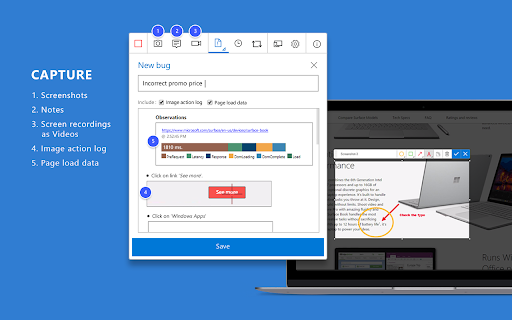
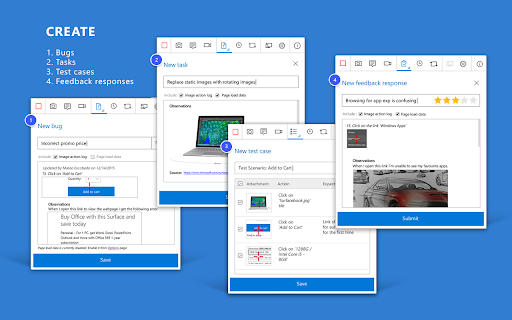
A Chrome extension designed for exploratory testing, allowing users to capture screenshots, screen recordings, and system logs. These findings can be converted into bugs, tasks, or test cases to streamline the software debugging process.
Overview
Installs
200K+
Rating
★ 4.2
177 reviews
Languages
1 locales
Includes English (United States)
Market analysis
Review-backed positioning, friction, and market signals for this Chrome extension.
Macro category
Automation & Workflow Efficiency
Pricing friction
Low review signal
Complaint intensity
High review signal
Listing positioning
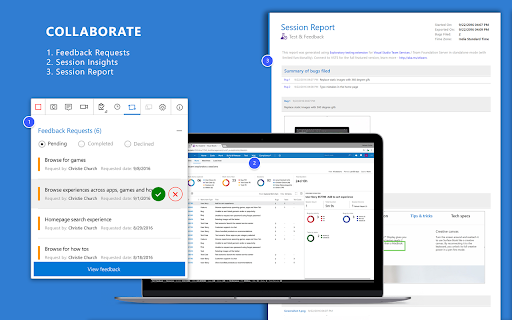
The product is positioned as a collaborative quality assurance tool that enables all team members to capture and report bugs directly from the browser. It emphasizes seamless integration with Azure DevOps and Team Foundation Server to provide end-to-end traceability for testing workflows.
Inferred product pattern
An enterprise-focused QA utility that bridges browser-based manual testing with professional DevOps project management suites.
Review-backed pain points
Users report the extension frequently crashes Google Chrome during screen recording, struggles to consistently capture all user interactions, and presents authorization errors even for administrators.
Observed feature gaps
Users identified an inability to link video recordings directly to test cases (only to bugs/tasks) and a lack of seamless video viewing within the tool, requiring manual downloads.
- QA Testers
- Software Developers
- Product Owners
- UX Designers
- Bug reporting
- Exploratory testing
- Creating test cases
- Capturing user session logs
- Strong conceptual value for testing workflows
- Great potential for team collaboration
- Browser instability and frequent crashes
- Inconsistent capture of video and screenshots
- Difficulties with Azure DevOps integration and permissions
- Account blocking complaints detected
- Performance complaints detected
- No direct pricing friction reported; the main friction is the requirement for Azure DevOps/TFS connectivity for full features.
Support
Users report technical friction regarding API authorization and permissions within the Azure ecosystem.
Reliability
High volume of complaints regarding Chrome browser crashes and failures to capture complete session data or recordings.
Privacy
No privacy or security complaints observed in the provided data.
- Free entry with paid features
- Login needed for core features
- Limited free usage observed
Store listing facts
- Screenshots: 3
- Videos: 1
- Languages: 1
- Privacy policy
- Developer contact
- Official website
- Support link
- Version: 1.0.276.2
- Size: 1.87MiB
- Last updated:
Listing SEO keywords
Core discovery
Comparison
Problem
Alternative
Similar extensions
Jump to related discovery paths:
FAQ
Screenshots
Links
Website: marketplace.visualstudio.com
Privacy policy: http://aka.ms/privacy
Support links: https://azure.microsoft.com/en-us/support/devops/
Videos: Watch






