Bulk URL Opener Extension icon

Bulk URL Opener Extension Chrome Extension Analysis

Automation & Workflow Efficiency

Chrome extension ID: hgenngnjgfkdggambccohomebieocekm

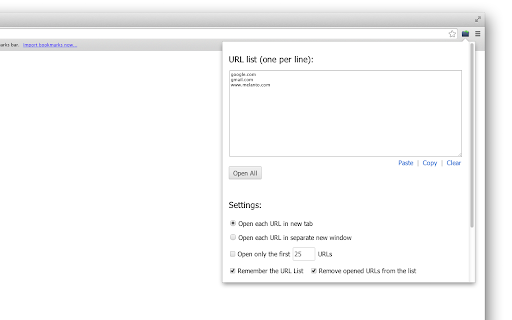
Bulk URL Opener allows users to paste, import, or extract URLs from text and launch them in new tabs or windows. It includes customizable settings for delay intervals between tabs and grouping options to organize URLs by host.

Developer:vpChar
Version:2.7.0.1
Size:59.96KiB
Last updated:

Overview

Installs

300K+

Rating

4.4

128 reviews

Languages

1 locales

Includes English

Market analysis

Review-backed positioning, friction, and market signals for this Chrome extension.

Backed by review samples

Macro category

Automation & Workflow Efficiency

Pricing friction

Low review signal

Complaint intensity

Moderate review signal

Listing & review signals
Observed signals from store listing text and review samples.

Listing positioning

The extension is positioned as a productivity utility designed to open multiple URLs simultaneously from a text list or file. It differentiates itself by offering automatic HTTPS scheme normalization for unformatted domains and options to manage batch opening behavior.

Inferred product pattern

Single-function browser utility with legacy support.

Review-backed pain points

Users cite frustration with update notifications triggering unwanted tabs and advertisements, as well as a workflow that some find no faster than manual input.

Observed feature gaps

Missing 'one-click' open functionality, lack of support for multi-file HTML imports, and desire for complex sequential opening logic (e.g., opening links 3-4 after 1-2).

Tags
Bulk URL OpenerTab ManagementProductivity ToolWorkflow Automation
Target users

- Power users managing large link sets

- Researchers

- Marketers

Primary use cases

- Batch opening links from a text list

- Importing URL lists from files

- Opening URLs in specific tab/window configurations

Positive themes

- Clean and effective UI compared to alternatives

- Lightweight design

- Appreciation for developer responsiveness and long-term maintenance

Negative themes

- Annoying intrusive update behavior with extra tabs

- Lack of advanced automation features like sequential batch opening

- Inconvenient workflow requiring multiple clicks to initiate

- Perceived lack of value over manual browser input

Observed friction

- Performance complaints detected

- No direct payment friction, but users find some implementation choices (like ads in update tabs) disruptive.

Evidence boundary: Evidence derived from a sample of 11 user reviews covering feature requests, UI satisfaction, and disruptive update behaviors. The review sample represents a small fraction of the 300,000 users, potentially biasing towards vocal critics or power users.
Complaint summaries
Review-backed complaint signals grouped by operational area.

Support

General reports of bugs in the past, though users note the developer is active in attempting to resolve issues.

Reliability

Some users report the tool fails to save URLs or encounters issues with specific site triggers.

Privacy

None reported.

Access & pricing

- Free usage observed

- No account requirement observed

- Free plan or free usage claimed

Store listing facts

Listing assets

- Screenshots: 2

- Videos: 1

- Languages: 1

Trust signals

- Privacy policy

- Developer contact

- Official website

Store metadata

- Version: 2.7.0.1

- Size: 59.96KiB

- Last updated:

Store description excerpt
Short excerpt from the public Chrome Web Store listing; full copy is available on the official store page.
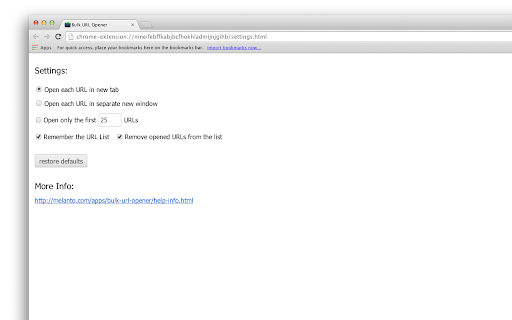
Bulk URL Opener Extension just lets you open multiple URLs at once (in new tabs or windows). Usage: Enter each URL in new line (you can paste the list or import urls from file) and click the "Open All" button. The app will the open all the pages in separate tabs or windows (depending on your settings). Some of the options: * Load URLs from file; Export links to file * Extract urls from text (the tool will try to find valid links in whatever text you provide) * Open in tabs, windows or group by host (to group your links in separate windows for each domain) * You can set delay (in seconds) between opening pages * Open part of the current list The difference between this extension and other similar extensions is that if an URL doesn't include scheme, it will default to HTTPS. In other words, you may skip the protocol part for "http(s)://" sites and enter only the meaningful part. For examp…

Listing SEO keywords

Search intent keywords
Keyword signals for evaluating how users may discover, compare, or search for this extension category.

Core discovery

open multiple links chromebulk url openerbatch open urls extensionbrowser link manager

Comparison

bulk url opener vs other extensionsbest link opener for chrome

Problem

cannot open links automaticallychrome extension not saving urls

Alternative

alternative to bulk url openerchrome link batch tool

Similar extensions

Jump to related discovery paths:

FAQ

What is Bulk URL Opener Extension mainly used for?
Bulk URL Opener allows users to paste, import, or extract URLs from text and launch them in new tabs or windows. It includes customizable settings for delay intervals between tabs and grouping options to organize URLs by host.
What market signals stand out?
Established adoption with moderate review base. Last known update: 02/25/2026.
What should builders compare before entering this space?
Compare install concentration, rating quality, update recency, screenshots, developer portfolio, listing claims, and review-backed friction signals.
Is this page review-backed?
Backed by review samples. This page combines store metadata with selected review signals, while raw store metrics remain visible for comparison.

Screenshots

Bulk URL Opener Extension screenshot

Links

Recommended Chrome extensions

Related listings from the same category, trending peers, and the same publisher portfolio.

Browse workflow