Chatwork Input Tools Chrome Extension Analysis
Automation & Workflow EfficiencyChrome extension ID: iaemcpeoioekjbbephpefmdoncmpdcdc
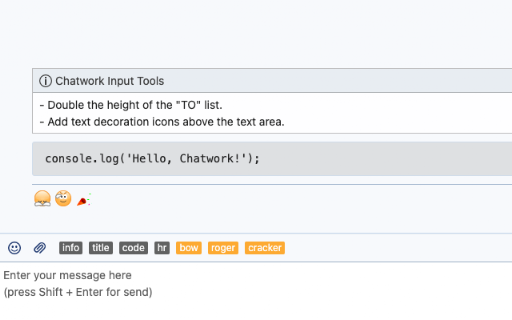
A Chrome extension designed for Chatwork users that simplifies the process of applying formatting tags. It provides UI buttons to automatically insert tags like [info] and [code] into the message input field.
Overview
Installs
50K+
Rating
★ 4.3
16 reviews
Languages
2 locales
Includes English, 日本語
Market analysis
Review-backed positioning, friction, and market signals for this Chrome extension.
Macro category
Automation & Workflow Efficiency
Pricing friction
Low review signal
Complaint intensity
Moderate review signal
Listing positioning
The product is positioned as a productivity utility that adds shortcut buttons to Chatwork for inserting specific formatting tags. It emphasizes its ability to help users quickly wrap messages in [info] and [code] tags to improve communication clarity.
Inferred product pattern
A niche UI-enhancement utility for a specific enterprise communication platform.
Review-backed pain points
Users have experienced the input buttons disappearing after browser refreshes or restarts. Additionally, English-speaking users expressed frustration that the extension's description is provided only in Japanese.
Observed feature gaps
Lack of full English localization for the store listing and a history of stability issues following Chatwork or Chrome updates.
- Chatwork users
- Business professionals
- Developers using Chatwork
- Inserting [info] blocks
- Inserting [code] blocks
- Fast formatting of chat messages
- Increased input speed
- Convenience of one-click formatting
- Responsive developer updates
- Intermittent UI disappearance
- Lack of English localization in descriptions
- Breakage following browser or platform updates
- Performance complaints detected
- No pricing friction observed as the tool appears to be free.
Support
No major support complaints, though one user mentioned difficulty in sending direct feedback to the developer.
Reliability
Reports of the tool intermittently stopping work or UI elements disappearing, often coinciding with browser or platform updates.
Privacy
No privacy or security complaints observed.
- Free usage observed
- No account requirement observed
- Free plan or free usage claimed
Store listing facts
- Screenshots: 1
- Videos: 0
- Languages: 2
- Developer contact
- Version: 1.6.1
- Size: 6.39KiB
- Last updated:
Listing SEO keywords
Core discovery
Comparison
Problem
Alternative
Similar extensions
Jump to related discovery paths:
FAQ
Screenshots