Ramp for Chrome icon

Ramp for Chrome Chrome Extension Analysis

Automation & Workflow Efficiency

Chrome extension ID: idefohglmnkliiadgfofeokcpjobdeik

A Chrome extension that integrates Ramp's corporate card management into the web browsing experience. It provides access to virtual cards, tools for uploading order confirmations, and software license visibility.

Developer:Ramp
Version:1.0.24
Size:1004KiB
Last updated:

Overview

Installs

100K+

Rating

4.1

42 reviews

Languages

1 locales

Includes English (United States)

Market analysis

Review-backed positioning, friction, and market signals for this Chrome extension.

Backed by review samples

Macro category

Automation & Workflow Efficiency

Pricing friction

Low review signal

Complaint intensity

Moderate review signal

Listing & review signals
Observed signals from store listing text and review samples.

Listing positioning

Positioned as a productivity bridge that allows Ramp users to manage corporate spending and compliance without leaving their browser. It emphasizes one-click checkout, automatic receipt matching, and policy adherence for flights and software.

Inferred product pattern

Companion browser extension for an enterprise spend management platform designed to reduce procurement and expense reporting friction.

Review-backed pain points

Users report significant friction with session management, stating the extension frequently signs them out. There are also repeated complaints that the autofill feature fails to work, forcing users to copy and paste details manually.

Observed feature gaps

Lack of support for PDF receipts (JPG only), inability to search for cards by the last four digits, and the inability to create new cards directly within the extension interface.

Tags
Corporate SpendVirtual CardsExpense ManagementReceipt UploadFinance Tool
Target users

- Corporate employees

- Finance managers

- Business travelers

- Operations managers

Primary use cases

- Autofilling corporate virtual card details at checkout

- Uploading and matching receipts for expense reports

- Verifying flight bookings against company policy

- Comparing software pricing and license usage

Positive themes

- Slick concept

- Convenient when functioning correctly

Negative themes

- Frequent session timeouts

- Unreliable autofill functionality

- Poor card searchability

- Limited receipt file format support

Observed friction

- Performance complaints detected

- No pricing friction observed in reviews as the extension is a companion to the Ramp corporate platform.

Evidence boundary: Analysis based on the store listing and a sample of 10 user reviews highlighting functional failures. The review sample size is small relative to the total user count and skewed toward low-rating signals.
Complaint summaries
Review-backed complaint signals grouped by operational area.

Support

No specific support ticket complaints, though users express frustration with the development pace regarding bug fixes.

Reliability

High reliability issues regarding authentication persistence and the core autofill value proposition.

Privacy

No privacy-specific complaints observed in the provided samples.

Access & pricing

- Enterprise pricing observed

- Account required for core usage

- Free plan or free usage claimed

Store listing facts

Listing assets

- Screenshots: 4

- Videos: 0

- Languages: 1

Trust signals

- Privacy policy

- Developer contact

- Official website

Store metadata

- Version: 1.0.24

- Size: 1004KiB

- Last updated:

Store description excerpt
Short excerpt from the public Chrome Web Store listing; full copy is available on the official store page.
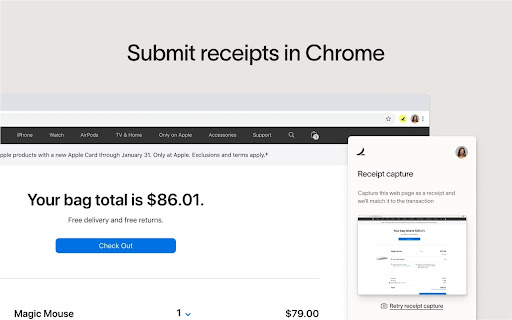
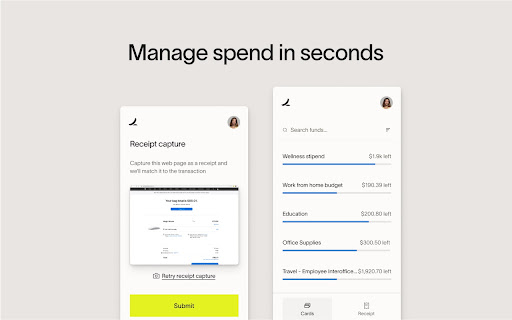
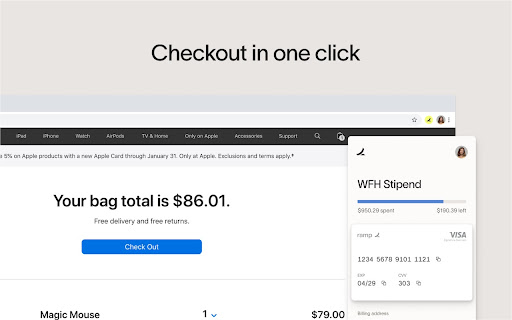
Shopping online? Keep your Ramp card close, right in Chrome. Autofill your card details at checkout, upload and match receipts automatically, and stay in policy without leaving your tab. 🛍️ Checkout in one click When you’re ready to pay, select a virtual card to autofill details. That’s it. 🧾 Submit receipts within Chrome Screenshot and upload your order confirmation—Ramp will automatch it to the transaction. 💳 Manage spend in seconds Request or issue new spend with a shortcut to your Ramp account. ✈️ Book flights in policy, every time As you’re planning your next trip, Ramp tags flights that match your company policies. 🔎 Get price-per-seat comparisons as you shop Compare the latest software pricing in the moment, before you checkout. 📊 See which software licenses are in use Ramp identifies the tools your team actually uses, so you never pay for unused licenses If you have any que…

Listing SEO keywords

Search intent keywords
Keyword signals for evaluating how users may discover, compare, or search for this extension category.

Core discovery

Ramp Chrome extensioncorporate card autofillexpense receipt uploadervirtual card manager

Comparison

Ramp vs Privacy.comRamp vs 1Password autofill

Problem

corporate card manual entryexpense report frictionsoftware license waste

Alternative

corporate card extensionsexpense management browser tools

Similar extensions

Jump to related discovery paths:

FAQ

What is Ramp for Chrome mainly used for?
A Chrome extension that integrates Ramp's corporate card management into the web browsing experience. It provides access to virtual cards, tools for uploading order confirmations, and software license visibility.
What market signals stand out?
Established adoption with limited review base. Last known update: 06/22/2026.
What should builders compare before entering this space?
Compare install concentration, rating quality, update recency, screenshots, developer portfolio, listing claims, and review-backed friction signals.
Is this page review-backed?
Backed by review samples. This page combines store metadata with selected review signals, while raw store metrics remain visible for comparison.

Screenshots

Ramp for Chrome screenshot

Links

Recommended Chrome extensions

Related listings from the same category, trending peers, and the same publisher portfolio.

Browse workflow