Page diagnostics for SharePoint icon

Page diagnostics for SharePoint Chrome Extension Analysis

Developer & Designer Tools

Chrome extension ID: inahogkhlkbkjkkaleonemeijihmfagi

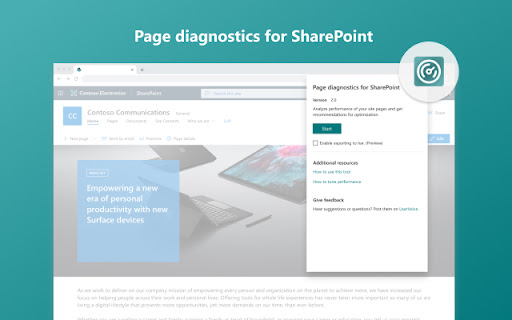
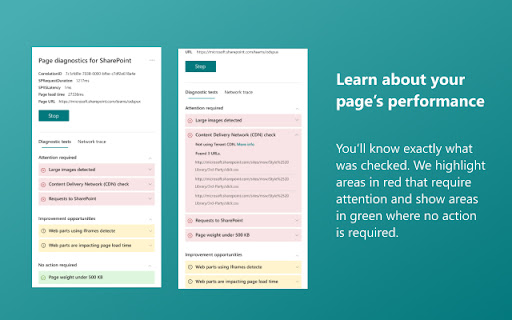
Page Diagnostics for SharePoint is a browser extension that analyzes SharePoint Online pages to highlight performance issues. It categorizes findings into required actions or improvement opportunities, offering links to Microsoft's documentation for guidance.

Version:3.0.3
Size:2.53MiB
Last updated:

Overview

Installs

30K+

Rating

3.6

7 reviews

Languages

39 locales

Includes Deutsch, English, Indonesia, Melayu...

Market analysis

Review-backed positioning, friction, and market signals for this Chrome extension.

Backed by review samples

Macro category

Developer & Designer Tools

Pricing friction

Low review signal

Complaint intensity

Moderate review signal

Listing & review signals
Observed signals from store listing text and review samples.

Listing positioning

This official Microsoft tool is positioned as a diagnostic assistant for SharePoint Online administrators and developers. It identifies performance bottlenecks on site pages and provides actionable recommendations to optimize load times without modifying the site directly.

Inferred product pattern

Single-purpose diagnostic utility provided as a free value-add by a platform vendor.

Review-backed pain points

Users have reported concerns regarding the extension flooding the browser console with log data and potential site interference, necessitating users to toggle the extension on and off.

Observed feature gaps

Some users report inconsistent reliability between Modern and Classic SharePoint pages, with limited control over background logging behavior.

Tags
SharePointPerformance TuningDiagnostic ToolMicrosoftWeb Analytics
Target users

- SharePoint Online Administrators

- Web Developers

- IT Support Staff

Primary use cases

- Diagnosing page load speed

- Identifying SharePoint performance bottlenecks

- Troubleshooting site performance issues

Positive themes

- Helpful for troubleshooting performance issues

- Provides clear links to educational resources

- Useful for identifying site-specific optimization opportunities

Negative themes

- Unreliable results on Modern SharePoint pages

- Excessive console logging/clutter

- Potential interference with other site functionality

Observed friction

- Performance complaints detected

- No pricing friction; the tool is a free utility provided by Microsoft.

Evidence boundary: Analysis is based on user reviews highlighting both the utility of the diagnostic features and technical frustrations regarding console output and site compatibility. Review sample size is limited to 7 entries; older reviews may not reflect recent updates to SharePoint Online infrastructure.
Complaint summaries
Review-backed complaint signals grouped by operational area.

Support

No specific support or refund complaints found; grievances focus on technical implementation and console noise.

Reliability

Users noted issues with Modern page compatibility and incidental performance interference with other web pages.

Privacy

No privacy complaints found.

Access & pricing

- Free usage observed

- No account requirement observed

- Free plan or free usage claimed

Store listing facts

Listing assets

- Screenshots: 4

- Videos: 0

- Languages: 39

Trust signals

- Privacy policy

- Developer contact

Store metadata

- Version: 3.0.3

- Size: 2.53MiB

- Last updated:

Store description excerpt
Short excerpt from the public Chrome Web Store listing; full copy is available on the official store page.
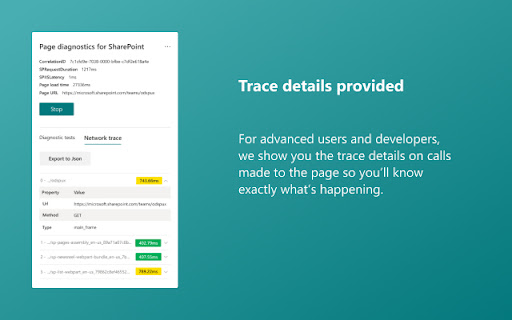
Page Diagnostics for SharePoint Online is aimed at assisting our customers optimize the performance of their Classic and Modern SharePoint site pages. The tool does not make any changes but rather highlights recommended practices showing them in an Attention Required, Improvement Opportunities and No Action Required sections. Reducing the server time and load on SQL within SharePoint is an important part of maintaining consistent performance with SharePoint and in particular SharePoint Online especially considering the performance optimizations Microsoft has made. The tool will highlight some of the optimizations and recommend utilizing these available resources. Each recommended practice also has a “Learn more” link to direct you to the right resource to assist you. Please also review the “How to use this tool” guide available from the About page. This extension supports SharePoint Onl…

Listing SEO keywords

Search intent keywords
Keyword signals for evaluating how users may discover, compare, or search for this extension category.

Core discovery

SharePoint performance toolSharePoint Online diagnosticsSharePoint page speed checker

Comparison

SharePoint optimization toolsSharePoint site analysis

Problem

SharePoint slow loadingSharePoint performance issues

Alternative

SharePoint developer toolsweb performance debugging

Similar extensions

Jump to related discovery paths:

FAQ

What is Page diagnostics for SharePoint mainly used for?
Page Diagnostics for SharePoint is a browser extension that analyzes SharePoint Online pages to highlight performance issues. It categorizes findings into required actions or improvement opportunities, offering links to Microsoft's documentation for guidance.
What market signals stand out?
Visible niche traction with limited review base. Last known update: 10/15/2025.
What should builders compare before entering this space?
Compare install concentration, rating quality, update recency, screenshots, developer portfolio, listing claims, and review-backed friction signals.
Is this page review-backed?
Backed by review samples. This page combines store metadata with selected review signals, while raw store metrics remain visible for comparison.

Screenshots

Page diagnostics for SharePoint screenshot

Links

Privacy policy: http://aka.ms/privacy

Recommended Chrome extensions

Related listings from the same category, trending peers, and the same publisher portfolio.

Browse workflow
OneNote Web Clipper icon

OneNote Web Clipper

Microsoft Corporation

Save anything on the web to OneNote. Clip it to OneNote, organize and edit it, then access it from any device.

Installs

800K+

Rating

4.8

Test & Feedback icon

Test & Feedback

Microsoft Corporation

Now everyone on the team can own quality. Capture findings, create issues, and collaborate with the team, directly from the browser.

Installs

200K+

Rating

4.2

Free Download Manager icon

Free Download Manager

Free Download Manager.ORG

Free Download Manager integration with browser

Installs

3.0M+

Rating

4.2

夸克网盘-网页嗅探 icon

夸克网盘-网页嗅探

广州市动悦信息技术有限公司

识别到网页资源时,可一键存夸克网盘

Installs

3.0M+

Rating

1.7

Mendeley Web Importer icon

Mendeley Web Importer

Mendeley

Fast, convenient import of references and PDFs to your Mendeley Reference Manager library.

Installs

3.0M+

Rating

2.3

Enable local file links icon

Enable local file links

Takashi Sugimoto (tksugimoto)

Make it possible to open by click a link to a local file that is disabled by Chrome.

Installs

3.0M+

Rating

3.9

Pop up blocker for Chrome™ - Poper Blocker icon

Pop up blocker for Chrome™ - Poper Blocker

dingosolutions

Block popups, ads, cookie requests, trackers, notifications, ads on social media & more. A clean browsing experience starts today.

Installs

2.0M+

Rating

4.8

Momentum icon

Momentum

Momentum

Transform your browser into a beautifully designed tab that helps you feel calm, keep focus, and stay energized.

Installs

2.0M+

Rating

4.5

Google Scholar PDF Reader icon

Google Scholar PDF Reader

scholar-chrome-extensions

Supercharge your paper reading: follow references, skim outline, jump to figures, cite and save.

Installs

2.0M+

Rating

4.1

Keeper® Password Manager & Digital Vault icon

Keeper® Password Manager & Digital Vault

Keeper Security

Generate strong passwords, autofill and protect your confidential info with zero-knowledge encryption.

Installs

2.0M+

Rating

4.8