

OP Auto Clicker Chrome Extension Analysis
Automation & Workflow EfficiencyChrome extension ID: kpmbpdpbjjadabknommjfphilmecebab
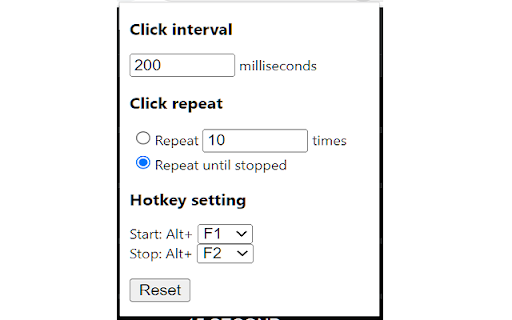
A browser extension that automates mouse clicking tasks on supported web pages. It allows users to set click limits and use hotkeys to trigger automation at specific or current cursor coordinates.
Overview
Installs
400K+
Rating
★ 2.3
456 reviews
Languages
1 locales
Includes English (United States)
Market analysis
Review-backed positioning, friction, and market signals for this Chrome extension.
Macro category
Automation & Workflow Efficiency
Pricing friction
Low review signal
Complaint intensity
High review signal
Listing positioning
The product is positioned as a full-fledged autoclicker offering two modes: dynamic cursor location and pre-specified locations. It highlights flexibility in click volume (fixed or infinite) and the convenience of background hotkeys, while noting that a client software version is recommended for better compatibility.
Inferred product pattern
Simple browser-based utility for simulating repetitive mouse inputs.
Review-backed pain points
Users frequently report that the extension does not start, hotkeys do not work, and some experience browser crashes or 'panic' when attempting to use the tool.
Observed feature gaps
Users have specifically requested the addition of a visible start and stop button to avoid reliance on hotkeys.
- Browser-based gamers
- Web automation enthusiasts
- Users performing repetitive web tasks
- Automating repetitive clicks on websites
- Fast-clicking for browser games
No positive theme data.
- Total failure to function
- Difficulty with startup/activation
- Poor user interface/lack of buttons
- Browser instability
- Performance complaints detected
- No pricing friction observed as no payment requirements are mentioned.
Support
No direct support interaction complaints, but high frustration regarding the product's basic utility.
Reliability
Severe reliability issues with multiple reports of the extension being completely non-functional.
Privacy
No privacy or security complaints observed in the provided samples.
- Free usage observed
- No account requirement observed
- Free plan or free usage claimed
Store listing facts
- Screenshots: 1
- Videos: 0
- Languages: 1
- Privacy policy
- Developer contact
- Version: 0.1.4
- Size: 11.27KiB
- Last updated:
Listing SEO keywords
Core discovery
Comparison
Problem
Alternative
Similar extensions
Jump to related discovery paths:
FAQ
Screenshots
Links
Privacy policy: https://opautoclicker.com/privacy-policy/





