Eagle for Chrome icon

Eagle for Chrome Chrome Extension Analysis

Developer & Designer Tools

Chrome extension ID: lieogkinebikhdchceieedcigeafdkid

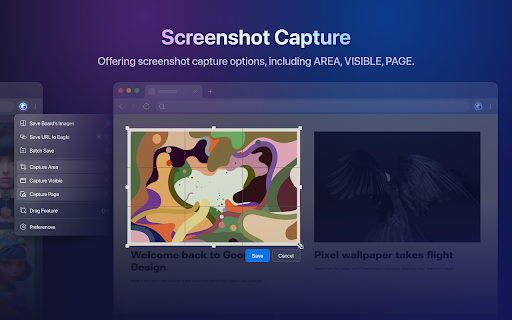
A browser extension that enables users to quickly save web images and capture screenshots directly into the Eagle asset management application. It offers specialized tools for batch collection and a dedicated screen capture utility.

Developer:Augus
Version:3.1.23
Size:1.26MiB
Last updated:

Overview

Installs

400K+

Rating

4.4

791 reviews

Languages

4 locales

Includes English, 中文(中国), 中文(台灣), 日本語

Market analysis

Review-backed positioning, friction, and market signals for this Chrome extension.

Backed by review samples

Macro category

Developer & Designer Tools

Pricing friction

Moderate review signal

Complaint intensity

Moderate review signal

Listing & review signals
Observed signals from store listing text and review samples.

Listing positioning

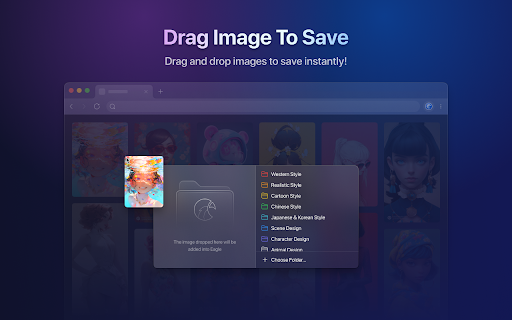
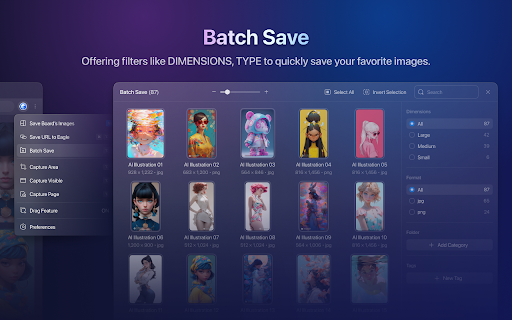
The product is positioned as a seamless bridge between the web browser and the Eagle App. It emphasizes speed and efficiency through shortcuts, drag-and-drop functionality, and batch saving capabilities.

Inferred product pattern

Browser companion extension for a paid desktop digital asset management (DAM) system.

Review-backed pain points

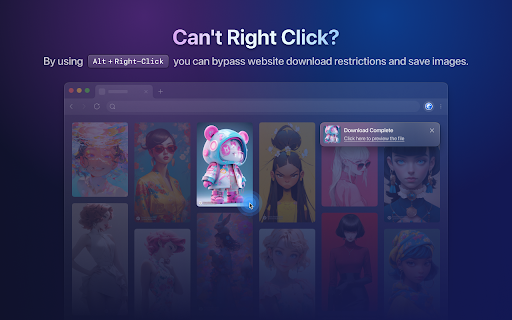
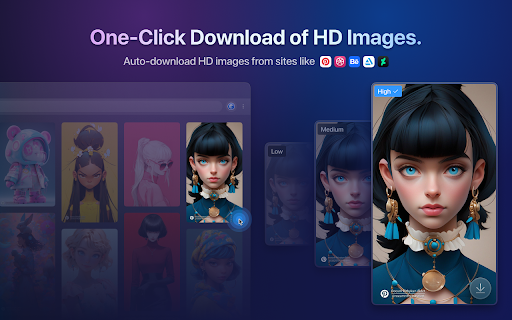
Users report that core features like drag-and-drop and Alt+Right-click frequently stop working, often returning a 'not started' or 'not open' error regardless of updates. Some users are frustrated by the extension saving low-res thumbnails instead of full-size images.

Observed feature gaps

Lack of a custom proxy configuration within the app for accessing foreign images and poor compatibility of WebP exports with older versions of Adobe Photoshop and Illustrator.

Tags
Asset ManagementImage SaverDesigner ToolScreenshot ToolVisual Research
Target users

- Graphic Designers

- UI/UX Designers

- Digital Artists

- Visual Researchers

Primary use cases

- Collecting design inspiration

- Building moodboards

- Saving reference images in bulk

- Archiving web screenshots

Positive themes

- General tool utility

Negative themes

- Core functionality failure (Drag & Drop/Alt+Right-click)

- Low-resolution thumbnail downloads

- Performance lag during batch saving

- Browser UI glitches (rotating links)

- Network/Proxy connectivity issues

Observed friction

- Payment required for meaningful usage

- Performance complaints detected

- Some users question the value of the paid model when experiencing bugs such as the downloading of thumbnails instead of full images.

Evidence boundary: Data extracted from the Chrome Web Store listing and a sample of 17 helpful and low-rating reviews. The provided review samples are heavily weighted toward negative feedback, which may not fully represent the high overall store rating.
Complaint summaries
Review-backed complaint signals grouped by operational area.

Support

Users express frustration with support responses that explain technical reasons for bugs rather than providing immediate functional fixes.

Reliability

Multiple reports of the extension becoming unresponsive after updates, requiring page refreshes or failing to communicate with the desktop app.

Privacy

No privacy complaints observed in review samples.

Access & pricing

- One-time purchase observed

- Account required for core usage

- Paid-only usage observed

Store listing facts

Listing assets

- Screenshots: 5

- Videos: 0

- Languages: 4

Trust signals

- Privacy policy

- Developer contact

- Official website

Store metadata

- Version: 3.1.23

- Size: 1.26MiB

- Last updated:

Store description excerpt
Short excerpt from the public Chrome Web Store listing; full copy is available on the official store page.
Browser Extensions allow you to easily save web page images and save screenshots to Eagle. #1. Drag & Drop: To collect pictures, just drag & drop it to your Eagle. #2. Alt + Right-click: Pressing alt key and right-click on any image to keep it! #3. Batch-saving: Get the pass to easily save images within seconds. #4. Screen Capture: The most simple way to take a screenshot of your current browser window. ---------------------------------------------------- Your privacy is very important to us, this extension don't collect any personal information while browsing on the internet. For more detailed privacy terms, please check: https://en.eagle.cool/privacy

Listing SEO keywords

Search intent keywords
Keyword signals for evaluating how users may discover, compare, or search for this extension category.

Core discovery

Save images to EagleEagle App Chrome extensionBulk image downloader for designersWeb screenshot tool

Comparison

Eagle vs Zero SpringEagle app alternativesEagle vs Pinterest for designers

Problem

organize design referencessave web images in bulkmanage design assets

Alternative

Eagle app alternativesVisual bookmarking toolsImage organization software

Similar extensions

Jump to related discovery paths:

FAQ

What is Eagle for Chrome mainly used for?
A browser extension that enables users to quickly save web images and capture screenshots directly into the Eagle asset management application. It offers specialized tools for batch collection and a dedicated screen capture utility.
What market signals stand out?
Established adoption with moderate review base. Last known update: 05/19/2026.
What should builders compare before entering this space?
Compare install concentration, rating quality, update recency, screenshots, developer portfolio, listing claims, and review-backed friction signals.
Is this page review-backed?
Backed by review samples. This page combines store metadata with selected review signals, while raw store metrics remain visible for comparison.

Screenshots

Eagle for Chrome screenshot

Links

Recommended Chrome extensions

Related listings from the same category, trending peers, and the same publisher portfolio.

Browse workflow
Enable local file links icon

Enable local file links

Takashi Sugimoto (tksugimoto)

Make it possible to open by click a link to a local file that is disabled by Chrome.

Installs

3.0M+

Rating

3.9

Pop up blocker for Chrome™ - Poper Blocker icon

Pop up blocker for Chrome™ - Poper Blocker

dingosolutions

Block popups, ads, cookie requests, trackers, notifications, ads on social media & more. A clean browsing experience starts today.

Installs

2.0M+

Rating

4.8

Momentum icon

Momentum

Momentum

Transform your browser into a beautifully designed tab that helps you feel calm, keep focus, and stay energized.

Installs

2.0M+

Rating

4.5

Google Scholar PDF Reader icon

Google Scholar PDF Reader

scholar-chrome-extensions

Supercharge your paper reading: follow references, skim outline, jump to figures, cite and save.

Installs

2.0M+

Rating

4.1

Keeper® Password Manager & Digital Vault icon

Keeper® Password Manager & Digital Vault

Keeper Security

Generate strong passwords, autofill and protect your confidential info with zero-knowledge encryption.

Installs

2.0M+

Rating

4.8

AI Grammar Checker & Paraphraser – LanguageTool icon

AI Grammar Checker & Paraphraser – LanguageTool

lt-extension-publisher

Instantly Enhance Your Texts with LanguageTool’s Grammar Checker and Paraphrasing Tool

Installs

2.0M+

Rating

4.7

Snow Web Application Metering icon

Snow Web Application Metering

snow_chrome_extensions

This extension tracks web application use for the purpose of license compliance and cost optimization. www.snowsoftware.com/browser

Installs

2.0M+

Rating

1.3

Sound Booster - increase volume up icon

Sound Booster - increase volume up

Sound-ultimate.com

Volume Booster helps boost sound video or music on any tab! Increase volume and bass booster, equalizer. Volume control.

Installs

2.0M+

Rating

4.5

Evernote Web Clipper icon

Evernote Web Clipper

Evernote

Use the Evernote extension to save things you see on the web into your Evernote account.

Installs

2.0M+

Rating

4.7

Microsoft Defender Browser Protection icon

Microsoft Defender Browser Protection

Microsoft Corporation

Protect yourself against online threats, like phishing and malicious websites, with real-time protection from Microsoft.

Installs

2.0M+

Rating

4.1