MediaPlayer - Video and Audio Player icon

MediaPlayer Chrome Extension Analysis

Video & Image Downloaders

Store listing title: MediaPlayer - Video and Audio Player

Chrome extension ID: mgmhnaapafpejpkhdhijgkljhpcpecpj

A browser extension that enables users to play both local and online video and audio files. It provides a suite of tools including playback speed adjustments, playlist management, and subtitle support.

Developer:InBasic
Version:0.4.9
Size:1.14MiB
Last updated:

Overview

Installs

100K+

Rating

3.9

141 reviews

Languages

12 locales

Includes Deutsch, English, Nederlands, español...

Market analysis

Review-backed positioning, friction, and market signals for this Chrome extension.

Backed by review samples

Macro category

Video & Image Downloaders

Pricing friction

Low review signal

Complaint intensity

Moderate review signal

Listing & review signals
Observed signals from store listing text and review samples.

Listing positioning

The product is positioned as a powerful, VLC-like media player built on the video.js project. It emphasizes advanced features such as HLS support, speed control, audio boosting, and media casting to enhance the native HTML5 experience.

Inferred product pattern

A feature-rich media utility for browser-based playback of various media formats.

Review-backed pain points

Users report significant issues with MKV/MPV compatibility, memory exhaustion leading to crashes, and difficulty with playlist and track navigation.

Observed feature gaps

Users noted a lack of automatic subtitle detection and difficulties with folder-based media loading for certain formats.

Tags
Media PlayerVideo PlayerAudio PlayerHLS Support
Target users

- Media consumers

- Chromebook users

- Users with local media files

Primary use cases

- Playing local video and audio files

- Streaming M3U8/HLS content

- Casting media to remote devices

Positive themes

- Reliable playback of MP3 and MP4 files

- Functional media casting capabilities

Negative themes

- Inconsistent support for MKV and MPV containers

- Memory-related crashes during long playback

- Clunky interface and navigation

Observed friction

- Performance complaints detected

- No pricing information or friction was identified in the listing or reviews.

Evidence boundary: Extracted from the product description and user reviews focusing on format compatibility and stability. Analysis is limited to the 141 reviews provided in the data sample.
Complaint summaries
Review-backed complaint signals grouped by operational area.

Support

No complaints regarding customer support were found.

Reliability

Significant reliability concerns were raised regarding memory usage causing crashes and the inability to play specific video containers like MKV.

Privacy

One user expressed suspicion due to the lack of developer identity and web presence.

Access & pricing

- No clear monetization signal

- No account requirement observed

- No clear pricing signal

Store listing facts

Listing assets

- Screenshots: 1

- Videos: 0

- Languages: 12

Trust signals

- Privacy policy

- Developer contact

- Official website

Store metadata

- Version: 0.4.9

- Size: 1.14MiB

- Last updated:

Store description excerpt
Short excerpt from the public Chrome Web Store listing; full copy is available on the official store page.
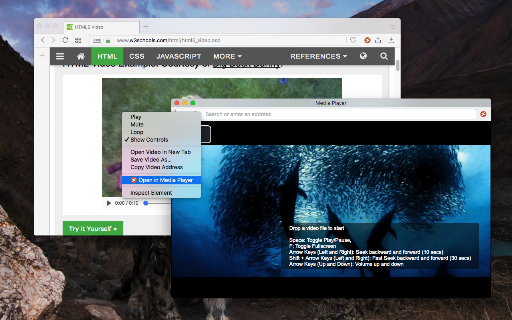
The "Media Player" is a browser extension to play music and video files either locally or from online sources. This project aims to bring a VLC-liked media playing experience using native HTML5 technology. The add-on is built on top of the well-known "video.js" project by applying a few custom plug-ins to enhance the user experience. This player supports media boosting, speed control, playlist media selection, fullwidth-progress bar, HTTP-streaming (M3U8), cast to a remote device, and wave surfer visual for audio files. How to Use (local resources): Open the interface and drop the media link to it How to Use (remote resources): Open a video page like https://www.w3schools.com/html/html5_video.asp Right-click on the player and select "Open in Media Player" You can start watching an offline video file by dragging and dropping the video file into the player or pressing the big play button.…

Listing SEO keywords

Search intent keywords
Keyword signals for evaluating how users may discover, compare, or search for this extension category.

Core discovery

media player extensionplay video in chromeHLS playeraudio booster extension

Comparison

VLC for chromevideo.js player

Problem

play MKV in chromefix video audio issuesmedia player crash

Alternative

VLCvideo.jsonline media player

Similar extensions

Jump to related discovery paths:

FAQ

What is MediaPlayer mainly used for?
A browser extension that enables users to play both local and online video and audio files. It provides a suite of tools including playback speed adjustments, playlist management, and subtitle support.
What market signals stand out?
Established adoption with moderate review base. Last known update: 12/10/2025.
What should builders compare before entering this space?
Compare install concentration, rating quality, update recency, screenshots, developer portfolio, listing claims, and review-backed friction signals.
Is this page review-backed?
Backed by review samples. This page combines store metadata with selected review signals, while raw store metrics remain visible for comparison.

Screenshots

MediaPlayer - Video and Audio Player screenshot

Links

Recommended Chrome extensions

Related listings from the same category, trending peers, and the same publisher portfolio.

Browse workflow