Cyber-Ark Clipboard Extension icon

Cyber-Ark Clipboard Extension Chrome Extension Analysis

Privacy, Security & Ad Blockers

Chrome extension ID: ndaciljfdnekbnmcpjidoebejglcjidc

A utility extension designed for CyberArk users to facilitate copying and pasting credentials from the Password Vault Web Access portal. It bypasses browser restrictions on clipboard access while implementing a security-focused auto-wipe feature.

Version:2.2
Size:26.68KiB
Last updated:

Overview

Installs

1.0M+

Rating

4.0

23 reviews

Languages

1 locales

Includes English (United States)

Market analysis

Review-backed positioning, friction, and market signals for this Chrome extension.

Backed by review samples

Macro category

Privacy, Security & Ad Blockers

Pricing friction

Low review signal

Complaint intensity

Moderate review signal

Listing & review signals
Observed signals from store listing text and review samples.

Listing positioning

Positions the product as a necessary technical bridge that enables CyberArk Password Vault Web Access (PVWA) to programmatically interact with the user's clipboard. It emphasizes security by highlighting an automatic clipboard clearing mechanism that triggers after 25 seconds or upon sign-out.

Inferred product pattern

Enterprise companion utility designed to bypass browser API restrictions for a specific paid security platform.

Review-backed pain points

Users are highly frustrated by the 25-second auto-wipe feature, which deletes all clipboard content regardless of whether it originated from CyberArk. Additionally, some users report the extension periodically stops functioning, requiring a browser restart to restore copy capabilities.

Observed feature gaps

Lack of a customizable timeout for clipboard clearing and no option to disable the auto-wipe function for users who multitask.

Tags
Password ManagementEnterprise SecurityClipboard IntegrationCyberArk PVWA
Target users

- Enterprise security administrators

- CyberArk PVWA users

- Corporate IT professionals

Primary use cases

- Copying sensitive account credentials from a secure vault to other applications

- Maintaining security compliance via automatic clipboard clearing

Positive themes

- Resolves password copying issues within PVWA

- Works as intended for basic credential transfer

Negative themes

- Rigid and unintelligent clipboard clearing timer

- Intermittent failure to copy passwords

- Lack of configuration options for the auto-wipe feature

Observed friction

- Performance complaints detected

- No pricing friction observed for the extension itself.

Evidence boundary: Analysis based on the store listing and a sample of 10 reviews. The review sample is small compared to the total user base; some negative reviews may relate to broader CyberArk system issues rather than the extension specifically.
Complaint summaries
Review-backed complaint signals grouped by operational area.

Support

Limited evidence of support issues, though one user expressed a desire to contact the developer regarding Mac/Brave compatibility.

Reliability

Reports of the extension frequently stopping work, where clicking 'copy' in PVWA fails to place the password into the clipboard.

Privacy

No privacy complaints; however, the security-driven clipboard clearing is viewed by some as a design flaw that disrupts workflow.

Access & pricing

- No clear monetization signal

- Account required for core usage

- Free plan or free usage claimed

Store listing facts

Listing assets

- Screenshots: 2

- Videos: 0

- Languages: 1

Trust signals

- Developer contact

- Official website

- Support link

Store metadata

- Version: 2.2

- Size: 26.68KiB

- Last updated:

Store description excerpt
Short excerpt from the public Chrome Web Store listing; full copy is available on the official store page.
This extension allows the CyberArk Password Vault Web Access to access a user’s clipboard. For security reasons, some browsers prevent programmatic access to the clipboard. This prevents CyberArk Password Vault Web Access users from being able to copy account content when needed. The CyberArk Password Vault Web Access Clipboard extension enables CyberArk Password Vault Web Access users to continue to copy and paste from the clipboard. Please note that clipboard content will be deleted after 25 seconds, or when the user signs out in order to make sure account content is not kept in the clipboard. This extension is supported in CyberArk Password Vault Web Access. Use of this extension is governed by the following license terms: https://www.cyberark.com/EULA.pdf. Please see the section describing free of charge software (“Free Trial or Beta Versions of the Software”).

Listing SEO keywords

Search intent keywords
Keyword signals for evaluating how users may discover, compare, or search for this extension category.

Core discovery

CyberArk clipboard extensionPVWA clipboard integrationCyberArk password copy

Comparison

CyberArk PVWA vs other password managersCyberArk clipboard vs manual copy

Problem

CyberArk cannot copy passwordPVWA clipboard not workingclipboard cleared after 25 seconds

Alternative

CyberArk manual copyenterprise password vault clipboard

Similar extensions

Jump to related discovery paths:

FAQ

What is Cyber-Ark Clipboard Extension mainly used for?
A utility extension designed for CyberArk users to facilitate copying and pasting credentials from the Password Vault Web Access portal. It bypasses browser restrictions on clipboard access while implementing a security-focused auto-wipe feature.
What market signals stand out?
Large installed base with limited review base. Last known update: 08/01/2024.
What should builders compare before entering this space?
Compare install concentration, rating quality, update recency, screenshots, developer portfolio, listing claims, and review-backed friction signals.
Is this page review-backed?
Backed by review samples. This page combines store metadata with selected review signals, while raw store metrics remain visible for comparison.

Screenshots

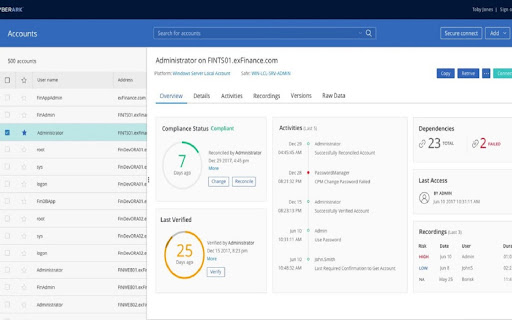
Cyber-Ark Clipboard Extension screenshot

Links

Recommended Chrome extensions

Related listings from the same category, trending peers, and the same publisher portfolio.

Browse workflow