Meet Attendance icon

Meet Attendance Chrome Extension Analysis

Automation & Workflow Efficiency

Chrome extension ID: nenibigflkdikhamlnekfppbganmojlg

Meet Attendance is a Chrome extension that extracts participant lists from Google Meet sessions and exports them to Google Spreadsheets. It offers basic capture for free and a paid subscription for advanced educator-focused roster management.

Developer:Clay
Version:3.0.29
Size:704KiB
Last updated:

Overview

Installs

400K+

Rating

2.8

350 reviews

Languages

6 locales

Includes English, català, español, čeština...

Market analysis

Review-backed positioning, friction, and market signals for this Chrome extension.

Backed by review samples

Macro category

Automation & Workflow Efficiency

Pricing friction

Moderate review signal

Complaint intensity

High review signal

Listing & review signals
Observed signals from store listing text and review samples.

Listing positioning

The product positions itself as a productivity tool for Google Meet users to automate attendance collection into Google Sheets. It emphasizes features like duration tracking and a premium tier for classroom roster comparison and automated capture frequencies.

Inferred product pattern

A niche utility extension that converts real-time meeting participants into structured spreadsheet data for educators.

Review-backed pain points

Users report the extension often stops working entirely, fails to generate data, and creates difficulty when trying to unsubscribe from the monthly payment.

Observed feature gaps

Lack of a clear, accessible subscription cancellation interface and inconsistent data synchronization across multiple classes.

Tags
Google MeetAttendance TrackerTeacher ToolsGoogle Sheets
Target users

- Teachers

- Educators

- Virtual Meeting Hosts

- Corporate Trainers

Primary use cases

- Automating student attendance in virtual classrooms

- Exporting participant lists to Google Sheets

- Identifying absent students via roster comparison

Positive themes

- Value of automated attendance for educators

- Simplification of manual tracking workloads

Negative themes

- Frequent functional failures and empty spreadsheets

- Difficulty canceling paid subscriptions

- Regressions after updates

- Unexpected transition to paid model

Observed friction

- Free-tier complaints detected

- Refund complaints detected

- Performance complaints detected

- Privacy complaints detected

- Users expressed frustration over a shift from a free to a paid model ($2.50/month) and reported an inability to find cancellation options on the developer's site.

Evidence boundary: Data extracted from the official store listing and 13 helpful/low-rating user reviews. Review data is heavily skewed toward negative sentiment and primarily dates from 2020-2021.
Complaint summaries
Review-backed complaint signals grouped by operational area.

Support

Complaints center on the inability to manage or cancel subscriptions via the provided website.

Reliability

Significant reports of the tool becoming unusable after updates, producing blank sheets, or failing to record participants entirely.

Privacy

One user reported laptop performance issues and virus detections following installation, as well as persistent login requests after removal.

Access & pricing

- Free entry with paid features

- Account required for core usage

- Limited free usage observed

Store listing facts

Listing assets

- Screenshots: 4

- Videos: 1

- Languages: 6

Trust signals

- Privacy policy

- Developer contact

- Official website

Store metadata

- Version: 3.0.29

- Size: 704KiB

- Last updated:

Store description excerpt
Short excerpt from the public Chrome Web Store listing; full copy is available on the official store page.
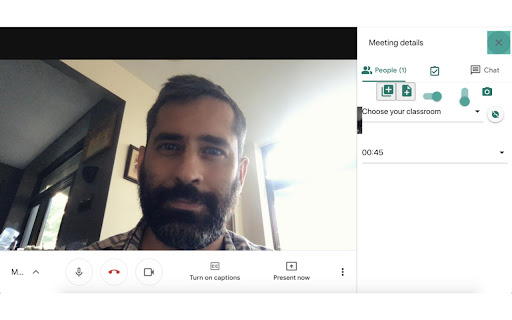
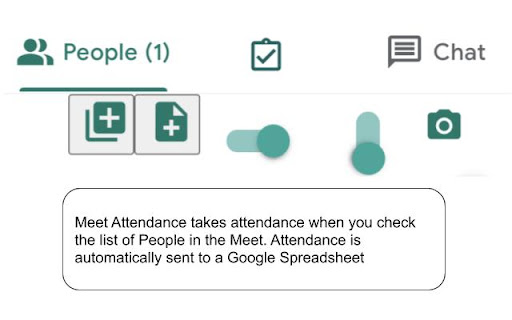
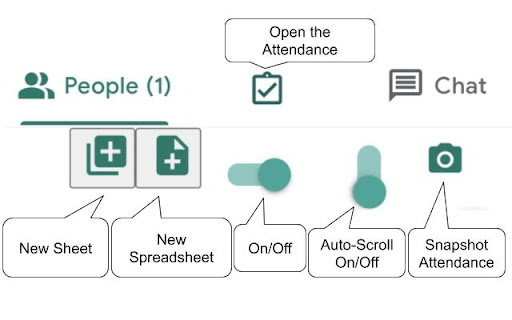
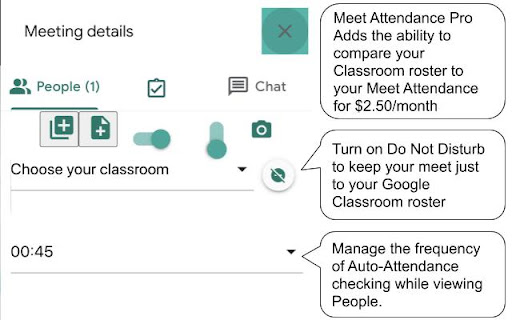
Meet Attendance requires logging in and Syncing your Chrome browser. When in Meet select the participants view. Accept the permissions. Close and reopen the people to capture attendance. Click the Attendance icon to open the Attendance Spreadsheet. Mouse over for further options, Add a sheet in the Spreadsheet, Create a new Spreadsheet, Turn Attendance collection off, Auto Scroll through participants, Snapshot attendance. Attendance duration will be tracked. Premium: Compare your classroom roster to the participants in the meet. Know who is absent from your Meet. Set the frequency for auto capturing attendance. Leaving the Participants view open attendance will be captured at the set frequency. Subscribe to premium for $2.50 monthly. Subscription management at claycodes.web.app

Listing SEO keywords

Search intent keywords
Keyword signals for evaluating how users may discover, compare, or search for this extension category.

Core discovery

Google Meet attendanceMeet attendance extensionexport Google Meet participants

Comparison

best google meet attendance trackerMeet Attendance vs manual tracking

Problem

how to take attendance in google meetcapture google meet participant list

Alternative

google meet attendance alternativesvirtual class attendance tool

Similar extensions

Jump to related discovery paths:

FAQ

What is Meet Attendance mainly used for?
Meet Attendance is a Chrome extension that extracts participant lists from Google Meet sessions and exports them to Google Spreadsheets. It offers basic capture for free and a paid subscription for advanced educator-focused roster management.
What market signals stand out?
Established adoption with moderate review base. Last known update: 02/21/2023.
What should builders compare before entering this space?
Compare install concentration, rating quality, update recency, screenshots, developer portfolio, listing claims, and review-backed friction signals.
Is this page review-backed?
Backed by review samples. This page combines store metadata with selected review signals, while raw store metrics remain visible for comparison.

Screenshots

Meet Attendance screenshot

Links

Recommended Chrome extensions

Related listings from the same category, trending peers, and the same publisher portfolio.

Browse workflow
Slides Timer icon

Slides Timer

Clay

Create timers using placeholders. ie <<0:00+>>, <<5:00->>, <<time>>, <<date>>, <<shortdate>>, <<longdate>>

Installs

100K+

Rating

3.4

Enable local file links icon

Enable local file links

Takashi Sugimoto (tksugimoto)

Make it possible to open by click a link to a local file that is disabled by Chrome.

Installs

3.0M+

Rating

3.9

Pop up blocker for Chrome™ - Poper Blocker icon

Pop up blocker for Chrome™ - Poper Blocker

dingosolutions

Block popups, ads, cookie requests, trackers, notifications, ads on social media & more. A clean browsing experience starts today.

Installs

2.0M+

Rating

4.8

Momentum icon

Momentum

Momentum

Transform your browser into a beautifully designed tab that helps you feel calm, keep focus, and stay energized.

Installs

2.0M+

Rating

4.5

Google Scholar PDF Reader icon

Google Scholar PDF Reader

scholar-chrome-extensions

Supercharge your paper reading: follow references, skim outline, jump to figures, cite and save.

Installs

2.0M+

Rating

4.1

Keeper® Password Manager & Digital Vault icon

Keeper® Password Manager & Digital Vault

Keeper Security

Generate strong passwords, autofill and protect your confidential info with zero-knowledge encryption.

Installs

2.0M+

Rating

4.8

AI Grammar Checker & Paraphraser – LanguageTool icon

AI Grammar Checker & Paraphraser – LanguageTool

lt-extension-publisher

Instantly Enhance Your Texts with LanguageTool’s Grammar Checker and Paraphrasing Tool

Installs

2.0M+

Rating

4.7

Snow Web Application Metering icon

Snow Web Application Metering

snow_chrome_extensions

This extension tracks web application use for the purpose of license compliance and cost optimization. www.snowsoftware.com/browser

Installs

2.0M+

Rating

1.3

Sound Booster - increase volume up icon

Sound Booster - increase volume up

Sound-ultimate.com

Volume Booster helps boost sound video or music on any tab! Increase volume and bass booster, equalizer. Volume control.

Installs

2.0M+

Rating

4.5

Evernote Web Clipper icon

Evernote Web Clipper

Evernote

Use the Evernote extension to save things you see on the web into your Evernote account.

Installs

2.0M+

Rating

4.7