Slides Timer icon

Slides Timer Chrome Extension Analysis

Automation & Workflow Efficiency

Chrome extension ID: nfhjdkmpebifdelclimjfaackjhiglpc

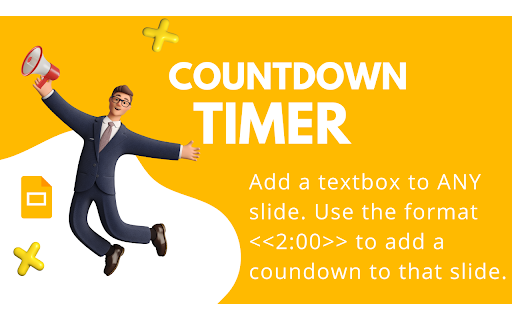
Slides Timer is a Google Slides extension that uses text placeholders to insert countdowns, count-ups, live clocks, and dates into presentations. It includes specialized features like Pomodoro cycles, progress bars, and automated slide transitions.

Developer:Clay
Version:2.05
Size:66.9KiB
Last updated:

Overview

Installs

100K+

Rating

3.4

113 reviews

Languages

7 locales

Includes Deutsch, English, Nederlands, español...

Market analysis

Review-backed positioning, friction, and market signals for this Chrome extension.

Backed by review samples

Macro category

Automation & Workflow Efficiency

Pricing friction

Moderate review signal

Complaint intensity

High review signal

Listing & review signals
Observed signals from store listing text and review samples.

Listing positioning

The product is positioned as a tool to bring Google Slides to life through dynamic timers and clocks. It targets educators and business professionals, offering a free tier for basic timers and a Pro tier for advanced customization and productivity features.

Inferred product pattern

A utility extension transitioning to a freemium model, causing friction via feature gating and reported stability regressions.

Review-backed pain points

Users express significant frustration over features that were previously free (such as specific time/date formatting) being moved behind a paywall. There are also reports of the extension breaking entirely after updates and interfering with microphone usage.

Observed feature gaps

Users reported difficulty using the extension in published/web-based presentations and noted a lack of clarity in documentation for specific keyboard shortcuts.

Tags
Google SlidesPresentation TimerClassroom ToolCountdown Timer
Target users

- Teachers

- Educators

- Business Presenters

- Workshop Facilitators

Primary use cases

- Classroom activity management

- Presentation timing

- Productivity/Pomodoro tracking during workshops

Positive themes

- Adds helpful layers of functionality to slides

Negative themes

- Removal of previously free features to the Pro tier

- Software breakage following updates

- Aggressive subscription pop-ups

- Privacy and permission concerns

- Compatibility issues with microphone/captions

Observed friction

- Free-tier complaints detected

- Performance complaints detected

- Privacy complaints detected

- High friction caused by 'feature stripping,' where existing users feel previously free functionality was moved to the Pro tier to drive subscriptions.

Evidence boundary: Data extracted from the official Chrome Web Store listing and a sample of 10 user reviews. The review sample is small and heavily weighted toward negative sentiment due to recent changes in the product's monetization model.
Complaint summaries
Review-backed complaint signals grouped by operational area.

Support

No specific support complaints, but users noted unclear documentation for complex features.

Reliability

Multiple reports of timers and clocks failing to work after updates or when using published web presentations.

Privacy

One user alleged the extension requested access to search history and email, though the developer denies this.

Access & pricing

- Free entry with paid features

- Account required for core usage

- Limited free usage observed

Store listing facts

Listing assets

- Screenshots: 4

- Videos: 1

- Languages: 7

Trust signals

- Privacy policy

- Developer contact

- Official website

Store metadata

- Version: 2.05

- Size: 66.9KiB

- Last updated:

Store description excerpt
Short excerpt from the public Chrome Web Store listing; full copy is available on the official store page.
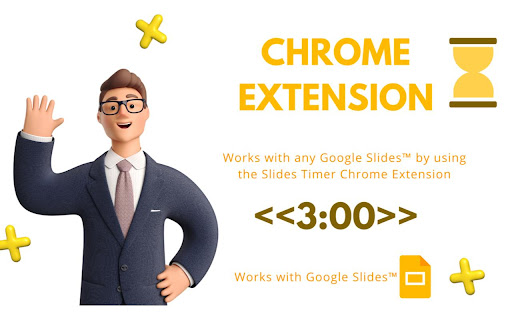
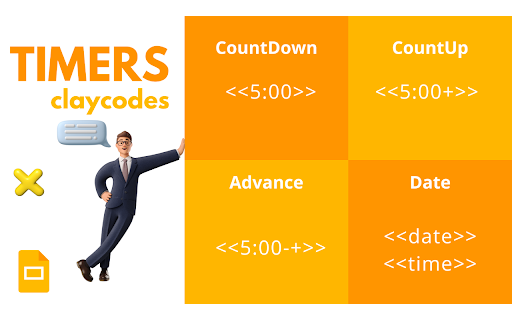
Slides Timer is a powerful extension that automatically brings your Google Slides to life with dynamic timers and clocks. Whether you're running a classroom activity, a business presentation, or a workshop, Slides Timer provides a seamless and beautiful way to keep your audience engaged and on track. Simply place your timer configuration between << and >> and let the extension do the rest! 🚀 KEY FEATURES (FREE) Countdown & Count-up: Use - to count down or + to count up (e.g., <<5:00->>). 🕰️ Live Clock & Date: Display the current time or date with <<time>> or <<date>>. ♾️ Continuous Timers: Use ~ to keep your timer running across different slides. ⏭️ Slide Triggers: Automatically advance slides (-+) or go back (--) when a timer hits zero. 🔔 Audio/Video Alarms: Trigger your inserted audio (@) or video (!) files at specific times. 💎 PREMIUM FEATURES (PRO) Unlock powerful tools to custo…

Listing SEO keywords

Search intent keywords
Keyword signals for evaluating how users may discover, compare, or search for this extension category.

Core discovery

Google Slides timerpresentation countdownclassroom timerGoogle Slides clock

Comparison

Google Slides timer alternative

Problem

Google Slides timer not workingpresentation timer brokenSlides Timer error

Alternative

Presentation timerPomodoro timer for slides

Similar extensions

Jump to related discovery paths:

FAQ

What is Slides Timer mainly used for?
Slides Timer is a Google Slides extension that uses text placeholders to insert countdowns, count-ups, live clocks, and dates into presentations. It includes specialized features like Pomodoro cycles, progress bars, and automated slide transitions.
What market signals stand out?
Established adoption with moderate review base. Last known update: 05/11/2026.
What should builders compare before entering this space?
Compare install concentration, rating quality, update recency, screenshots, developer portfolio, listing claims, and review-backed friction signals.
Is this page review-backed?
Backed by review samples. This page combines store metadata with selected review signals, while raw store metrics remain visible for comparison.

Screenshots

Slides Timer screenshot

Links

Recommended Chrome extensions

Related listings from the same category, trending peers, and the same publisher portfolio.

Browse workflow