Video Speed Controller - video manager icon

Video Speed Controller Chrome Extension Analysis

Automation & Workflow Efficiency

Store listing title: Video Speed Controller - video manager

Chrome extension ID: nkkhljadiejecbgelalchmjncoilpnlk

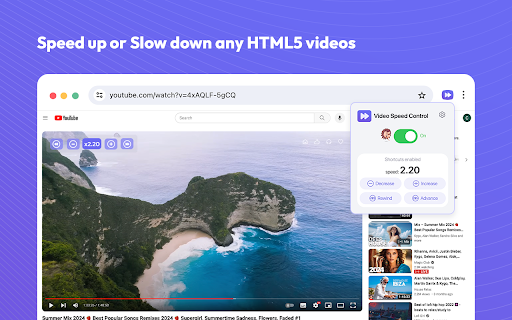
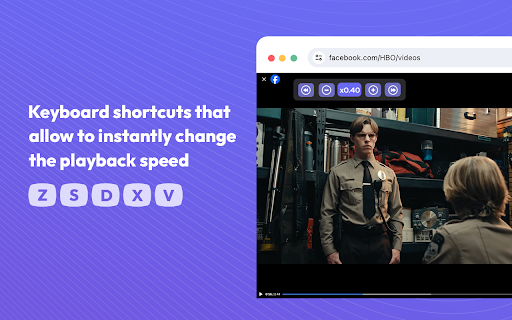
A Chrome extension that allows users to adjust the playback speed of any HTML5 video or audio content. It offers a speed range from 0.25x to 4x via a popup menu or dedicated keyboard shortcuts.

Developer:Video Control
Version:1.0.6
Size:10.05MiB
Last updated:

Overview

Installs

400K+

Rating

4.6

841 reviews

Languages

34 locales

Includes Deutsch, English, English (United Kingdom), English (United States)...

Market analysis

Review-backed positioning, friction, and market signals for this Chrome extension.

Backed by review samples

Macro category

Automation & Workflow Efficiency

Pricing friction

Low review signal

Complaint intensity

Moderate review signal

Listing & review signals
Observed signals from store listing text and review samples.

Listing positioning

The product is positioned as a universal HTML5 video speed controller compatible with major sites like YouTube, Netflix, and Amazon Prime. It emphasizes precision (1% increments), time-saving efficiency, and ease of use through keyboard shortcuts.

Inferred product pattern

Single-purpose utility tool leveraging the HTML5 video API to provide granular playback control for improved consumption efficiency.

Review-backed pain points

Users are primarily frustrated by frequent prompts to rate the extension and the inability to set multiple preferred speed shortcuts for different types of content.

Observed feature gaps

Missing functionality for auto-playing the next video and a lack of persistent speed settings that carry over when switching videos.

Tags
Video Speed ControllerPlayback SpeedHTML5 VideoProductivity ToolKeyboard Shortcuts
Target users

- Online learners

- Heavy video consumers

- Binge watchers

- Professionals consuming video-based training

Primary use cases

- Speeding up long tutorials or lectures

- Slowing down complex content for better understanding

- Fast-forwarding through irrelevant video segments

- Increasing audio playback speed

Positive themes

- Clean and intuitive user interface

- High reliability across various websites

- Lightweight performance

- Effective productivity boost

Negative themes

- Intrusive rating/review pop-ups

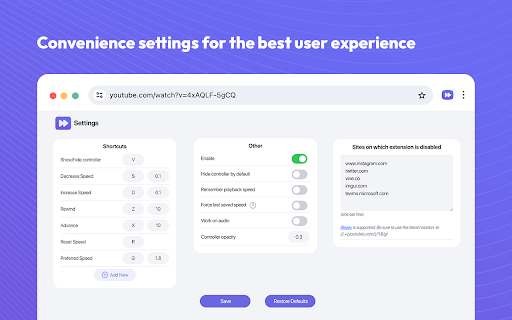
- Limited customization for speed shortcuts

- Lack of settings persistence across different videos

Observed friction

- No pricing friction observed in the provided data.

Evidence boundary: Analysis based on store listing descriptions and 10 high-signal reviews in multiple languages. Review sample size is small relative to total user base; pricing and account requirements are not explicitly detailed in the listing.
Complaint summaries
Review-backed complaint signals grouped by operational area.

Support

No direct support complaints, although the frequency of rating requests is viewed as a nuisance.

Reliability

Generally reported as reliable and smooth, with some reports that settings must be reapplied for each new video.

Privacy

No privacy or security complaints observed.

Access & pricing

- Free usage observed

- No account requirement observed

- Free plan or free usage claimed

Store listing facts

Listing assets

- Screenshots: 4

- Videos: 0

- Languages: 34

Trust signals

- Privacy policy

- Developer contact

Store metadata

- Version: 1.0.6

- Size: 10.05MiB

- Last updated:

Store description excerpt
Short excerpt from the public Chrome Web Store listing; full copy is available on the official store page.
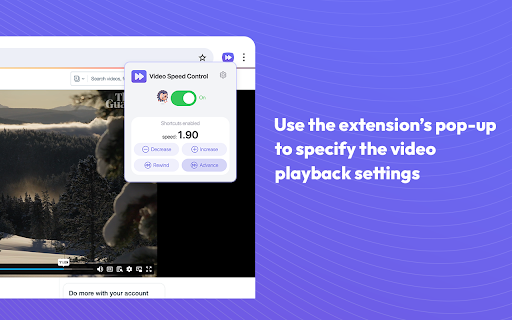
Video speed controller for online videos. Speed up, slow down playback on any website. Speed up or slow down video playback on websites such as Youtube and all other websites with video in. Do you struggle with adjusting the speed of video playback on various websites, including popular streaming platforms like Netflix, Amazon Prime Video, and YouTube? Introducing the video speed controller, a Google Chrome extension that enables you to finely adjust the playback settings on your favorite streaming websites. With options ranging from 0.25x to 4x, the extension supports a wide range of playback speeds. How to use Video Speed Controller Extension: - Install the extension and pin to your browser (one-time process). - Open any video on your desired streaming website. - Click on the extension’s icon. - Use the extension’s pop-up to specify the video playback settings. - The chosen settings a…

Listing SEO keywords

Search intent keywords
Keyword signals for evaluating how users may discover, compare, or search for this extension category.

Core discovery

chrome video speed controllerhtml5 playback speedyoutube speed control extensionvideo speedup tool

Comparison

best video speed controllervideo speed controller alternatives

Problem

how to speed up online videoscontrol video speed on netflixslow down web videos

Alternative

playback speed managervideo speed controller extension

Similar extensions

Jump to related discovery paths:

FAQ

What is Video Speed Controller mainly used for?
A Chrome extension that allows users to adjust the playback speed of any HTML5 video or audio content. It offers a speed range from 0.25x to 4x via a popup menu or dedicated keyboard shortcuts.
What market signals stand out?
Established adoption with moderate review base. Last known update: 03/08/2026.
What should builders compare before entering this space?
Compare install concentration, rating quality, update recency, screenshots, developer portfolio, listing claims, and review-backed friction signals.
Is this page review-backed?
Backed by review samples. This page combines store metadata with selected review signals, while raw store metrics remain visible for comparison.

Screenshots

Video Speed Controller - video manager screenshot

Links

Recommended Chrome extensions

Related listings from the same category, trending peers, and the same publisher portfolio.

Browse workflow