Melanto Calculator icon

Melanto Calculator Chrome Extension Analysis

Automation & Workflow Efficiency

Chrome extension ID: olhcajgllkpacioibcjiniefblpmpech

Melanto Calculator is a Chrome extension providing scientific calculation capabilities with a focus on operational transparency. It supports basic keyboard shortcuts and provides multiple visual themes for the interface.

Developer:vpChar
Version:4.1
Size:633KiB
Last updated:

Overview

Installs

4K+

Rating

4.2

52 reviews

Languages

1 locales

Includes English

Market analysis

Review-backed positioning, friction, and market signals for this Chrome extension.

Backed by review samples

Macro category

Automation & Workflow Efficiency

Pricing friction

Low review signal

Complaint intensity

Moderate review signal

Listing & review signals
Observed signals from store listing text and review samples.

Listing positioning

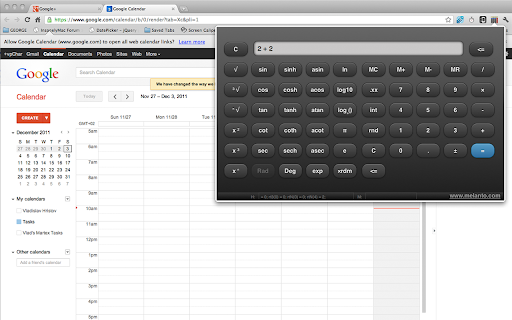
The product is positioned as an unusual scientific calculator that allows users to see both sides of a binary operation until the result is calculated. It emphasizes accessibility for touch-screen Chromebooks and offers visual customization through different themes.

Inferred product pattern

A utility tool originally developed as a technical demonstration (jQuery Mobile) that evolved into a functional productivity extension.

Review-backed pain points

Users have reported that the calculator is slow, flashes during use, takes up too much screen space, and lacks support for scientific notation and fraction calculations.

Observed feature gaps

Lack of scientific notation display, missing fraction calculator functionality, and absence of keyboard shortcuts for advanced scientific functions.

Tags
Scientific CalculatorMath ToolProductivity UtilityTouch Screen Optimized
Target users

- Students

- Chromebook users

- Users requiring a visual history of current calculations

Primary use cases

- Performing scientific math operations

- Quick calculations while browsing

- Touch-based calculating on laptops

Positive themes

- General usefulness

- Core functionality works as intended

Negative themes

- Performance lag

- UI stability issues

- Missing advanced mathematical notation

Observed friction

- Performance complaints detected

- No pricing friction observed; the tool appears to be free.

Evidence boundary: Extracted from the store listing and a sample of 10 user reviews. The review sample is a small subset of the total number of comments.
Complaint summaries
Review-backed complaint signals grouped by operational area.

Support

No support or account-related complaints observed.

Reliability

Some reports of the interface flashing and general slowness.

Privacy

No privacy or security complaints observed.

Access & pricing

- Free usage observed

- No account requirement observed

- Free plan or free usage claimed

Store listing facts

Listing assets

- Screenshots: 2

- Videos: 0

- Languages: 1

Trust signals

- Privacy policy

- Developer contact

- Official website

Store metadata

- Version: 4.1

- Size: 633KiB

- Last updated:

Store description excerpt
Short excerpt from the public Chrome Web Store listing; full copy is available on the official store page.
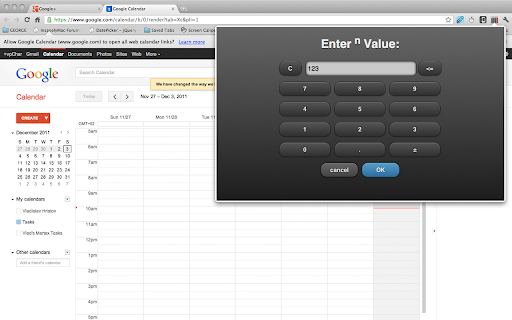
This is kinda unusual scientific calculator. What makes it unusual is that you can see both sides of the current binary operation. For example -- if you type 2 + 2 you'll see exactly "2 + 2" until you press "=". The tool was made with touch-screen in mind and should be ready for touch-screen chromebooks. On devices with keyboard you can use the obvious keys: number keys, dot (floating point), +, -, *, /, Enter (=), ESC (C) and Backspace. The advanced ("scientific") functions are not yet accessible with keyboard shortcuts (but better keyboard support is planned for the next releases). The initial goal of this extension was to be a real-life example of jQuery Mobile (and it worked as such) but somehow, with the time, more options were added and it became full-featured scientific calculator. It is, however, still work in progress, so let me know if you find a bug, if something isn't workin…

Listing SEO keywords

Search intent keywords
Keyword signals for evaluating how users may discover, compare, or search for this extension category.

Core discovery

scientific calculator chrome extensiontouch screen calculator for chromebookvisual binary operation calculator

Comparison

Melanto vs standard calculatorbest scientific calculator for chrome

Problem

calculator that shows operation stepsscientific calculator for touch screen

Alternative

free scientific calculator extensionchrome math tool alternative

Similar extensions

Jump to related discovery paths:

FAQ

What is Melanto Calculator mainly used for?
Melanto Calculator is a Chrome extension providing scientific calculation capabilities with a focus on operational transparency. It supports basic keyboard shortcuts and provides multiple visual themes for the interface.
What market signals stand out?
Early or small audience with limited review base. Last known update: 02/23/2026.
What should builders compare before entering this space?
Compare install concentration, rating quality, update recency, screenshots, developer portfolio, listing claims, and review-backed friction signals.
Is this page review-backed?
Backed by review samples. This page combines store metadata with selected review signals, while raw store metrics remain visible for comparison.

Screenshots

Melanto Calculator screenshot

Links

Recommended Chrome extensions

Related listings from the same category, trending peers, and the same publisher portfolio.

Browse workflow