Accessibility Insights for Web icon

Accessibility Insights for Web Chrome Extension Analysis

Developer & Designer Tools

Chrome extension ID: pbjjkligggfmakdaogkfomddhfmpjeni

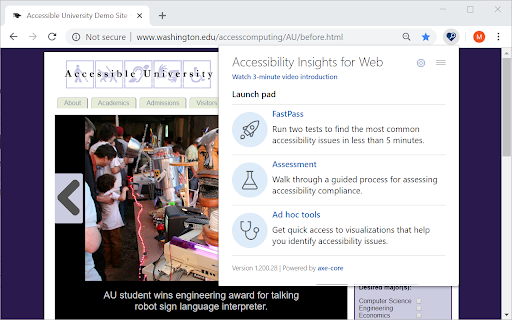
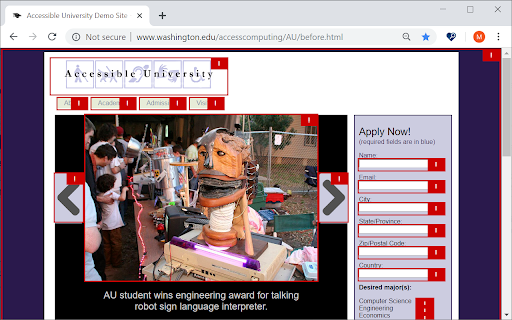
Accessibility Insights for Web is a browser extension that assists in auditing web content for accessibility compliance. It provides visualization tools, detailed test steps, and references to W3C guidelines to help developers improve web usability.

Version:2.47.0
Size:3.64MiB
Last updated:

Overview

Installs

100K+

Rating

4.7

40 reviews

Languages

1 locales

Includes English

Market analysis

Review-backed positioning, friction, and market signals for this Chrome extension.

Backed by review samples

Macro category

Developer & Designer Tools

Pricing friction

Low review signal

Complaint intensity

Moderate review signal

Listing & review signals
Observed signals from store listing text and review samples.

Listing positioning

The product is positioned as a developer-centric tool designed to quickly identify and remediate web accessibility issues. It emphasizes speed and ease of use in finding and fixing compliance errors.

Inferred product pattern

A high-utility, free developer tool focused on visual accessibility auditing and compliance verification.

Review-backed pain points

Linux users report the extension being broken or the icon disappearing. Some users experience intermittent stability issues and background error messages.

Observed feature gaps

Some users observed that certain accessibility problems are detectable in Edge but not in Chrome.

Tags
Web AccessibilityDeveloper ToolsAccessibility AuditingUI/UX Testing
Target users

- Web Developers

- Accessibility Specialists

- QA Engineers

- UI/UX Designers

Primary use cases

- Auditing web pages for accessibility compliance

- Visualizing tab stops and header hierarchies

- Identifying and fixing HTML accessibility errors

Positive themes

- Polished and intuitive user interface

- Detailed test steps and real-world solution explanations

- Impressive visualization tools such as header highlighting and tab stop tracking

- High accuracy and adherence to W3C documentation

Negative themes

- Functionality breakage on Linux operating systems

- Intermittent service interruptions and background errors

- Discrepancies in error detection between Chrome and Edge

Observed friction

- Performance complaints detected

- No pricing friction observed; users identify the tool as a high-quality free resource.

Evidence boundary: Analysis based on the Chrome Web Store listing and user reviews highlighting high satisfaction with visualization features alongside reports of Linux compatibility issues. The review sample size is relatively small and contains older reports regarding specific OS compatibility.
Complaint summaries
Review-backed complaint signals grouped by operational area.

Support

No support complaints observed.

Reliability

Users reported intermittent functionality failures and specific breakage on Linux-based systems.

Privacy

No privacy complaints observed.

Access & pricing

- Free usage observed

- No account requirement observed

- Free plan or free usage claimed

Store listing facts

Listing assets

- Screenshots: 2

- Videos: 0

- Languages: 1

Trust signals

- Privacy policy

- Developer contact

Store metadata

- Version: 2.47.0

- Size: 3.64MiB

- Last updated:

Store description excerpt
Short excerpt from the public Chrome Web Store listing; full copy is available on the official store page.
Learn more about Accessibility Insights at https://aka.ms/accessibilityinsights. The default keyboard shortcut to launch Accessibility Insights for Web is [Ctrl+Shift+K]. If that doesn't work, follow these instructions: 1. Select Shift+Alt+T to move focus to the Chrome address bar 2. Select the Left arrow key to move focus to the Accessibility Insights for Web extension. 3. Select the Space key to open the extension. Privacy policy: http://go.microsoft.com/fwlink/?LinkId=521839 Third Party Notice: https://microsoft.github.io/accessibility-insights-web/NOTICE.html License: https://microsoft.github.io/accessibility-insights-web/LICENSE.txt

Listing SEO keywords

Search intent keywords
Keyword signals for evaluating how users may discover, compare, or search for this extension category.

Core discovery

web accessibility checkeraccessibility audit toolWCAG compliance extensionaccessibility testing

Comparison

accessibility tools comparisonaccessibility checker vs

Problem

fix web accessibilityaccessibility errorsWCAG compliance issues

Alternative

axe devtoolsWAVE accessibilityaccessibility inspector

Similar extensions

Jump to related discovery paths:

FAQ

What is Accessibility Insights for Web mainly used for?
Accessibility Insights for Web is a browser extension that assists in auditing web content for accessibility compliance. It provides visualization tools, detailed test steps, and references to W3C guidelines to help developers improve web usability.
What market signals stand out?
Established adoption with limited review base. Last known update: 05/14/2026.
What should builders compare before entering this space?
Compare install concentration, rating quality, update recency, screenshots, developer portfolio, listing claims, and review-backed friction signals.
Is this page review-backed?
Backed by review samples. This page combines store metadata with selected review signals, while raw store metrics remain visible for comparison.

Screenshots

Accessibility Insights for Web screenshot

Links

Recommended Chrome extensions

Related listings from the same category, trending peers, and the same publisher portfolio.

Browse developer