PageSpeed Insights Shortcut & History Report Recorder icon

PageSpeed Insights Shortcut & History Report Recorder Chrome Extension Analysis

SEO & Traffic Analytics

Chrome extension ID: pnibhbifpoiplpgkaajjejeigfchahpl

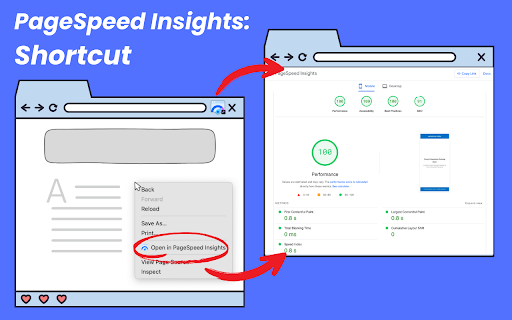
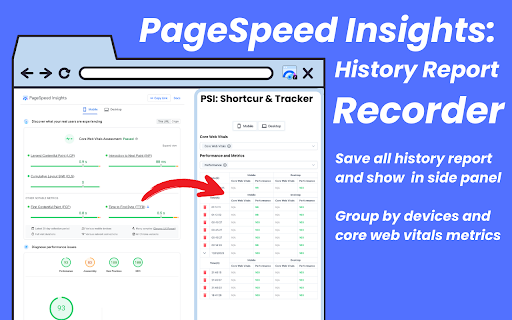
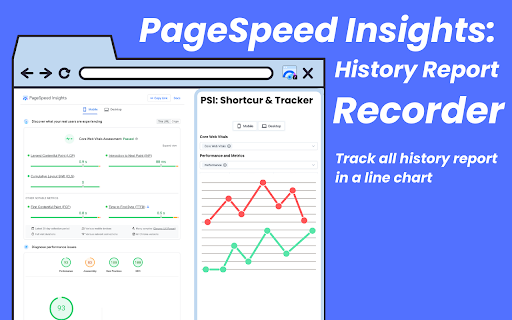
A utility extension that provides a shortcut to Google PageSpeed Insights and records performance history locally. It enables users to monitor Core Web Vitals and visualize performance trends over time through line charts and data tables.

Developer:Extension Rocks
Version:3.0.8
Size:320KiB
Last updated:

Overview

Installs

6K+

Rating

4.8

17 reviews

Languages

51 locales

Includes Deutsch, English, Filipino, Indonesia...

Market analysis

Review-backed positioning, friction, and market signals for this Chrome extension.

Backed by review samples

Macro category

SEO & Traffic Analytics

Pricing friction

Low review signal

Complaint intensity

Low review signal

Listing & review signals
Observed signals from store listing text and review samples.

Listing positioning

The extension positions itself as an all-in-one productivity tool for web developers and SEO specialists to instantly access Google PageSpeed Insights. It highlights efficiency through one-click testing and historical performance tracking using visual charts.

Inferred product pattern

A workflow wrapper for Google PageSpeed Insights that adds a local historical tracking layer.

Review-backed pain points

A user reported a bug where Mobile and Desktop performance scores appear to be swapped in the display.

Observed feature gaps

No specific feature gaps identified from reviews.

Tags
PageSpeed InsightsSEO ToolsWeb PerformanceSpeed Tracking
Target users

- Web Developers

- SEO Specialists

- Performance Enthusiasts

Primary use cases

- Analyzing webpage speed

- Monitoring Core Web Vitals

- Tracking performance trends

- Competitor page analysis

Positive themes

- Efficiency

- Ease of use

- Effective auditing

Negative themes

- UI data mapping errors

Observed friction

- No pricing information or friction observed in the provided data.

Evidence boundary: Extracted from store listing description and a small sample of user reviews. The review sample size is limited to 16 total comments.
Complaint summaries
Review-backed complaint signals grouped by operational area.

Support

No support complaints observed.

Reliability

One reported instance of incorrect data categorization between mobile and desktop metrics.

Privacy

No privacy complaints observed; listing claims data is stored locally.

Access & pricing

- No clear monetization signal

- No account requirement observed

- No clear pricing signal

Store listing facts

Listing assets

- Screenshots: 3

- Videos: 1

- Languages: 51

Trust signals

- Privacy policy

- Developer contact

- Official website

Store metadata

- Version: 3.0.8

- Size: 320KiB

- Last updated:

Store description excerpt
Short excerpt from the public Chrome Web Store listing; full copy is available on the official store page.
"PageSpeed Insights Shortcut & History Report Recorder" is the all-in-one extension for web developers, SEO specialists, and performance enthusiasts. Instantly analyze any webpage’s speed and performance using Google PageSpeed Insights, and now, track and review your report history with ease. Whether you're optimising Core Web Vitals, monitoring your site's performance, or analysing competitor pages, this extension is your go-to tool for desktop and mobile. Key Features • Instant Access to PageSpeed Insights: Analyze any webpage's performance with one click. The current page URL is automatically redirected for testing, saving you time and effort. • Track Report History: All test results are securely stored locally, ensuring your data remains private and secure. View your report history directly in Chrome’s side panel. • Visualise with Line Charts: Monitor trends and improvements over ti…

Listing SEO keywords

Search intent keywords
Keyword signals for evaluating how users may discover, compare, or search for this extension category.

Core discovery

PageSpeed Insights shortcutCore Web Vitals trackerwebsite speed historyweb performance monitoring

Comparison

Google PageSpeed Insights

Problem

slow website speedmonitor core web vitalspage load time tracking

Alternative

LighthousePageSpeed Insights

Similar extensions

Jump to related discovery paths:

FAQ

What is PageSpeed Insights Shortcut & History Report Recorder mainly used for?
A utility extension that provides a shortcut to Google PageSpeed Insights and records performance history locally. It enables users to monitor Core Web Vitals and visualize performance trends over time through line charts and data tables.
What market signals stand out?
Early or small audience with limited review base. Last known update: 02/08/2026.
What should builders compare before entering this space?
Compare install concentration, rating quality, update recency, screenshots, developer portfolio, listing claims, and review-backed friction signals.
Is this page review-backed?
Backed by review samples. This page combines store metadata with selected review signals, while raw store metrics remain visible for comparison.

Screenshots

PageSpeed Insights Shortcut & History Report Recorder screenshot

Links

Recommended Chrome extensions

Related listings from the same category, trending peers, and the same publisher portfolio.

Browse workflow
Pesticide - Advanced CSS Debugger icon

Pesticide - Advanced CSS Debugger

Extension Rocks

Not only inserts outlines (without background color) on all elements, but also inspects size and layout. CSS is awesome!

Installs

20K+

Rating

4.9

Swoosh Cookie and Local Storage Specialist icon

Swoosh Cookie and Local Storage Specialist

Extension Rocks

Manage Cookies, Local Storage & Session Storage in one place. Powerful, intuitive, and real-time web dev toolkit.

Installs

10K+

Rating

3.9

Keeper® Password Manager & Digital Vault icon

Keeper® Password Manager & Digital Vault

Keeper Security

Generate strong passwords, autofill and protect your confidential info with zero-knowledge encryption.

Installs

2.0M+

Rating

4.8

AI Grammar Checker & Paraphraser – LanguageTool icon

AI Grammar Checker & Paraphraser – LanguageTool

lt-extension-publisher

Instantly Enhance Your Texts with LanguageTool’s Grammar Checker and Paraphrasing Tool

Installs

2.0M+

Rating

4.7

Snow Web Application Metering icon

Snow Web Application Metering

snow_chrome_extensions

This extension tracks web application use for the purpose of license compliance and cost optimization. www.snowsoftware.com/browser

Installs

2.0M+

Rating

1.3

Sound Booster - increase volume up icon

Sound Booster - increase volume up

Sound-ultimate.com

Volume Booster helps boost sound video or music on any tab! Increase volume and bass booster, equalizer. Volume control.

Installs

2.0M+

Rating

4.5

Evernote Web Clipper icon

Evernote Web Clipper

Evernote

Use the Evernote extension to save things you see on the web into your Evernote account.

Installs

2.0M+

Rating

4.7

Clever icon

Clever

Clever

Allows students and staff to access apps in Clever Portal.

Installs

2.0M+

Rating

2.5

Microsoft Defender Browser Protection icon

Microsoft Defender Browser Protection

Microsoft Corporation

Protect yourself against online threats, like phishing and malicious websites, with real-time protection from Microsoft.

Installs

2.0M+

Rating

4.1

Визуальные закладки icon

Визуальные закладки

Yandex

Визуальные закладки – это страница, на которой собраны ваши любимые сайты

Installs

2.0M+

Rating

3.4