Wappalyzer - Technology profiler icon

Wappalyzer Chrome Extension Analysis

Developer & Designer Tools

Store listing title: Wappalyzer - Technology profiler

Chrome extension ID: gppongmhjkpfnbhagpmjfkannfbllamg

A browser extension that detects the underlying software stack of websites. It allows users to see programming languages, analytics tools, and payment processors used by a site and offers a CSV export feature for the results.

Developer:Wappalyzer
Version:6.12.3
Size:33.08MiB
Last updated:

Overview

Installs

3.0M+

Rating

4.6

1,969 reviews

Languages

32 locales

Includes Deutsch, English, Indonesia, Nederlands...

Market analysis

Review-backed positioning, friction, and market signals for this Chrome extension.

Backed by review samples

Macro category

Developer & Designer Tools

Pricing friction

Moderate review signal

Complaint intensity

Moderate review signal

Listing & review signals
Observed signals from store listing text and review samples.

Listing positioning

Wappalyzer positions itself as a comprehensive technology profiler capable of uncovering over a thousand technologies across dozens of categories. It emphasizes the ability to identify CMS, frameworks, ecommerce platforms, and JavaScript libraries at a glance.

Inferred product pattern

A lead-generation tool that provides a lightweight browser-based teaser for a more comprehensive paid technology intelligence service.

Review-backed pain points

Users report that the extension can double page loading times, occasionally stops detecting any technology entirely after updates, and has a very limited free tier (50 lookups per month).

Observed feature gaps

Lack of a confidence score or percentage for detected technologies, leading to false positives (e.g., incorrectly flagging sites as React).

Tags
Tech ProfilerCMS DetectorWeb DevelopmentCompetitive IntelligenceMarket Research
Target users

- Web Developers

- Digital Marketers

- Competitive Intelligence Analysts

- SEO Specialists

Primary use cases

- Identifying a competitor's technology stack

- Detecting the CMS used by a website

- Researching popular JavaScript libraries in the wild

- Exporting site technology data for analysis

Positive themes

- Accurate detection of most web applications

Negative themes

- Significant browser performance degradation

- Reliability issues after updates

- Restrictive free tier limits

- Privacy concerns regarding background data collection

Observed friction

- Free-tier complaints detected

- Performance complaints detected

- Privacy complaints detected

- Strong friction regarding the transition from a limited free tier (50 lookups) to high-cost paid options.

Evidence boundary: Analysis based on the store listing and 10 provided review samples focusing on performance, privacy, and pricing. The provided review samples are skewed toward low ratings, which may not represent the overall 4.5+ star user sentiment.
Complaint summaries
Review-backed complaint signals grouped by operational area.

Support

General frustration over updates that break core functionality across multiple computers.

Reliability

Reports of the extension failing to detect any technologies ('No technologies detected') following version updates.

Privacy

Concerns regarding the 'send reports' option being enabled by default and the extension scanning frames to send data to an ad-related URL.

Access & pricing

- Free entry with paid features

- No clear access signal

- Limited free usage observed

Store listing facts

Listing assets

- Screenshots: 1

- Videos: 0

- Languages: 32

Trust signals

- Privacy policy

- Developer contact

- Official website

Store metadata

- Version: 6.12.3

- Size: 33.08MiB

- Last updated:

Store description excerpt
Short excerpt from the public Chrome Web Store listing; full copy is available on the official store page.
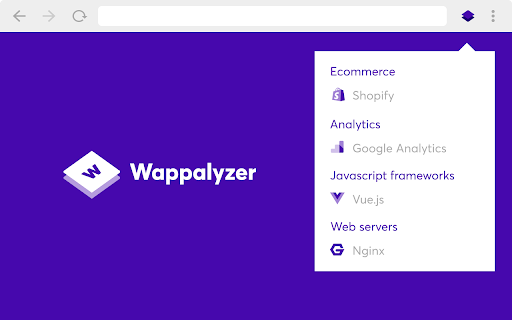
Wappalyzer is a technology profiler that shows you what websites are built with. Find out what CMS a website is using, as well as any framework, ecommerce platform, JavaScript libraries and many more. Wappalyzer is more than a CMS detector or framework detector: it uncovers more than a thousand technologies in dozens of categories such as programming languages, analytics, marketing tools, payment processors, CRM, CDN and others. Use the export button to save results to CSV. The extension has a toggle for light and dark mode. Install Wappalyzer for Chrome to find out the technologies used on websites you visit at glance.

Listing SEO keywords

Search intent keywords
Keyword signals for evaluating how users may discover, compare, or search for this extension category.

Core discovery

what technology does this website useCMS detectorframework identifierweb tech profiler

Comparison

Wappalyzer vs BuiltWithWappalyzer vs WhatWebWappalyzer vs Shodan

Problem

how to find website CMSidentify website javascript librariesdetect website ecommerce platform

Alternative

BuiltWith alternativeWhatWeb alternativeShodan alternative

Similar extensions

Jump to related discovery paths:

FAQ

What is Wappalyzer mainly used for?
A browser extension that detects the underlying software stack of websites. It allows users to see programming languages, analytics tools, and payment processors used by a site and offers a CSV export feature for the results.
What market signals stand out?
Large installed base with substantial review base. Last known update: 06/17/2026.
What should builders compare before entering this space?
Compare install concentration, rating quality, update recency, screenshots, developer portfolio, listing claims, and review-backed friction signals.
Is this page review-backed?
Backed by review samples. This page combines store metadata with selected review signals, while raw store metrics remain visible for comparison.

Screenshots

Wappalyzer - Technology profiler screenshot

Links

Recommended Chrome extensions

Related listings from the same category, trending peers, and the same publisher portfolio.

Browse developer
Window Resizer icon

Window Resizer

Ionuț Botizan

Resize the browser window to emulate various screen resolutions.

Installs

700K+

Rating

4.3

Tag Assistant Companion icon

Tag Assistant Companion

Google

The Tag Assistant Companion extension works with Tag Assistant to help troubleshoot installation of gtag.js and Google Tag Manager.

Installs

600K+

Rating

3.1

Talend API Tester - Free Edition icon

Talend API Tester - Free Edition

Qlik

Visually interact with REST, SOAP and HTTP APIs.

Installs

600K+

Rating

4.8

TikTok Pixel Helper icon

TikTok Pixel Helper

TikTok For Business

The TikTok Pixel Helper is a plug-in that monitors whether your TikTok Pixel is functioning properly.

Installs

600K+

Rating

2.6

Google Analytics Debugger icon

Google Analytics Debugger

Google Analytics

Prints useful information to the JavaScript console by enabling the debug version of the Google Analytics Javascript.

Installs

600K+

Rating

4.2

Detailed SEO Extension icon

Detailed SEO Extension

ahrefsseotoolbar

Get SEO insights at the click of a button to any website you're currently on. Built by full-time SEO's for daily analysis.

Installs

500K+

Rating

4.9

CSS Peeper icon

CSS Peeper

CSS Peeper

Inspect website styles in seconds. Supercharge your workflow, and save hours of work.

Installs

500K+

Rating

4.1

Salesforce Inspector Reloaded icon

Salesforce Inspector Reloaded

Thomas Prouvot

Productivity tools for Salesforce administrators and developers to inspect data and metadata directly from the Salesforce UI.

Installs

500K+

Rating

4.8

Axure RP Extension for Chrome icon

Axure RP Extension for Chrome

Axure Software Solutions, Inc.

An extension that allows viewing of locally published Axure RP prototypes (HTML files) from Google Chrome.

Installs

500K+

Rating

3.3

SelectorsHub icon

SelectorsHub

Sanjay Kumar | SelectorsHub Founder

Locators Plugin to Auto Generate and Verify Playwright Locators, XPath & CSS Selectors.

Installs

400K+

Rating

4.8