Save All Resources icon

Save All Resources Chrome Extension Analysis

Developer & Designer Tools

Chrome extension ID: abpdnfjocnmdomablahdcfnoggeeiedb

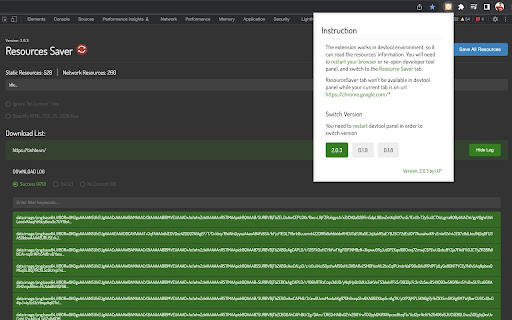
A Chrome extension that integrates into the browser's Developer Tools panel to extract and save site assets. It features a version switcher and an optional code beautifier for JS, HTML, and CSS files.

Developer:ashok-singh
Version:2.0.6
Size:4.73MiB
Last updated:

Overview

Installs

400K+

Rating

4.6

387 reviews

Languages

1 locales

Includes English

Market analysis

Review-backed positioning, friction, and market signals for this Chrome extension.

Backed by review samples

Macro category

Developer & Designer Tools

Pricing friction

Low review signal

Complaint intensity

Moderate review signal

Listing & review signals
Observed signals from store listing text and review samples.

Listing positioning

The product is positioned as a one-click utility for downloading all resource files of a web page while preserving the original folder structure. It explicitly clarifies that it is a resource collector rather than a full website downloader for local hosting.

Inferred product pattern

DevTools-integrated asset extraction utility for technical users.

Review-backed pain points

Users frequently struggle to find or activate the 'Resource Saver' tab within the DevTools panel and report receiving 'No content' for several requested resources.

Observed feature gaps

Unable to download background images set via CSS, lacks the ability to download the index.html file, and the built-in beautifier can corrupt minified code.

Tags
Asset DownloaderDeveloper ToolResource SaverFrontend Utility
Target users

- Web Developers

- Frontend Engineers

- UI/UX Designers

- Web Analysts

Primary use cases

- Extracting CSS and JS files for study

- Downloading page assets for local reference

- Backing up website resources with directory structure

Positive themes

- Handy utility for resource gathering

- Efficient initial setup

Negative themes

- Difficulty locating DevTools tab

- Incomplete resource extraction

- Beautifier introducing syntax errors

- Failure to download CDN-hosted assets

Observed friction

- Performance complaints detected

- No pricing friction observed; the tool appears to be free.

Evidence boundary: Analysis based on store listing and 10 provided review samples focusing on usability and technical gaps. Provided review samples are primarily negative, which may not reflect the sentiment of the 400k+ user base given the 4.57 rating.
Complaint summaries
Review-backed complaint signals grouped by operational area.

Support

Users report a lack of clear instructions, leading to confusion on how to access the tool's interface in the developer panel.

Reliability

Reports of the extension failing to capture all resources, specifically those hosted on CDNs or cached services.

Privacy

No privacy complaints observed.

Access & pricing

- Free usage observed

- No account requirement observed

- Free plan or free usage claimed

Store listing facts

Listing assets

- Screenshots: 1

- Videos: 0

- Languages: 1

Trust signals

- Developer contact

- Official website

Store metadata

- Version: 2.0.6

- Size: 4.73MiB

- Last updated:

Store description excerpt
Short excerpt from the public Chrome Web Store listing; full copy is available on the official store page.
Chrome Extension for one click downloading all resources files and keeping folder structures. *** ResourceSaver tab wont be available in devtool panel while your current tab is on url https://chrome.google.com/* *** *** Please note, this ext is a resources collector, not a website downloader, so it won't do the job that you can run the website locally *** Update Information: 2.0.6: Update icon 2.0.5: Bug fixes 2.0.4: Incognito mode quick fix 2.0.3: Add version switcher (including legacy versions such as 0.1.8 0.1.9) 2.0.2: Bug fixes for content blob promise 2.0.1: Refactor UI ----------------------------------------------------------------------------------- 0.1.9: Add download list 0.1.8: fixed zip file uncompressing with missing path issue in Windows 0.1.7: fixed Url to Path converting bug 0.1.6: getContent async problems fixed (turned all into sync before downloading) 0.1.5: Fix XHRs…

Listing SEO keywords

Search intent keywords
Keyword signals for evaluating how users may discover, compare, or search for this extension category.

Core discovery

save all resources chrome extensiondownload website assets folder structurechrome devtools resource saver

Comparison

Save All Resources vs site downloaderbest chrome extension for asset extraction

Problem

how to download all css and js from websitesave website assets with folder structure

Alternative

web resource collectorwebsite asset downloader

Similar extensions

Jump to related discovery paths:

FAQ

What is Save All Resources mainly used for?
A Chrome extension that integrates into the browser's Developer Tools panel to extract and save site assets. It features a version switcher and an optional code beautifier for JS, HTML, and CSS files.
What market signals stand out?
Established adoption with moderate review base. Last known update: 12/14/2023.
What should builders compare before entering this space?
Compare install concentration, rating quality, update recency, screenshots, developer portfolio, listing claims, and review-backed friction signals.
Is this page review-backed?
Backed by review samples. This page combines store metadata with selected review signals, while raw store metrics remain visible for comparison.

Screenshots

Save All Resources screenshot

Links

Website: github.com

Recommended Chrome extensions

Related listings from the same category, trending peers, and the same publisher portfolio.

Browse developer