React Developer Tools icon

React Developer Tools Chrome Extension Analysis

Developer & Designer Tools

Chrome extension ID: fmkadmapgofadopljbjfkapdkoienihi

React Developer Tools is a browser extension provided by Meta that enables developers to visualize and debug React component trees within the Chrome browser. It offers specific interfaces for monitoring component state, props, and performance profiling during the development lifecycle.

Developer:Meta
Version:7.0.1 (10/20/2025)
Size:789KiB
Last updated:

Overview

Installs

5.0M+

Rating

4.0

1,632 reviews

Languages

1 locales

Includes English

Market analysis

Review-backed positioning, friction, and market signals for this Chrome extension.

Backed by review samples

Macro category

Developer & Designer Tools

Pricing friction

Low review signal

Complaint intensity

High review signal

Listing & review signals
Observed signals from store listing text and review samples.

Listing positioning

The store listing positions this as the official companion tool for the React library, integrated directly into Chrome DevTools. It emphasizes its capability to inspect component hierarchies, props, state, and record performance data via dedicated tabs.

Inferred product pattern

Standard open-source developer utility with mature feature sets but significant recent performance debt.

Review-backed pain points

Users consistently report significant performance overhead, including high CPU usage, browser instability, and UI interface failures where elements or toolbars vanish during use.

Observed feature gaps

Users frequently express difficulty with live state tracking, missing features compared to previous versions, and integration issues with modern framework iterations like Next.js.

Tags
ReactDebuggingWeb DevelopmentProfilerComponent Inspector
Target users

- Frontend Developers

- React Engineers

- Full-Stack Developers

Primary use cases

- Inspecting React component trees

- Editing component props and state

- Performance profiling of React applications

Positive themes

- Essential tool for React development

- Useful for debugging hierarchy

- Integrated seamlessly with Chrome DevTools

Negative themes

- High CPU consumption and performance degradation

- UI glitches and visual disappearing elements

- Frequent freezing during profiling

- Incompatibility with newer Next.js or React versions

Observed friction

- Performance complaints detected

- Privacy complaints detected

- None; the extension is free and open-source.

Evidence boundary: Evidence is drawn from user reviews indicating widespread performance issues (CPU spikes), UI instability, and specific concerns regarding new permission requests. Reviews are primarily from developers experiencing technical issues; the high download count (5M+) suggests a large user base that may not be represented by the recent negative complaints.
Complaint summaries
Review-backed complaint signals grouped by operational area.

Support

Users report lack of resolution for persistent 'stuck' loading screens and general frustration with the tool's reliability.

Reliability

High; users report CPU thrashing, browser crashes, and interface components disappearing, making it unusable for some professional workflows.

Privacy

Some users have expressed concern over updated permission requirements requesting extended access when Chrome is closed.

Access & pricing

- Free usage observed

- No account requirement observed

- Free plan or free usage claimed

Store listing facts

Listing assets

- Screenshots: 1

- Videos: 0

- Languages: 1

Trust signals

- Developer contact

- Support link

Store metadata

- Version: 7.0.1 (10/20/2025)

- Size: 789KiB

- Last updated:

Store description excerpt
Short excerpt from the public Chrome Web Store listing; full copy is available on the official store page.
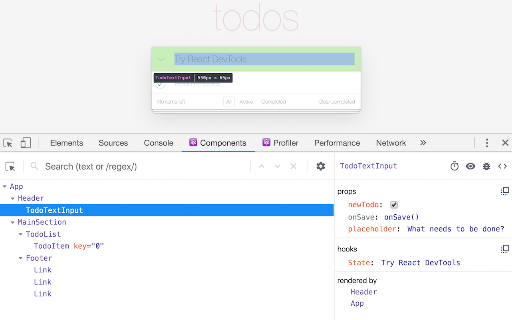
React Developer Tools is a Chrome DevTools extension for the open-source React JavaScript library. It allows you to inspect the React component hierarchies in the Chrome Developer Tools. You will get two new tabs in your Chrome DevTools: "Components ⚛" and "Profiler ⚛". The Components tab shows you the root React components that were rendered on the page, as well as the subcomponents that they ended up rendering. By selecting one of the components in the tree, you can inspect and edit its current props and state in the panel on the right. In the breadcrumbs you can inspect the selected component, the component that created it, the component that created that one, and so on. If you inspect a React element on the page using the regular Elements tab, then switch over to the React tab, that element will be automatically selected in the React tree. The Profiler tab allows you to record perfo…

Listing SEO keywords

Search intent keywords
Keyword signals for evaluating how users may discover, compare, or search for this extension category.

Core discovery

React DevToolsChrome debugger for ReactReact component inspectorReact profiler extension

Comparison

React DevTools vs Vue DevToolsdebug React components

Problem

React DevTools high CPUReact DevTools not loadingReact DevTools crashing

Alternative

React debugging toolsinspect React props

Similar extensions

Jump to related discovery paths:

FAQ

What is React Developer Tools mainly used for?
React Developer Tools is a browser extension provided by Meta that enables developers to visualize and debug React component trees within the Chrome browser. It offers specific interfaces for monitoring component state, props, and performance profiling during the development lifecycle.
What market signals stand out?
Large installed base with substantial review base. Last known update: 10/22/2025.
What should builders compare before entering this space?
Compare install concentration, rating quality, update recency, screenshots, developer portfolio, listing claims, and review-backed friction signals.
Is this page review-backed?
Backed by review samples. This page combines store metadata with selected review signals, while raw store metrics remain visible for comparison.

Screenshots

React Developer Tools screenshot

Links

Recommended Chrome extensions

Related listings from the same category, trending peers, and the same publisher portfolio.

Browse developer
Meta Pixel Helper icon

Meta Pixel Helper

Meta

The Meta Pixel Helper is a troubleshooting tool that helps you validate your pixel implementation.

Installs

3.0M+

Rating

3.9

Window Resizer icon

Window Resizer

Ionuț Botizan

Resize the browser window to emulate various screen resolutions.

Installs

700K+

Rating

4.3

Tag Assistant Companion icon

Tag Assistant Companion

Google

The Tag Assistant Companion extension works with Tag Assistant to help troubleshoot installation of gtag.js and Google Tag Manager.

Installs

600K+

Rating

3.1

Talend API Tester - Free Edition icon

Talend API Tester - Free Edition

Qlik

Visually interact with REST, SOAP and HTTP APIs.

Installs

600K+

Rating

4.8

TikTok Pixel Helper icon

TikTok Pixel Helper

TikTok For Business

The TikTok Pixel Helper is a plug-in that monitors whether your TikTok Pixel is functioning properly.

Installs

600K+

Rating

2.6

Google Analytics Debugger icon

Google Analytics Debugger

Google Analytics

Prints useful information to the JavaScript console by enabling the debug version of the Google Analytics Javascript.

Installs

600K+

Rating

4.2

Detailed SEO Extension icon

Detailed SEO Extension

ahrefsseotoolbar

Get SEO insights at the click of a button to any website you're currently on. Built by full-time SEO's for daily analysis.

Installs

500K+

Rating

4.9

CSS Peeper icon

CSS Peeper

CSS Peeper

Inspect website styles in seconds. Supercharge your workflow, and save hours of work.

Installs

500K+

Rating

4.1

Salesforce Inspector Reloaded icon

Salesforce Inspector Reloaded

Thomas Prouvot

Productivity tools for Salesforce administrators and developers to inspect data and metadata directly from the Salesforce UI.

Installs

500K+

Rating

4.8

Axure RP Extension for Chrome icon

Axure RP Extension for Chrome

Axure Software Solutions, Inc.

An extension that allows viewing of locally published Axure RP prototypes (HTML files) from Google Chrome.

Installs

500K+

Rating

3.3