Pesticide icon

Pesticide Chrome Extension Analysis

Developer & Designer Tools

Chrome extension ID: bakpbgckdnepkmkeaiomhmfcnejndkbi

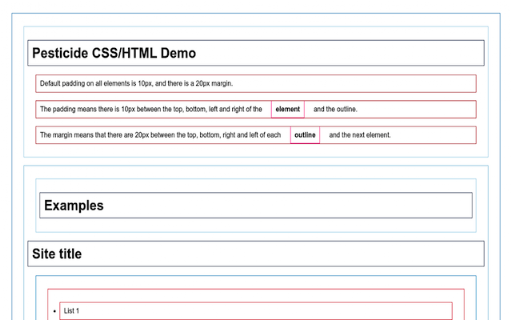
Pesticide is a browser extension that assists in CSS troubleshooting by outlining every element on a webpage. This allows developers to see the exact placement and boundaries of DIVs and other HTML elements.

Version:2.0.0
Size:24.29KiB
Last updated:

Overview

Installs

200K+

Rating

4.0

143 reviews

Languages

1 locales

Includes English

Market analysis

Review-backed positioning, friction, and market signals for this Chrome extension.

Backed by review samples

Macro category

Developer & Designer Tools

Pricing friction

Low review signal

Complaint intensity

High review signal

Listing & review signals
Observed signals from store listing text and review samples.

Listing positioning

The extension is positioned as a CSS debugging tool designed to help developers visualize page layouts by inserting outlines onto all elements. It is explicitly identified as a fork of the original Pesticide tool, created for students in a specific web development bootcamp.

Inferred product pattern

A niche developer utility that has experienced significant user backlash due to a version update that changed its core minimalist UX to a more intrusive visual style.

Review-backed pain points

Users report that a recent update added colored backgrounds to all elements which makes the page unreadable, and the 'Ctrl' key functionality for viewing dimensions is broken.

Observed feature gaps

Lack of a toggle to disable background colors; lack of ability to revert to the original outline-only mode.

Tags
CSS DebuggingWeb DevelopmentLayout ToolElement Outliner
Target users

- Web Developers

- CSS Designers

- Coding Students

Primary use cases

- Debugging CSS layout issues

- Visualizing element boundaries

- Troubleshooting web page alignment

Positive themes

- Historically highly valued as a primary troubleshooting tool

Negative themes

- Intrusive background colors obscuring page content

- Broken dimension annotation features

- Regressive updates

Observed friction

- No pricing friction observed.

Evidence boundary: Evidence is based on the store description and several highly critical reviews regarding a recent update to the UI and feature set. Review data is heavily weighted toward negative feedback following a specific product update.
Complaint summaries
Review-backed complaint signals grouped by operational area.

Support

No support complaints observed.

Reliability

Users report core features like the Ctrl-key dimension annotations are non-functional in the current version.

Privacy

No privacy complaints observed.

Access & pricing

- Free usage observed

- No account requirement observed

- Free plan or free usage claimed

Store listing facts

Listing assets

- Screenshots: 1

- Videos: 0

- Languages: 1

Trust signals

- Developer contact

Store metadata

- Version: 2.0.0

- Size: 24.29KiB

- Last updated:

Store description excerpt
Short excerpt from the public Chrome Web Store listing; full copy is available on the official store page.
This extension inserts the Pesticide CSS into the current page, outlining each element to better see placement on the page. This is a forked copy of Pesticide created originally by Adam Morse: https://github.com/mrmrs/pesticide This copy of Pesticide is created for students on the Complete Web Development Bootcamp by Dr. Angela Yu. https://www.udemy.com/course/the-complete-web-development-bootcamp/

Listing SEO keywords

Search intent keywords
Keyword signals for evaluating how users may discover, compare, or search for this extension category.

Core discovery

CSS debugging toolelement outline extensionweb layout debuggerCSS inspector

Comparison

original Pesticidestandard Chrome DevTools

Problem

CSS layout issueselement boundary problemsunaligned web elements

Alternative

CSS layout inspectorvisual CSS debugger

Similar extensions

Jump to related discovery paths:

FAQ

What is Pesticide mainly used for?
Pesticide is a browser extension that assists in CSS troubleshooting by outlining every element on a webpage. This allows developers to see the exact placement and boundaries of DIVs and other HTML elements.
What market signals stand out?
Established adoption with moderate review base. Last known update: 03/10/2025.
What should builders compare before entering this space?
Compare install concentration, rating quality, update recency, screenshots, developer portfolio, listing claims, and review-backed friction signals.
Is this page review-backed?
Backed by review samples. This page combines store metadata with selected review signals, while raw store metrics remain visible for comparison.

Screenshots

Pesticide screenshot

Recommended Chrome extensions

Related listings from the same category, trending peers, and the same publisher portfolio.

Browse developer