Whois ip lookup icon

Whois ip lookup Chrome Extension Analysis

Developer & Designer Tools

Chrome extension ID: hjfkopginlgihmjejgpfdhcgconehokj

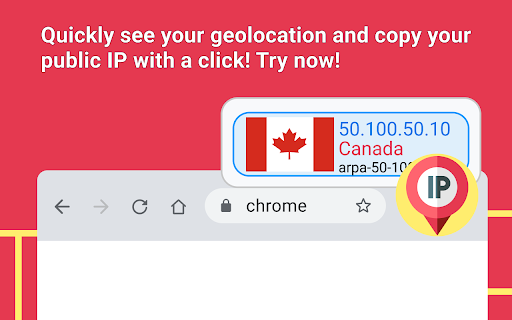
A browser utility that provides quick access to IP address information, WHOIS domain details, and geolocation data. It allows users to identify server names, hostnames, and network origins directly within the Chrome browser.

Version:1.0.2
Size:395KiB
Last updated:

Overview

Installs

607

Rating

4.8

17 reviews

Languages

52 locales

Includes Deutsch, English, Filipino, Indonesia...

Market analysis

Review-backed positioning, friction, and market signals for this Chrome extension.

Backed by review samples

Macro category

Developer & Designer Tools

Pricing friction

Low review signal

Complaint intensity

Low review signal

Listing & review signals
Observed signals from store listing text and review samples.

Listing positioning

The product is positioned as a comprehensive network utility for determining public IPv4 addresses and obtaining detailed WHOIS and geographical insights. It emphasizes speed, real-time updates, and ease of use for managing network identity and monitoring safety.

Inferred product pattern

A lightweight, utility-focused network diagnostic tool for quick IP and domain metadata retrieval.

Review-backed pain points

One user reported confusion regarding the workflow after copying an IP address to the clipboard, indicating a potential lack of clear next steps in the UI.

Observed feature gaps

No specific feature gaps were identified from the provided data, though UX guidance for certain actions could be improved.

Tags
IP LookupWhois ToolNetwork AnalysisGeolocation
Target users

- Network Administrators

- Developers

- Security Researchers

- General Users

Primary use cases

- Checking public IP address

- Performing WHOIS domain lookups

- Reverse IP address lookups

- Identifying server geolocation

Positive themes

- Speed and ease of use

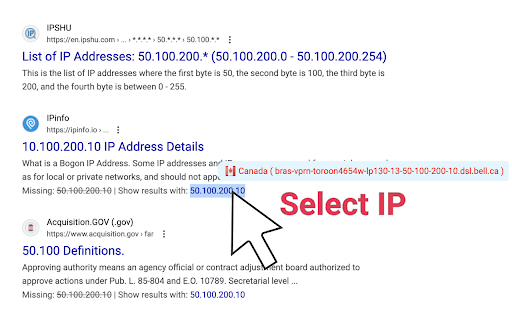
- Contextual lookup capability via text selection

- Helpful hostname identification

Negative themes

- User workflow confusion

Observed friction

- No pricing friction observed; the listing describes the tool as free.

Evidence boundary: Data extracted from the official store listing and 10 user reviews. The review sample size is small, which may not represent the full user sentiment distribution.
Complaint summaries
Review-backed complaint signals grouped by operational area.

Support

No support complaints found in the provided reviews.

Reliability

No reliability or performance complaints found in the provided reviews.

Privacy

No privacy complaints found in the provided reviews.

Access & pricing

- Free usage observed

- No account requirement observed

- Free plan or free usage claimed

Store listing facts

Listing assets

- Screenshots: 2

- Videos: 0

- Languages: 52

Trust signals

- Privacy policy

- Developer contact

- Official website

Store metadata

- Version: 1.0.2

- Size: 395KiB

- Last updated:

Store description excerpt
Short excerpt from the public Chrome Web Store listing; full copy is available on the official store page.
Easily determine what is my public ip address ipv4 lookup. Explore the capabilities of our Chrome extension tailored to provide detailed insights into your network addr and its precise geographical details. Access comprehensive Whois ip lookup information for managing your network identity. Features Overview 1. Utilize easy whois domain lookup for direct domain details. 2. Fast and reliable analysis of network statistics. 3. User-friendly interface for streamlined navigation. 4. Continuous updates to ensure accurate data. 5. Access geographical details via reverse ip lookup whois. Ease of Installation: 1️⃣ Navigate to the Chrome Web Store, search whois ip address lookup free. 2️⃣ Find the extension, click 'Add to Chrome'. 3️⃣ Click 'Add Extension' to confirm the installation. 4️⃣ Once added, open the extension to see what is my ipaddress vpn. 5️⃣ Begin using it for detailed network anal…

Listing SEO keywords

Search intent keywords
Keyword signals for evaluating how users may discover, compare, or search for this extension category.

Core discovery

whois ip lookupip address checkerreverse ip lookupip geolocationcheck my ip

Comparison

IP lookup extensionWHOIS checker

Problem

what is my ipfind ip locationcheck ip address

Alternative

Network identity toolDNS lookup extension

Similar extensions

Jump to related discovery paths:

FAQ

What is Whois ip lookup mainly used for?
A browser utility that provides quick access to IP address information, WHOIS domain details, and geolocation data. It allows users to identify server names, hostnames, and network origins directly within the Chrome browser.
What market signals stand out?
Early or small audience with limited review base. Last known update: 04/15/2025.
What should builders compare before entering this space?
Compare install concentration, rating quality, update recency, screenshots, developer portfolio, listing claims, and review-backed friction signals.
Is this page review-backed?
Backed by review samples. This page combines store metadata with selected review signals, while raw store metrics remain visible for comparison.

Screenshots

Whois ip lookup screenshot

Links

Recommended Chrome extensions

Related listings from the same category, trending peers, and the same publisher portfolio.

Browse developer
Image Extractor icon

Image Extractor

Unknown developer

Use the image extractor extension to download images from websites and capture background pictures with this photo downloader.

Installs

40K+

Rating

4.5

Detailed SEO Extension icon

Detailed SEO Extension

ahrefsseotoolbar

Get SEO insights at the click of a button to any website you're currently on. Built by full-time SEO's for daily analysis.

Installs

500K+

Rating

4.9

CSS Peeper icon

CSS Peeper

CSS Peeper

Inspect website styles in seconds. Supercharge your workflow, and save hours of work.

Installs

500K+

Rating

4.1

Salesforce Inspector Reloaded icon

Salesforce Inspector Reloaded

Thomas Prouvot

Productivity tools for Salesforce administrators and developers to inspect data and metadata directly from the Salesforce UI.

Installs

500K+

Rating

4.8

Axure RP Extension for Chrome icon

Axure RP Extension for Chrome

Axure Software Solutions, Inc.

An extension that allows viewing of locally published Axure RP prototypes (HTML files) from Google Chrome.

Installs

500K+

Rating

3.3

SelectorsHub icon

SelectorsHub

Sanjay Kumar | SelectorsHub Founder

Locators Plugin to Auto Generate and Verify Playwright Locators, XPath & CSS Selectors.

Installs

400K+

Rating

4.8

Angular DevTools icon

Angular DevTools

Angular

Angular DevTools extends Chrome DevTools adding Angular specific debugging and profiling capabilities.

Installs

400K+

Rating

3.7

SAML-tracer icon

SAML-tracer

SimpleSAMLphp

A debugger for viewing SAML messages

Installs

400K+

Rating

4.5

WhatRuns icon

WhatRuns

Ownedit Ltd

Discover what runs a website. Frameworks, Analytics Tools, Wordpress Plugins, Fonts - you name it.

Installs

400K+

Rating

4.2

Font Finder icon

Font Finder

unixeco

An easy-to-use font inspector to get CSS styles of the selected element

Installs

400K+

Rating

4.5