Salesforce User Login icon

Salesforce User Login Chrome Extension Analysis

Automation & Workflow Efficiency

Chrome extension ID: hjmcdlnohlfebdibegkcdhjifjfphjgb

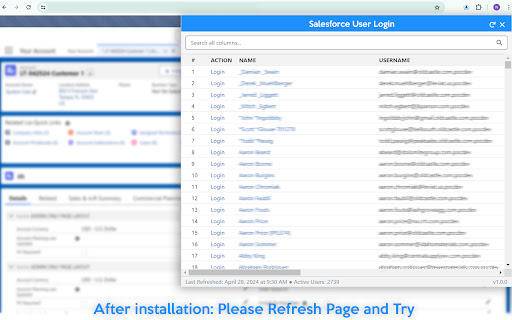
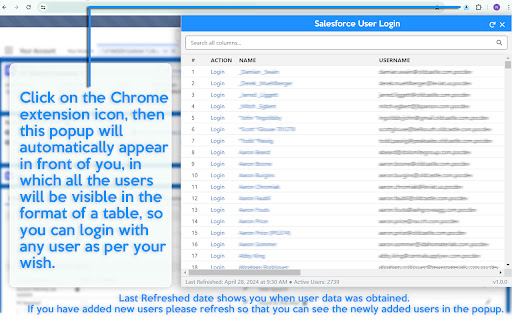
This Chrome extension allows Salesforce administrators to impersonate active users in both Classic and Lightning interfaces. It features a user search function and ensures that administrators are returned to their original page upon logging out of the impersonated session.

Version:1.0.2
Size:79.26KiB
Last updated:

Overview

Installs

726

Rating

5.0

5 reviews

Languages

1 locales

Includes English (United States)

Market analysis

Review-backed positioning, friction, and market signals for this Chrome extension.

Backed by review samples

Macro category

Automation & Workflow Efficiency

Pricing friction

Low review signal

Complaint intensity

Low review signal

Listing & review signals
Observed signals from store listing text and review samples.

Listing positioning

The product is positioned as a utility to simplify troubleshooting and empowerment for Salesforce administrators. It highlights the ability to quickly log in as other users while maintaining the current page context.

Inferred product pattern

A specialized administrative utility designed to streamline Salesforce user impersonation and troubleshooting workflows.

Review-backed pain points

No review-backed pain points were identified.

Observed feature gaps

No feature gaps were identified from the provided data.

Tags
Salesforce AdminUser ImpersonationCRM ProductivityTroubleshooting Tool
Target users

- Salesforce Administrators

- IT Support Professionals

- CRM Managers

Primary use cases

- Troubleshooting user-specific issues

- Rapid user impersonation for support

- Verifying user permissions and page views

Positive themes

- Significant time savings when logging in as multiple users

- Seamless integration into the browsing experience

- Highly effective functionality for administrative tasks

Negative themes

No negative theme data.

Observed friction

- No pricing information is available in the listing or reviews.

Evidence boundary: Evidence is based on the product's store description and five high-rating user reviews. The total number of reviews is very low, representing a limited sample size.
Complaint summaries
Review-backed complaint signals grouped by operational area.

Support

No support-related complaints were observed.

Reliability

No reliability or performance complaints were observed.

Privacy

No privacy complaints were observed.

Access & pricing

- No clear monetization signal

- No account requirement observed

- No clear pricing signal

Store listing facts

Listing assets

- Screenshots: 2

- Videos: 0

- Languages: 1

Trust signals

- Privacy policy

- Developer contact

- Official website

Store metadata

- Version: 1.0.2

- Size: 79.26KiB

- Last updated:

Store description excerpt
Short excerpt from the public Chrome Web Store listing; full copy is available on the official store page.
Makes it easier for admins to login to the Salesforce org as another user. 👨🏻‍💻 💻 How to use: 🔹After installation, Login to Salesforce org (OR) Refresh the Page, and Click on the extension icon. (wait for a while). 🔹If you have more than 2K active users in your organization the popup may take some time to appear the first time. 🔹Last Refreshed date shows you when user data was obtained. If you have added new users please refresh so that you can see the newly added users in the popup. ⛔️This tool provides you Login Link but may not allow some users to login due to salesforce minimum permission or some restriction. 🔍Highlights: 🔹Supports Classic and Lightning. 🔹Displays all active users with search feature. 🔹When a user is selected, it logs you in as that user and keeps you on the page you were viewing. 🔹When you log out, it will take you back to the page you were originally o…

Listing SEO keywords

Search intent keywords
Keyword signals for evaluating how users may discover, compare, or search for this extension category.

Core discovery

Salesforce User LoginLogin as Salesforce UserSalesforce Admin ToolSalesforce Impersonation

Comparison

Salesforce admin extensionSalesforce user login tool

Problem

Salesforce troubleshootingimpersonate user SalesforceSalesforce admin login issue

Alternative

Salesforce productivity toolsSalesforce management utilities

Similar extensions

Jump to related discovery paths:

FAQ

What is Salesforce User Login mainly used for?
This Chrome extension allows Salesforce administrators to impersonate active users in both Classic and Lightning interfaces. It features a user search function and ensures that administrators are returned to their original page upon logging out of the impersonated session.
What market signals stand out?
Early or small audience with limited review base. Last known update: 09/06/2024.
What should builders compare before entering this space?
Compare install concentration, rating quality, update recency, screenshots, developer portfolio, listing claims, and review-backed friction signals.
Is this page review-backed?
Backed by review samples. This page combines store metadata with selected review signals, while raw store metrics remain visible for comparison.

Screenshots

Salesforce User Login screenshot

Links

Recommended Chrome extensions

Related listings from the same category, trending peers, and the same publisher portfolio.

Browse developer
Lightning Studio icon

Lightning Studio

Unknown developer

Build Salesforce LWC development easy and fastest.

Installs

100K+

Rating

3.9

Salesforce Log Inspector icon

Salesforce Log Inspector

Unknown developer

Simplifying Debugging, Enhancing Salesforce Performance!

Installs

9K+

Rating

4.8

Postman Interceptor icon

Postman Interceptor

Postman

Capture requests from any website and send them to Postman Client.

Installs

700K+

Rating

4.3

Window Resizer icon

Window Resizer

Ionuț Botizan

Resize the browser window to emulate various screen resolutions.

Installs

700K+

Rating

4.3

Tag Assistant Companion icon

Tag Assistant Companion

Google

The Tag Assistant Companion extension works with Tag Assistant to help troubleshoot installation of gtag.js and Google Tag Manager.

Installs

600K+

Rating

3.1

Talend API Tester - Free Edition icon

Talend API Tester - Free Edition

Qlik

Visually interact with REST, SOAP and HTTP APIs.

Installs

600K+

Rating

4.8

TikTok Pixel Helper icon

TikTok Pixel Helper

TikTok For Business

The TikTok Pixel Helper is a plug-in that monitors whether your TikTok Pixel is functioning properly.

Installs

600K+

Rating

2.6

Assinatura Digital no Navegador icon

Assinatura Digital no Navegador

bry-suporte-apps

Esta extensão é projetada para ser utilizada em conjunto com outras soluções e não funciona de forma isolada para a assinatura.

Installs

600K+

Rating

2.4

Google Analytics Debugger icon

Google Analytics Debugger

Google Analytics

Prints useful information to the JavaScript console by enabling the debug version of the Google Analytics Javascript.

Installs

600K+

Rating

4.2

Detailed SEO Extension icon

Detailed SEO Extension

ahrefsseotoolbar

Get SEO insights at the click of a button to any website you're currently on. Built by full-time SEO's for daily analysis.

Installs

500K+

Rating

4.9