Odoo Debug icon

Odoo Debug Chrome Extension Analysis

Developer & Designer Tools

Chrome extension ID: hmdmhilocobgohohpdpolmibjklfgkbi

This extension enables users to quickly toggle Odoo debug mode and debug assets mode without manually editing URLs or re-entering command parameters. It acts as a browser-based shortcut tool specifically for Odoo platform administrators and developers.

Developer:Droggol
Version:5.1
Size:372KiB
Last updated:

Overview

Installs

100K+

Rating

4.7

100 reviews

Languages

1 locales

Includes English

Market analysis

Review-backed positioning, friction, and market signals for this Chrome extension.

Backed by review samples

Macro category

Developer & Designer Tools

Pricing friction

Low review signal

Complaint intensity

Low review signal

Listing & review signals
Observed signals from store listing text and review samples.

Listing positioning

Odoo Debug positions itself as a lightweight, minimalist utility designed to streamline developer workflows by toggling Odoo debug modes. It emphasizes speed and ease of use through both mouse interactions and configurable keyboard shortcuts.

Inferred product pattern

Utility-focused developer tool with open-source roots.

Review-backed pain points

Users struggle with the toggle logic (cycling through modes), intermittent issues after browser or Odoo version updates, and the desire for more advanced features like per-URL defaults.

Observed feature gaps

Lack of persistent debug mode settings for specific URLs and potential script errors when interacting with newer Odoo versions.

Tags
OdooDeveloper ToolsDebuggingProductivity
Target users

- Odoo Developers

- Odoo System Administrators

- ERP Implementers

Primary use cases

- Activating Odoo debug mode

- Activating Odoo debug mode with assets

- Reducing manual URL parameter entry

Positive themes

- Significant time saver for daily Odoo management

- Simple and efficient functionality

- Responsive developer history

Negative themes

- Toggle logic inconsistency

- Compatibility issues with newer Odoo versions (e.g., v17/v19)

- Chrome update interference

Observed friction

- Performance complaints detected

- None; the extension is free to use.

Evidence boundary: Evidence based on user feedback regarding functional behavior, version compatibility with Odoo/Chrome, and general utility experiences. Review data is historical, spanning multiple years, which may include feedback on legacy versions that do not reflect current performance.
Complaint summaries
Review-backed complaint signals grouped by operational area.

Support

Minimal; most support interaction revolves around feature requests or bug reports related to Odoo/Chrome version updates.

Reliability

Occasional reports of the extension failing to persist or triggering console errors after Chrome or Odoo platform updates.

Privacy

No privacy-related complaints observed.

Access & pricing

- Free usage observed

- No account requirement observed

- Free plan or free usage claimed

Store listing facts

Listing assets

- Screenshots: 2

- Videos: 0

- Languages: 1

Trust signals

- Developer contact

- Official website

- Support link

Store metadata

- Version: 5.1

- Size: 372KiB

- Last updated:

Store description excerpt
Short excerpt from the public Chrome Web Store listing; full copy is available on the official store page.
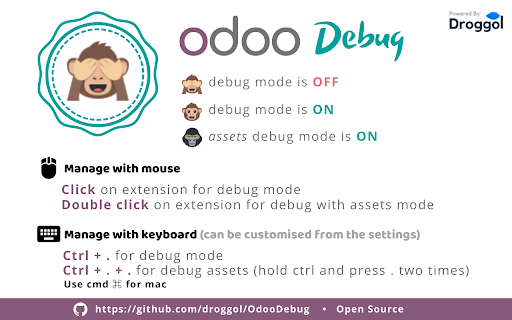
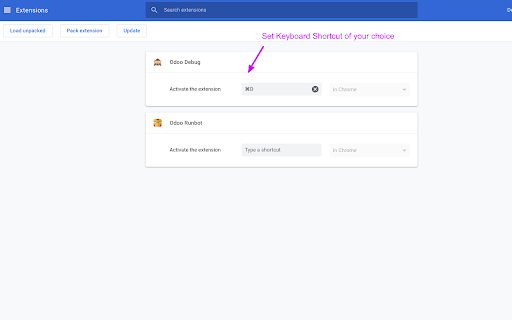
Can be used via mouse and keyboard shortcuts How to use with mouse? - Click on extension for debug. - Double click on extension for debug with Assets mode. How to use with keyboard? (use cmd ⌘ in mac) - Press Ctrl + . for debug mode. - Press Ctrl + . + . for debug with Assets mode. (hold ctrl and press . two times) You can change keyboard shortcut from Setting > Extension > Keyboard shortcuts (at bottom) Contribute at: https://github.com/droggol/OdooDebug Emoji art supplied by Emojione

Listing SEO keywords

Search intent keywords
Keyword signals for evaluating how users may discover, compare, or search for this extension category.

Core discovery

Odoo debug mode extensionOdoo developer toolsactivate Odoo debugOdoo debug shortcut

Comparison

Odoo debug module vs extension

Problem

Odoo debug not workingOdoo developer mode issues

Alternative

Odoo URL parameter helper

Similar extensions

Jump to related discovery paths:

FAQ

What is Odoo Debug mainly used for?
This extension enables users to quickly toggle Odoo debug mode and debug assets mode without manually editing URLs or re-entering command parameters. It acts as a browser-based shortcut tool specifically for Odoo platform administrators and developers.
What market signals stand out?
Established adoption with moderate review base. Last known update: 01/18/2026.
What should builders compare before entering this space?
Compare install concentration, rating quality, update recency, screenshots, developer portfolio, listing claims, and review-backed friction signals.
Is this page review-backed?
Backed by review samples. This page combines store metadata with selected review signals, while raw store metrics remain visible for comparison.

Screenshots

Odoo Debug screenshot

Links

Recommended Chrome extensions

Related listings from the same category, trending peers, and the same publisher portfolio.

Browse developer
Odoo Utility icon

Odoo Utility

Droggol

Simple shortcuts and tools to save time

Installs

8K+

Rating

5.0

Window Resizer icon

Window Resizer

Ionuț Botizan

Resize the browser window to emulate various screen resolutions.

Installs

700K+

Rating

4.3

Tag Assistant Companion icon

Tag Assistant Companion

Google

The Tag Assistant Companion extension works with Tag Assistant to help troubleshoot installation of gtag.js and Google Tag Manager.

Installs

600K+

Rating

3.1

Talend API Tester - Free Edition icon

Talend API Tester - Free Edition

Qlik

Visually interact with REST, SOAP and HTTP APIs.

Installs

600K+

Rating

4.8

TikTok Pixel Helper icon

TikTok Pixel Helper

TikTok For Business

The TikTok Pixel Helper is a plug-in that monitors whether your TikTok Pixel is functioning properly.

Installs

600K+

Rating

2.6

Assinatura Digital no Navegador icon

Assinatura Digital no Navegador

bry-suporte-apps

Esta extensão é projetada para ser utilizada em conjunto com outras soluções e não funciona de forma isolada para a assinatura.

Installs

600K+

Rating

2.4

Google Analytics Debugger icon

Google Analytics Debugger

Google Analytics

Prints useful information to the JavaScript console by enabling the debug version of the Google Analytics Javascript.

Installs

600K+

Rating

4.2

Detailed SEO Extension icon

Detailed SEO Extension

ahrefsseotoolbar

Get SEO insights at the click of a button to any website you're currently on. Built by full-time SEO's for daily analysis.

Installs

500K+

Rating

4.9

CSS Peeper icon

CSS Peeper

CSS Peeper

Inspect website styles in seconds. Supercharge your workflow, and save hours of work.

Installs

500K+

Rating

4.1

Salesforce Inspector Reloaded icon

Salesforce Inspector Reloaded

Thomas Prouvot

Productivity tools for Salesforce administrators and developers to inspect data and metadata directly from the Salesforce UI.

Installs

500K+

Rating

4.8