Open in PDF Reader icon

Open in PDF Reader Chrome Extension Analysis

Automation & Workflow Efficiency

Chrome extension ID: kdpmhmcieiaddjoegooocahccoegbemo

This tool aims to bridge the gap between browser-based PDF viewing and desktop-based PDF software. It provides a context menu option to open files in preferred external readers instead of the default browser viewer.

Version:3.0.1
Size:787KiB
Last updated:

Overview

Installs

20K+

Rating

3.6

238 reviews

Languages

40 locales

Includes Deutsch, English, Filipino, Indonesia...

Market analysis

Review-backed positioning, friction, and market signals for this Chrome extension.

Backed by review samples

Macro category

Automation & Workflow Efficiency

Pricing friction

Low review signal

Complaint intensity

High review signal

Listing & review signals
Observed signals from store listing text and review samples.

Listing positioning

The extension positions itself as a utility to launch PDF links directly in external software like Adobe Acrobat Reader via a right-click context menu. It also claims to offer PDF to JPG/PNG conversion capabilities.

Inferred product pattern

A niche workflow utility attempting to interface web content with desktop software, currently experiencing high technical failure rates.

Review-backed pain points

Users report the extension frequently fails to execute its primary function, with many stating the right-click option exists but does nothing. There is also significant frustration regarding the difficulty of configuring the extension to work with specific local file paths.

Observed feature gaps

Users expressed a preference for this functionality to be a native browser setting rather than a third-party extension, and noted difficulties in selecting custom paths for different local PDF readers.

Tags
PDF ReaderAdobe AcrobatFile ConverterWorkflow Utility
Target users

- Desktop PDF software users

- Adobe Acrobat users

Primary use cases

- Opening PDF links in external desktop applications

- Converting PDF files to image formats

Positive themes

No positive theme data.

Negative themes

- Functional failure

- Setup complexity

- Non-responsive context menu

Observed friction

- Performance complaints detected

- No pricing information or friction is mentioned in the provided data.

Evidence boundary: Extracted from the Chrome Web Store listing and user reviews highlighting functional failures. High-rating reviews were not available to provide a balanced sentiment perspective.
Complaint summaries
Review-backed complaint signals grouped by operational area.

Support

No direct support complaints were identified, though users expressed extreme frustration with the product's lack of utility.

Reliability

High frequency of reliability complaints; users report the extension is often non-functional or fails to trigger the external application.

Privacy

No explicit privacy complaints were found, though one user questioned the necessity of file downloads.

Access & pricing

- No clear monetization signal

- No account requirement observed

- No clear pricing signal

Store listing facts

Listing assets

- Screenshots: 2

- Videos: 0

- Languages: 40

Trust signals

- Developer contact

- Official website

Store metadata

- Version: 3.0.1

- Size: 787KiB

- Last updated:

Store description excerpt
Short excerpt from the public Chrome Web Store listing; full copy is available on the official store page.
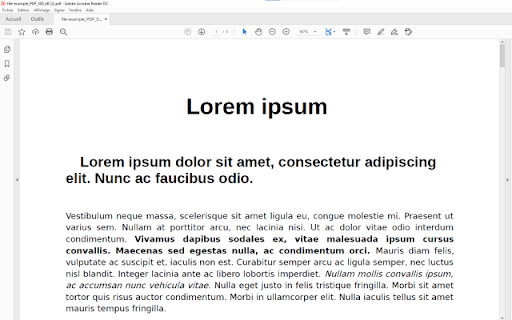
Open your PDF files using Adobe Reader now. Use acrobat reader to open PDF files. Want to open PDF files using your favorite PDF reader software Adobe Reader? You can do so now after you install our software extension. To begin using adobe acrobat to open PDF files, here are the steps you need to do. Ensure you have Adobe Reader installed on your computer. Double check and ensure adobe acrobat reader is installed Install our software extension "Open in PDF Viewer" Once you install our software acrobat free, please refresh all your existing Tabs/close browser and restart browser to let the extension load. Choose the PDF file you wish to open with Adobe Reader via the right click context menu button. Its that simple, just use the right click context menu to choose Adobe Reader when you want to open your PDF Files. This software also allows you to convert your PDF files to JPG/PNG format.…

Listing SEO keywords

Search intent keywords
Keyword signals for evaluating how users may discover, compare, or search for this extension category.

Core discovery

Open PDF in Adobe ReaderExternal PDF ViewerPDF to JPG converterAcrobat Reader extension

Comparison

Adobe AcrobatBuilt-in Chrome PDF viewer

Problem

PDF not opening in readerRight click PDF not workingOpen PDF with external app

Alternative

Adobe Acrobat ReaderSumatraPDFBrowser PDF viewer

Similar extensions

Jump to related discovery paths:

FAQ

What is Open in PDF Reader mainly used for?
This tool aims to bridge the gap between browser-based PDF viewing and desktop-based PDF software. It provides a context menu option to open files in preferred external readers instead of the default browser viewer.
What market signals stand out?
Visible niche traction with moderate review base. Last known update: 07/14/2022.
What should builders compare before entering this space?
Compare install concentration, rating quality, update recency, screenshots, developer portfolio, listing claims, and review-backed friction signals.
Is this page review-backed?
Backed by review samples. This page combines store metadata with selected review signals, while raw store metrics remain visible for comparison.

Screenshots

Open in PDF Reader screenshot

Links

Recommended Chrome extensions

Related listings from the same category, trending peers, and the same publisher portfolio.

Browse workflow