Bookmarks Commander icon

Bookmarks Commander Chrome Extension Analysis

Tab & Bookmark Productivity

Chrome extension ID: knfpajocfeohpaipkfpdbfhgibajfmcf

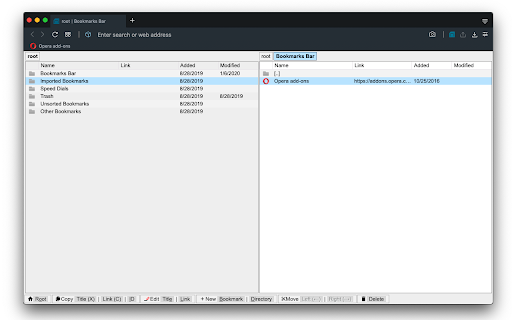
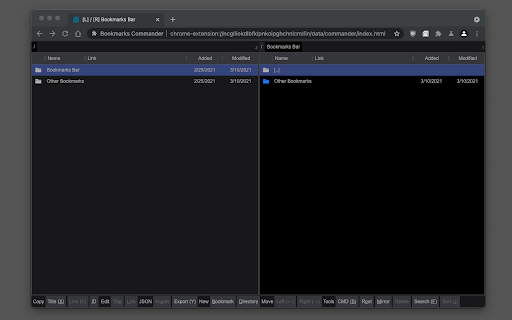
Bookmarks Commander is a Chrome extension that provides a two-panel interface for organizing browser bookmarks. It allows users to view two directories simultaneously, move items between panes, and use keyboard shortcuts for high-speed management.

Developer:brian.girko
Version:0.5.0
Size:98.41KiB
Last updated:

Overview

Installs

7K+

Rating

4.4

69 reviews

Languages

12 locales

Includes Deutsch, English, Nederlands, español...

Market analysis

Review-backed positioning, friction, and market signals for this Chrome extension.

Backed by review samples

Macro category

Tab & Bookmark Productivity

Pricing friction

Low review signal

Complaint intensity

Moderate review signal

Listing & review signals
Observed signals from store listing text and review samples.

Listing positioning

The product is positioned as a professional-grade bookmark management tool inspired by classic dual-pane file managers like Norton Commander. It emphasizes keyboard-driven navigation, efficient organization, and specialized tasks like duplicate detection.

Inferred product pattern

A niche productivity utility attempting to bring desktop file-management workflows to the browser, currently facing scaling/performance issues.

Review-backed pain points

Users report significant performance issues, including memory spikes and browser unresponsiveness during searches or large transfers. Others struggle with a lack of bookmark previews and inconsistent UI settings.

Observed feature gaps

Missing undo/redo functionality, inability to easily rename titles, lack of page previews, and difficulty dragging bookmarks directly into folders.

Tags
Bookmark ManagerDual PaneProductivity ToolFile Manager Style
Target users

- Power users with large bookmark collections

- Users familiar with file manager software

- Productivity enthusiasts

Primary use cases

- Reorganizing massive bookmark directories

- Detecting and deleting duplicate bookmarks

- Transferring bookmarks between browsers via clipboard

Positive themes

- Innovative dual-pane UI concept

- Effective keyboard-centric navigation

- Useful utility for heavy bookmark users

Negative themes

- Performance lag and unresponsiveness

- Poor UI/UX implementation details

- Lack of essential management features

Observed friction

- Performance complaints detected

- No pricing friction observed as monetization details are not explicitly detailed in reviews.

Evidence boundary: Extracted from the Chrome Web Store description and a sample of user reviews covering various ratings. The analysis is based on a limited sample of 10 reviews provided in the input.
Complaint summaries
Review-backed complaint signals grouped by operational area.

Support

No specific support complaints were identified in the provided sample.

Reliability

Significant reliability issues reported, including the extension causing the browser to hang or become unresponsive during data operations.

Privacy

No privacy or security complaints were identified.

Access & pricing

- No clear monetization signal

- No account requirement observed

- No clear pricing signal

Store listing facts

Listing assets

- Screenshots: 2

- Videos: 1

- Languages: 12

Trust signals

- Developer contact

- Official website

Store metadata

- Version: 0.5.0

- Size: 98.41KiB

- Last updated:

Store description excerpt
Short excerpt from the public Chrome Web Store listing; full copy is available on the official store page.
This is a two-panel bookmarks manager for your browser. It works similar to the famous Total Commander. You can move items between the panels or view two different directories simultaneously. Instruction: Click on the toolbar button once to open the commander in a new browser tab. By default the left panel has focus. Use arrow up and arrow down keys to navigate. Use Enter to move to a directory. To move the other panel simply press The left or right arrow key. Shortcuts: [open links]: Press Enter key to open on the same tab. Press Ctrl + Enter or Command + Enter to open in a background tab or use double-click to open on the same tab. Press Ctrl/Command while double-clicking to open in a background tab. [select multiple bookmarks]: Ctrl/Command with left-click to select more items. [copy links to the clipboard]: Ctrl + C or Command + C to copy selected links to the clipboard. [copy title…

Listing SEO keywords

Search intent keywords
Keyword signals for evaluating how users may discover, compare, or search for this extension category.

Core discovery

dual pane bookmark managerduplicate bookmark finderkeyboard bookmark managerNorton Commander bookmarks

Comparison

Chrome native bookmark managerFirefox bookmark managerTotal Commander

Problem

duplicate bookmarksorganize bookmarksslow bookmark manager

Alternative

bookmark organizerfile manager browser extension

Similar extensions

Jump to related discovery paths:

FAQ

What is Bookmarks Commander mainly used for?
Bookmarks Commander is a Chrome extension that provides a two-panel interface for organizing browser bookmarks. It allows users to view two directories simultaneously, move items between panes, and use keyboard shortcuts for high-speed management.
What market signals stand out?
Early or small audience with limited review base. Last known update: 04/29/2024.
What should builders compare before entering this space?
Compare install concentration, rating quality, update recency, screenshots, developer portfolio, listing claims, and review-backed friction signals.
Is this page review-backed?
Backed by review samples. This page combines store metadata with selected review signals, while raw store metrics remain visible for comparison.

Screenshots

Bookmarks Commander screenshot

Links

Website: add0n.com

Videos: Watch

Recommended Chrome extensions

Related listings from the same category, trending peers, and the same publisher portfolio.

Browse workflow