ordbogen.com icon

ordbogen.com Chrome Extension Analysis

AI & Writing Assistants

Chrome extension ID: lliifkldpflpgmjkpdoolkfpafbdbkoh

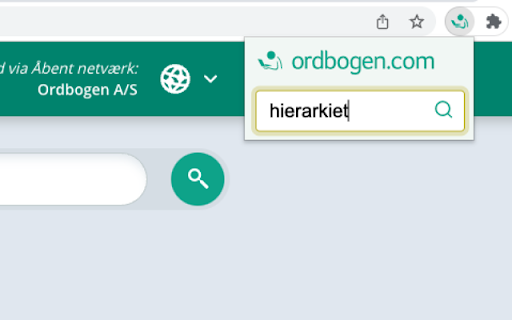
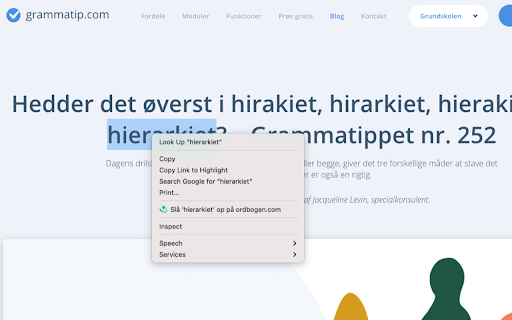
This is the official Chrome extension for Ordbogen.com, providing users with fast access to online dictionaries. Users can look up words by typing them into the extension or by right-clicking selected text. The extension opens dictionary results in a new tab or reuses an existing one to maintain the user's browsing flow.

Developer:Ordbogen A/S
Version:1.4.2
Size:92.62KiB
Last updated:

Overview

Installs

60K+

Rating

4.2

5 reviews

Languages

1 locales

Includes dansk

Market analysis

Review-backed positioning, friction, and market signals for this Chrome extension.

Backed by review samples

Macro category

AI & Writing Assistants

Pricing friction

Low review signal

Complaint intensity

Moderate review signal

Listing & review signals
Observed signals from store listing text and review samples.

Listing positioning

The listing positions this Chrome extension as the official and most convenient way to access online dictionaries. It emphasizes quick access to dictionaries with a single click or via a right-click context menu, aiming to make language exploration effortless.

Inferred product pattern

A browser extension that provides a contextual lookup function for an online dictionary service.

Review-backed pain points

One user described the extension as 'extremely poor and confusing'.

Observed feature gaps

No specific feature gaps were identified in the listing or reviews.

Tags
DictionaryLookup ToolLanguageReference
Target users

- Language learners

- Writers

- Students

- Academics

- Anyone needing quick dictionary lookups

Primary use cases

- Quickly looking up word definitions

- Translating words or phrases

- Enhancing language comprehension

- Researching vocabulary

Positive themes

- The extension is described as a 'super good extension'.

Negative themes

- The extension is described as 'extremely poor and confusing'.

Observed friction

- The extension appears to be free to use, with no mention of paid features or subscriptions.

Evidence boundary: Information is sourced from the Chrome Web Store listing and two user reviews. The review data is very limited, with only two reviews available, one of which is negative.
Complaint summaries
Review-backed complaint signals grouped by operational area.

Support

No specific complaints regarding support, accounts, or refunds were found.

Reliability

No specific complaints regarding reliability or performance were found, although one user described it as 'extremely poor'.

Privacy

No privacy or security complaints were observed.

Access & pricing

- Free usage observed

- No clear access signal

- Free plan or free usage claimed

Store listing facts

Listing assets

- Screenshots: 2

- Videos: 0

- Languages: 1

Trust signals

- Privacy policy

- Developer contact

- Support link

Store metadata

- Version: 1.4.2

- Size: 92.62KiB

- Last updated:

Store description excerpt
Short excerpt from the public Chrome Web Store listing; full copy is available on the official store page.
Føj Ordbogens officielle Chrome-extension til din Google Chrome-browser og oplev den ultimative bekvemmelighed med lynhurtig adgang til ordbøger online! Med vores Google Chrome-udvidelse er ordbøgerne kun et klik væk. Skriv blot det ønskede ord, eller højreklik på en tekst og vælg “Slå op på ordbogen.com”. Det har aldrig været nemmere at udforske sproget. Når du slår et ord op, vil det automatisk åbne i en ny fane med ordbogen.com. Og hvis du allerede har en fane åben, vil vores smarte extension benytte den, så du kan fortsætte din aktuelle browsingoplevelse. Prøv Ordbogens officielle Chrome-extension og få en ordbog direkte i din browser!

Listing SEO keywords

Search intent keywords
Keyword signals for evaluating how users may discover, compare, or search for this extension category.

Core discovery

dictionary chrome extensiononline dictionary lookupword definition toollanguage reference extensionordbogen extension

Comparison

alternative to google translatedictionary app for chrome

Problem

difficult to find word meaningsneed quick definitionlanguage barrier

Alternative

online thesaurustranslation websites

Similar extensions

Jump to related discovery paths:

FAQ

What is ordbogen.com mainly used for?
This is the official Chrome extension for Ordbogen.com, providing users with fast access to online dictionaries. Users can look up words by typing them into the extension or by right-clicking selected text. The extension opens dictionary results in a new tab or reuses an existing one to maintain the user's browsing flow.
What market signals stand out?
Visible niche traction with limited review base. Last known update: 10/30/2023.
What should builders compare before entering this space?
Compare install concentration, rating quality, update recency, screenshots, developer portfolio, listing claims, and review-backed friction signals.
Is this page review-backed?
Backed by review samples. This page combines store metadata with selected review signals, while raw store metrics remain visible for comparison.

Screenshots

ordbogen.com screenshot

Links

Recommended Chrome extensions

Related listings from the same category, trending peers, and the same publisher portfolio.

Browse education
オクリンクプラス Webページスクリーンショット機能 icon

オクリンクプラス Webページスクリーンショット機能

ベネッセコーポレーション

オクリンクプラスのカードにWebページのスクリーンショットを挿入し、リンクを埋め込むことができます!

Installs

500K+

Rating

3.0

GPTZero: AI Detection & Writing Replay icon

GPTZero: AI Detection & Writing Replay

chrome-extension-publisher

Bring AI detection, citation checks, live essay feedback, and writing replays directly into Google Docs and your workflow.

Installs

400K+

Rating

4.7

Google Meet Attendance List icon

Google Meet Attendance List

MeetList

Easiest way to save the attendance list for your meetings or lectures

Installs

400K+

Rating

4.7

Cite This For Me: Web Citer icon

Cite This For Me: Web Citer

Chegg Writing Tools

Automatically create website citations in the APA, MLA, Chicago, or Harvard referencing styles at the click of a button.

Installs

400K+

Rating

3.8

Trancy - AI Translator & Dual Subtitles icon

Trancy - AI Translator & Dual Subtitles

Trancy

Trancy provides bilingual subtitle for platforms like YouTube, Disney+, as well as AI translator for websites.

Installs

300K+

Rating

4.7

Assessment Lock (Vretta) icon

Assessment Lock (Vretta)

google-web-store-admin

Assessment Security extension for e-Assessments running on ChromeOS

Installs

300K+

Rating

1.9

edpuzzle icon

edpuzzle

Edpuzzle

Import your favorite educational YouTube video into Edpuzzle with a click!

Installs

300K+

Rating

4.2

Certificate Enrollment for ChromeOS icon

Certificate Enrollment for ChromeOS

google.com

Request a certificate for your device.

Installs

300K+

Rating

4.4

rikaikun icon

rikaikun

Erek Speed

rikaikun shows the reading and English definition of Japanese words when you hover over Japanese text in the browser.

Installs

200K+

Rating

4.7

xFanatical Safe Doc icon

xFanatical Safe Doc

xFanatical

xFanatical Safe Doc smooths the way for schools managing Google Workspace for Education features (Docs, Sheets, Slides, Classroom,…

Installs

200K+

Rating

1.4