FreshStart - Cross Browser Session Manager icon

FreshStart Chrome Extension Analysis

Tab & Bookmark Productivity

Store listing title: FreshStart - Cross Browser Session Manager

Chrome extension ID: nmidkjogcjnnlfimjcedenagjfacpobb

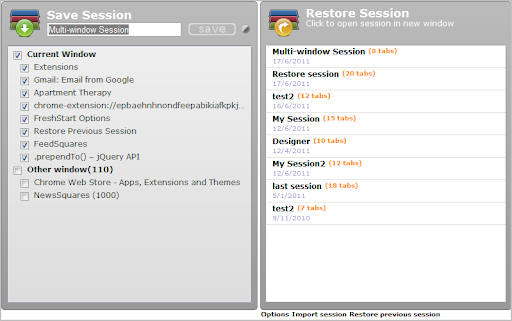
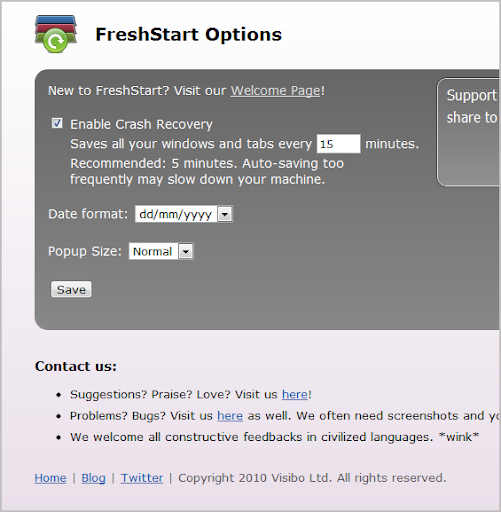
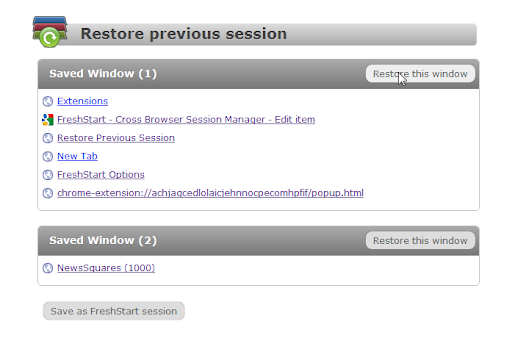
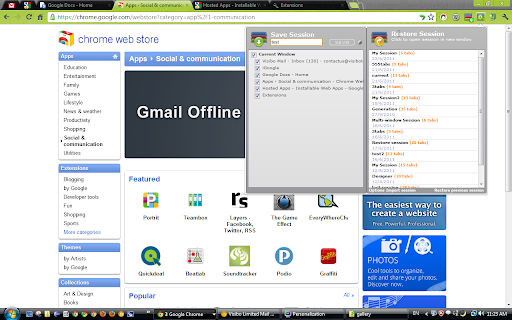
FreshStart is a Chrome extension that allows users to save all or selected open tabs into named sessions. It includes a crash recovery feature that autosaves windows every few minutes and supports exporting and importing sessions.

Developer:Visibo Team
Version:1.7.1
Size:147KiB
Last updated:

Overview

Installs

60K+

Rating

4.4

815 reviews

Languages

5 locales

Includes English, Nederlands, español, français...

Market analysis

Review-backed positioning, friction, and market signals for this Chrome extension.

Backed by review samples

Macro category

Tab & Bookmark Productivity

Pricing friction

Low review signal

Complaint intensity

High review signal

Listing & review signals
Observed signals from store listing text and review samples.

Listing positioning

The product positions itself as a simple cross-browser session manager for users who need to organize different sets of websites for work, home, or multiple user profiles. It emphasizes the ability to synchronize sessions across computers by saving them within the browser's bookmark folder.

Inferred product pattern

Bookmark-based session state persistence.

Review-backed pain points

Users report severe frustration over the loss of dozens of saved sessions and the 'Crash Recovery' feature automatically toggling off without notification during updates.

Observed feature gaps

Lack of bulk export/import capabilities (currently limited to one by one) and inability to save the search history associated with tabs.

Tags
Session ManagerTab ManagementBrowser ProductivityCrash Recovery
Target users

- Power users with high tab counts

- Users switching between distinct work and personal contexts

- Users sharing a single browser installation

Primary use cases

- Saving current tab sets to free up system resources

- Recovering tabs after a browser crash

- Synchronizing tab sessions across multiple devices via bookmarks

Positive themes

- Intuitive graphical interface

- Clear visibility of the extension icon

- Helpful tab counter for saved sessions

Negative themes

- Unreliable data persistence

- Crash recovery settings resetting after updates

- Dependency on the 'Other Bookmarks' folder

Observed friction

- Performance complaints detected

- No pricing friction observed; the tool appears to be free.

Evidence boundary: Analysis based on store listing and a sample of helpful/low-rating reviews. The review sample provided is heavily weighted toward low-rating feedback, which may not represent the overall 4.36 star sentiment.
Complaint summaries
Review-backed complaint signals grouped by operational area.

Support

No specific support interaction complaints, but users express frustration over unresolved technical bugs.

Reliability

Significant reliability issues regarding session loss and the failure of the crash recovery system to remain active.

Privacy

No privacy or security complaints observed.

Access & pricing

- Free usage observed

- No account requirement observed

- Free plan or free usage claimed

Store listing facts

Listing assets

- Screenshots: 5

- Videos: 0

- Languages: 5

Trust signals

- Developer contact

- Official website

Store metadata

- Version: 1.7.1

- Size: 147KiB

- Last updated:

Store description excerpt
Short excerpt from the public Chrome Web Store listing; full copy is available on the official store page.
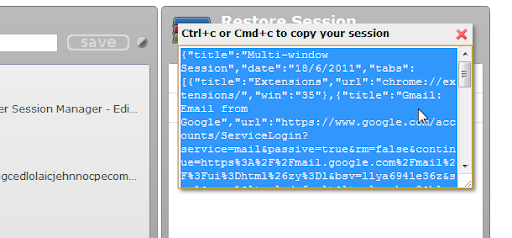
Manage your browsing session easily with FreshStart! If you have different sets of websites that matter to you at work, at home or at different times, or if you have multiple users, you should give this a try! Features ************************************** - New 1.7, update to Manifest V3 - Release notes here https://www.visibotech.com/search/label/FreshStart ************************************** - Save multiple windows into a single session - Save all open tabs to a new session, or hand select what to be saved - Sessions are saved in the "FreshStart Sessions" folder in bookmarks, allowing you to synchronize it with other computers - Crash recovery - autosave your windows every few minutes - Restore a session in a new window or merge it with the current window by middle mouse click. - Session editing and easily merge new tabs into existing sessions - Export and import sessions If you…

Listing SEO keywords

Search intent keywords
Keyword signals for evaluating how users may discover, compare, or search for this extension category.

Core discovery

Chrome session managersave open tabsbrowser session backuptab group organizer

Comparison

FreshStart vs Session Buddybest session manager for Chrome

Problem

lost chrome tabsbrowser crash recoverytoo many open tabs

Alternative

session manager alternativestab saver extension

Similar extensions

Jump to related discovery paths:

FAQ

What is FreshStart mainly used for?
FreshStart is a Chrome extension that allows users to save all or selected open tabs into named sessions. It includes a crash recovery feature that autosaves windows every few minutes and supports exporting and importing sessions.
What market signals stand out?
Visible niche traction with moderate review base. Last known update: 05/17/2024.
What should builders compare before entering this space?
Compare install concentration, rating quality, update recency, screenshots, developer portfolio, listing claims, and review-backed friction signals.
Is this page review-backed?
Backed by review samples. This page combines store metadata with selected review signals, while raw store metrics remain visible for comparison.

Screenshots

FreshStart - Cross Browser Session Manager screenshot

Links

Recommended Chrome extensions

Related listings from the same category, trending peers, and the same publisher portfolio.

Browse workflow
TooManyTabs for Chrome icon

TooManyTabs for Chrome

Visibo Team

Manage your tabs, improve your browsing, and maintain your sanity when you have many tabs open.

Installs

100K+

Rating

4.2

Momentum icon

Momentum

Momentum

Transform your browser into a beautifully designed tab that helps you feel calm, keep focus, and stay energized.

Installs

2.0M+

Rating

4.5

Google Scholar PDF Reader icon

Google Scholar PDF Reader

scholar-chrome-extensions

Supercharge your paper reading: follow references, skim outline, jump to figures, cite and save.

Installs

2.0M+

Rating

4.1

Keeper® Password Manager & Digital Vault icon

Keeper® Password Manager & Digital Vault

Keeper Security

Generate strong passwords, autofill and protect your confidential info with zero-knowledge encryption.

Installs

2.0M+

Rating

4.8

AI Grammar Checker & Paraphraser – LanguageTool icon

AI Grammar Checker & Paraphraser – LanguageTool

lt-extension-publisher

Instantly Enhance Your Texts with LanguageTool’s Grammar Checker and Paraphrasing Tool

Installs

2.0M+

Rating

4.7

Snow Web Application Metering icon

Snow Web Application Metering

snow_chrome_extensions

This extension tracks web application use for the purpose of license compliance and cost optimization. www.snowsoftware.com/browser

Installs

2.0M+

Rating

1.3

Sound Booster - increase volume up icon

Sound Booster - increase volume up

Sound-ultimate.com

Volume Booster helps boost sound video or music on any tab! Increase volume and bass booster, equalizer. Volume control.

Installs

2.0M+

Rating

4.5

Evernote Web Clipper icon

Evernote Web Clipper

Evernote

Use the Evernote extension to save things you see on the web into your Evernote account.

Installs

2.0M+

Rating

4.7

Clever icon

Clever

Clever

Allows students and staff to access apps in Clever Portal.

Installs

2.0M+

Rating

2.5

Microsoft Defender Browser Protection icon

Microsoft Defender Browser Protection

Microsoft Corporation

Protect yourself against online threats, like phishing and malicious websites, with real-time protection from Microsoft.

Installs

2.0M+

Rating

4.1