GQueues for Gmail icon

GQueues for Gmail Chrome Extension Analysis

Automation & Workflow Efficiency

Chrome extension ID: oabmjafkkhaamplldfiipdefcdmjcfac

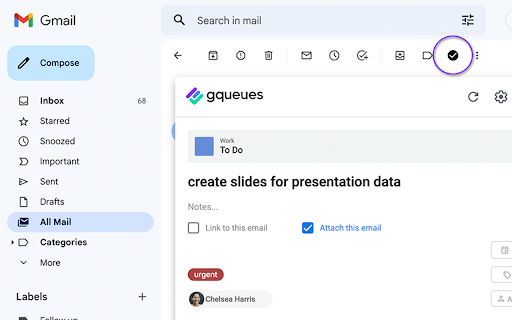
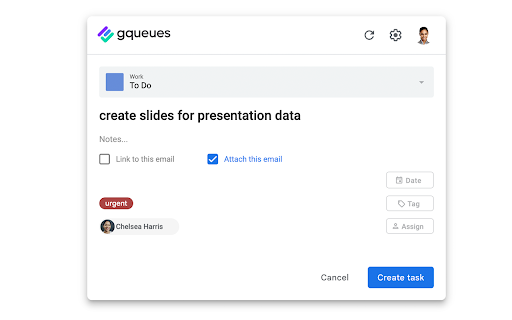
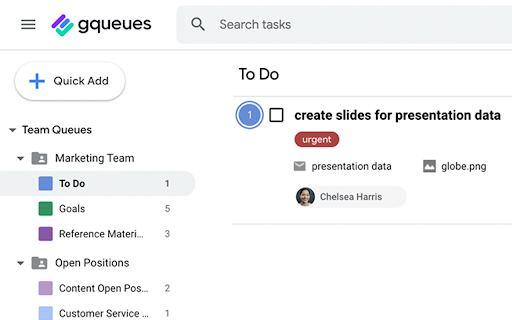
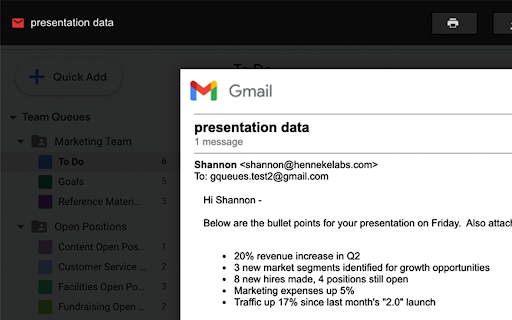
This Chrome extension provides a direct interface between Gmail and the GQueues task management platform. It enables users to create tasks from emails, attach email content to tasks, and manage project workflows, collaboration, and assignments within a unified environment.

Developer:Boomerang
Version:1.3.2
Size:533KiB
Last updated:

Overview

Installs

6K+

Rating

4.3

29 reviews

Languages

1 locales

Includes English (United States)

Market analysis

Review-backed positioning, friction, and market signals for this Chrome extension.

Backed by review samples

Macro category

Automation & Workflow Efficiency

Pricing friction

High review signal

Complaint intensity

Moderate review signal

Listing & review signals
Observed signals from store listing text and review samples.

Listing positioning

GQueues for Gmail is positioned as an essential task management utility designed specifically for Google Workspace users. It focuses on streamlining email processing by allowing users to transform email threads directly into actionable tasks linked to the GQueues ecosystem.

Inferred product pattern

Dedicated task management interface bridge for Google ecosystem power users.

Review-backed pain points

Users reported frustration with technical instability (tasks not saving), issues with multi-account support, and disappointment regarding the transition to a paid model.

Observed feature gaps

Reviewers identified gaps in cross-platform consistency (specifically Android app integration) and UI rendering issues following Gmail interface updates.

Tags
Task ManagementGmail IntegrationProductivityGQueuesGoogle Workspace
Target users

- Google Workspace Power Users

- Project Managers

- Remote Teams

- Office Administrators

Primary use cases

- Converting emails into actionable tasks

- Delegating tasks to team members

- Synchronizing tasks with Google Calendar

- Managing project-based workflows

Positive themes

- Increased team alignment and productivity

- Useful for organizing tasks by project or due date

- Efficient collaboration features for task delegation

- Intuitive linking of emails to task notes

Negative themes

- Unexpected paywalls after initial use

- Technical performance issues like spinning icons or save failures

- Incompatibility with multiple Gmail accounts

- UI/UX misalignment in updated Gmail interfaces

Observed friction

- Payment required for meaningful usage

- Free-tier complaints detected

- Performance complaints detected

- Users expressed dissatisfaction that the service is not free, despite potential initial expectations of free access.

Evidence boundary: The analysis is based on 10 user reviews and the product's official Chrome Web Store description, reflecting both functional integration benefits and technical performance feedback. Review sample size is small, and some feedback dates back to 2014-2018, which may not reflect the current performance of the latest version.
Complaint summaries
Review-backed complaint signals grouped by operational area.

Support

Complaints focus more on functional bugs and installation errors than direct support interactions.

Reliability

Users noted reliability issues, including buttons failing to trigger, save errors, and UI layout misalignment.

Privacy

No privacy or security complaints were observed in the provided review samples.

Access & pricing

- Subscription model observed

- Account required for core usage

- Trial or limited free usage before paid plan

Store listing facts

Listing assets

- Screenshots: 4

- Videos: 1

- Languages: 1

Trust signals

- Privacy policy

- Developer contact

- Official website

Store metadata

- Version: 1.3.2

- Size: 533KiB

- Last updated:

Store description excerpt
Short excerpt from the public Chrome Web Store listing; full copy is available on the official store page.
Turn your emails into action items in GQueues. Link or attach the email thread to a task to view from inside GQueues. Streamline your email processing and take control of your inbox with GQueues for Gmail. --------------------------------------------------------------- The GQueues for Gmail Chrome Extension requires a GQueues account to work. GQueues is a task management app specifically designed for Google users. With GQueues you get: • Deep integration with Google Workspace including Chrome, Gmail, Calendar, and Drive • Gmail integration to turn your emails into tasks • Simple, intuitive interface • Core task management including subtasks and repeating tasks • Robust search and task filters • Easy collaboration with shared folders and assignments for delegating work • Mobile apps for Android and iOS Get more information or sign up at https://www.gqueues.com

Listing SEO keywords

Search intent keywords
Keyword signals for evaluating how users may discover, compare, or search for this extension category.

Core discovery

Gmail task managerGQueues for GmailGoogle Workspace task integrationEmail to task extension

Comparison

GQueues vs TodoistGmail productivity toolstask manager extensions

Problem

cannot create task from GmailGQueues not savingGmail extension broken

Alternative

Google Tasks alternativeGmail task plugins

Similar extensions

Jump to related discovery paths:

FAQ

What is GQueues for Gmail mainly used for?
This Chrome extension provides a direct interface between Gmail and the GQueues task management platform. It enables users to create tasks from emails, attach email content to tasks, and manage project workflows, collaboration, and assignments within a unified environment.
What market signals stand out?
Early or small audience with limited review base. Last known update: 11/07/2025.
What should builders compare before entering this space?
Compare install concentration, rating quality, update recency, screenshots, developer portfolio, listing claims, and review-backed friction signals.
Is this page review-backed?
Backed by review samples. This page combines store metadata with selected review signals, while raw store metrics remain visible for comparison.

Screenshots

GQueues for Gmail screenshot

Links

Website: gqueues.com

Privacy policy: https://www.gqueues.com/privacy

Videos: Watch

Recommended Chrome extensions

Related listings from the same category, trending peers, and the same publisher portfolio.

Browse workflow