Shortcuts for Google™ Products icon

Shortcuts for Google™ Products Chrome Extension Analysis

Tab & Bookmark Productivity

Chrome extension ID: pdlecffodcfabchelafoljcdphfpkpcl

This tool provides a central, customizable drop-down menu for accessing Google applications directly from the browser toolbar. It includes support for opening links in new tabs, windows, or background tabs through modifier keys.

Developer:Benni
Version:2.1.2
Size:733KiB
Last updated:

Overview

Installs

10K+

Rating

4.5

110 reviews

Languages

1 locales

Includes English

Market analysis

Review-backed positioning, friction, and market signals for this Chrome extension.

Backed by review samples

Macro category

Tab & Bookmark Productivity

Pricing friction

Low review signal

Complaint intensity

Moderate review signal

Listing & review signals
Observed signals from store listing text and review samples.

Listing positioning

The extension is positioned as a space-saving toolbar popup that consolidates all Google product links into one interface. It emphasizes customization, allowing users to re-arrange, resize, and add custom icons to their workflow.

Inferred product pattern

Customizable browser launcher utility.

Review-backed pain points

Users find the icon-only interface hard to navigate without text labels, express annoyance at donation solicitations, and desire more flexible tab-opening settings.

Observed feature gaps

Missing search functionality for finding specific icons and lack of native text label support for products.

Tags
Google LauncherProductivity ToolShortcut ManagerBrowser Utility
Target users

- Power users

- Google Workspace users

- Business professionals

Primary use cases

- Rapid navigation to Google apps

- Browser toolbar organization

Positive themes

- Long-term reliability and stability

- Useful for professional business workflows

- Easy access to a large list of tools

Negative themes

- Persistent donation requests

- Difficult navigation due to lack of text labels

- Default behavior opens apps in the current tab

Observed friction

- No payment required, but users have reported frustration with frequent donation requests/prompts.

Evidence boundary: Evidence is derived from user feedback spanning over a decade, highlighting long-term utility alongside specific UX friction points regarding UI customization. The sample reviews cover a wide chronological range (2014-2026), which may not reflect current UI updates.
Complaint summaries
Review-backed complaint signals grouped by operational area.

Support

No significant support or refund complaints identified.

Reliability

The extension is generally regarded as highly reliable and long-standing; no major technical failures identified.

Privacy

No privacy or security complaints identified.

Access & pricing

- Free usage observed

- No account requirement observed

- Free plan or free usage claimed

Store listing facts

Listing assets

- Screenshots: 3

- Videos: 1

- Languages: 1

Trust signals

- Developer contact

- Official website

Store metadata

- Version: 2.1.2

- Size: 733KiB

- Last updated:

Store description excerpt
Short excerpt from the public Chrome Web Store listing; full copy is available on the official store page.
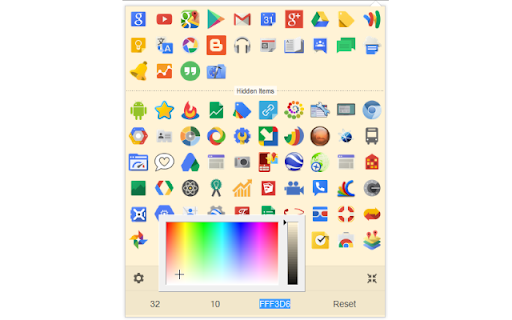
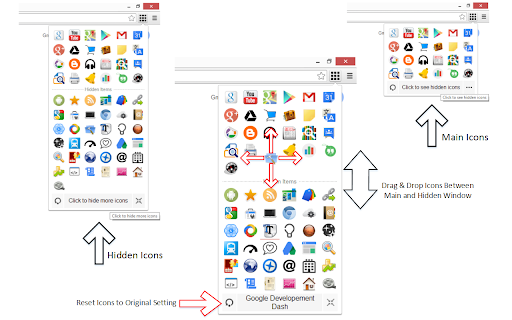
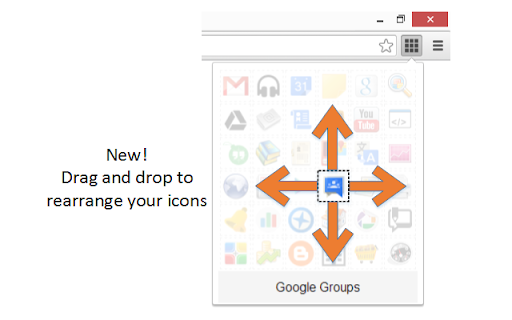
The "Shortcuts for Google Products" extension lists all Google products in your browser's toolbar popup. Clicking on an icon will open the product in a new tab. Operation: Click: Opens in a new active tab next to the current tab Shift + Click: Opens in a new window Ctrl + Click or Command + Click: Open in a background tab next to the current tab Updates: 1. Drag & drop to re-arrange your icons. 2. Re-size popup and also icons. 3. Add a new custom product to the list Notes: 1. In order to change the popup width, please enter an integer value from 5 to 24 in the designated space. This value represents the number of columns in the popup. 2. In order to change the icon's size, please enter an integer value from 16 to 64 in the designated space. This value represents the icon size in pixels. 3. in order to see the new icons after each update (not for the first install), you need to reset the…

Listing SEO keywords

Search intent keywords
Keyword signals for evaluating how users may discover, compare, or search for this extension category.

Core discovery

Google apps launcherbrowser shortcutsGoogle products toolbarextension for Google apps

Comparison

Google app launcher alternativebest Google shortcut extension

Problem

how to organize Google appsquick access to Google services

Alternative

Google launchershortcut manager

Similar extensions

Jump to related discovery paths:

FAQ

What is Shortcuts for Google™ Products mainly used for?
This tool provides a central, customizable drop-down menu for accessing Google applications directly from the browser toolbar. It includes support for opening links in new tabs, windows, or background tabs through modifier keys.
What market signals stand out?
Visible niche traction with moderate review base. Last known update: 03/02/2026.
What should builders compare before entering this space?
Compare install concentration, rating quality, update recency, screenshots, developer portfolio, listing claims, and review-backed friction signals.
Is this page review-backed?
Backed by review samples. This page combines store metadata with selected review signals, while raw store metrics remain visible for comparison.

Screenshots

Shortcuts for Google™ Products screenshot

Links

Website: webextension.org

Videos: Watch

Recommended Chrome extensions

Related listings from the same category, trending peers, and the same publisher portfolio.

Browse workflow