Voice In - Speech-To-Text Dictation icon

Voice In Chrome Extension Analysis

AI & Writing Assistants

Store listing title: Voice In - Speech-To-Text Dictation

Chrome extension ID: pjnefijmagpdjfhhkpljicbbpicelgko

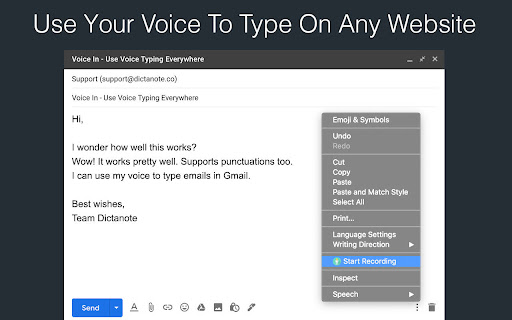
Voice In is a Chrome extension designed to enable real-time speech-to-text transcription in web-based text boxes. It allows users to type using their voice in applications like Gmail, Slack, and various web-based CRMs.

Developer:Dictanote
Version:4.42
Size:2.28MiB
Last updated:

Overview

Installs

600K+

Rating

4.4

2,715 reviews

Languages

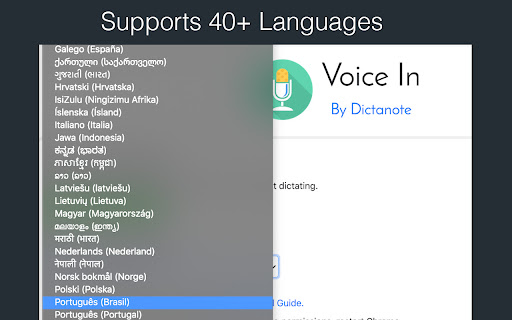
40 locales

Includes Deutsch, English, Filipino, Indonesia...

Market analysis

Review-backed positioning, friction, and market signals for this Chrome extension.

Backed by review samples

Macro category

AI & Writing Assistants

Pricing friction

Moderate review signal

Complaint intensity

High review signal

Listing & review signals
Observed signals from store listing text and review samples.

Listing positioning

Voice In positions itself as a universal browser-based dictation tool that works across over 10,000 websites. It emphasizes multi-language support and versatility for professional use cases like email, CRM, and messaging.

Inferred product pattern

A productivity utility offering basic free speech-to-text services with a subscription model for enhanced features and broader site compatibility.

Review-backed pain points

Users report significant issues with transcription accuracy, specifically regarding capitalization and sentence structure, as well as the product suddenly stopping work after updates.

Observed feature gaps

Users noted a sparse medical dictionary, inability to use voice commands for formatting (e.g., 'capitalize'), and inconsistent transcription of identical words.

Tags
Speech To TextVoice DictationVoice TypingTranscription
Target users

- Students

- Journalists

- Salespeople

- Medical Professionals

Primary use cases

- Email composition

- Writing blog posts

- Customer support ticketing

- Completing online assignments

Positive themes

- Cost-effective alternative to high-end software like Dragon

- Effective for reducing keyboard usage when speaking clearly

Negative themes

- Sudden loss of functionality and reliability

- Poor handling of punctuation and capitalization

- Unresponsive customer support

Observed friction

- Free-tier complaints detected

- Refund complaints detected

- Performance complaints detected

- Some users reported that certain site integrations require additional apps or upgrades to paid versions to function.

Evidence boundary: Analysis based on Chrome Web Store listing description and a diverse sample of user reviews highlighting both utility and functional instability. Review data is subject to user subjectivity and may not represent the experience of the entire 600k user base.
Complaint summaries
Review-backed complaint signals grouped by operational area.

Support

Multiple reviewers expressed frustration over the lack of response from the support team regarding paid subscriptions.

Reliability

Users reported the extension frequently becomes unreliable, misses the start of sentences, or ceases to work entirely after updates.

Privacy

no review-backed data available

Access & pricing

- Free entry with paid features

- Account required for core usage

- Limited free usage observed

Store listing facts

Listing assets

- Screenshots: 3

- Videos: 1

- Languages: 40

Trust signals

- Privacy policy

- Developer contact

- Official website

- Support link

Store metadata

- Version: 4.42

- Size: 2.28MiB

- Last updated:

Store description excerpt
Short excerpt from the public Chrome Web Store listing; full copy is available on the official store page.
Voice In enables voice typing --- it makes it easy to type in the browser using voice-to-text. Whether it is writing emails in Gmail, answering assignments in Classroom, responding to customer tickets, replying to chats or learning pronunciations, Voice In Speech-To-Text capability lets you do them all using your voice. For more information, visit https://dictanote.co/voicein/ WORKS WHERE YOU DO Voice In for Chrome allows you to use the power of speech recognition to type emails in Gmail or write blog posts on Wordpress or send messages in Slack. Voice In works in Gmail, Outlook, web-based CRMs and EHRs, dating sites, Teladoc, and in any site that contains a text box. TRUSTED BY THOUSANDS OF USERS Voice In is trusted by 500K+ users across more than 50 countries who record over 5 million minutes every month. Students, journalists, salespeople, medical professionals, elders, and anyone wh…

Listing SEO keywords

Search intent keywords
Keyword signals for evaluating how users may discover, compare, or search for this extension category.

Core discovery

speech to text chrome extensionvoice dictation for gmailvoice typing toolbrowser dictation

Comparison

Dragon NaturallySpeakingChatGPT Voice Mode

Problem

voice typing not workingspeech to text accuracydictation capitalization issues

Alternative

voice typingspeech recognitionvoice to text

Similar extensions

Jump to related discovery paths:

FAQ

What is Voice In mainly used for?
Voice In is a Chrome extension designed to enable real-time speech-to-text transcription in web-based text boxes. It allows users to type using their voice in applications like Gmail, Slack, and various web-based CRMs.
What market signals stand out?
Established adoption with substantial review base. Last known update: 06/21/2026.
What should builders compare before entering this space?
Compare install concentration, rating quality, update recency, screenshots, developer portfolio, listing claims, and review-backed friction signals.
Is this page review-backed?
Backed by review samples. This page combines store metadata with selected review signals, while raw store metrics remain visible for comparison.

Screenshots

Voice In - Speech-To-Text Dictation screenshot

Links

Recommended Chrome extensions

Related listings from the same category, trending peers, and the same publisher portfolio.

Browse education
Custom New Tab icon

Custom New Tab

Dictanote

Customize the New Tab URL. Change New Tab to point to any URL or local file you want.

Installs

50K+

Rating

4.1

オクリンクプラス Webページスクリーンショット機能 icon

オクリンクプラス Webページスクリーンショット機能

ベネッセコーポレーション

オクリンクプラスのカードにWebページのスクリーンショットを挿入し、リンクを埋め込むことができます!

Installs

500K+

Rating

3.0

GPTZero: AI Detection & Writing Replay icon

GPTZero: AI Detection & Writing Replay

chrome-extension-publisher

Bring AI detection, citation checks, live essay feedback, and writing replays directly into Google Docs and your workflow.

Installs

400K+

Rating

4.7

Google Meet Attendance List icon

Google Meet Attendance List

MeetList

Easiest way to save the attendance list for your meetings or lectures

Installs

400K+

Rating

4.7

Cite This For Me: Web Citer icon

Cite This For Me: Web Citer

Chegg Writing Tools

Automatically create website citations in the APA, MLA, Chicago, or Harvard referencing styles at the click of a button.

Installs

400K+

Rating

3.8

Trancy - AI Translator & Dual Subtitles icon

Trancy - AI Translator & Dual Subtitles

Trancy

Trancy provides bilingual subtitle for platforms like YouTube, Disney+, as well as AI translator for websites.

Installs

300K+

Rating

4.7

Assessment Lock (Vretta) icon

Assessment Lock (Vretta)

google-web-store-admin

Assessment Security extension for e-Assessments running on ChromeOS

Installs

300K+

Rating

1.9

edpuzzle icon

edpuzzle

Edpuzzle

Import your favorite educational YouTube video into Edpuzzle with a click!

Installs

300K+

Rating

4.2

Certificate Enrollment for ChromeOS icon

Certificate Enrollment for ChromeOS

google.com

Request a certificate for your device.

Installs

300K+

Rating

4.4

rikaikun icon

rikaikun

Erek Speed

rikaikun shows the reading and English definition of Japanese words when you hover over Japanese text in the browser.

Installs

200K+

Rating

4.7