WebRTC Control icon

WebRTC Control Chrome Extension Analysis

Privacy, Security & Ad Blockers

Chrome extension ID: fjkmabmdepjfammlpliljpnbhleegehm

This extension allows users to enable or disable WebRTC components, including navigator.getUserMedia and window.RTCPeerConnection. It is designed to act as a security layer for users concerned about their IP address visibility during web browsing.

Developer:Grephy
Version:0.3.4
Size:55.17KiB
Last updated:

Overview

Installs

200K+

Rating

4.5

215 reviews

Languages

1 locales

Includes English

Market analysis

Review-backed positioning, friction, and market signals for this Chrome extension.

Backed by review samples

Macro category

Privacy, Security & Ad Blockers

Pricing friction

Low review signal

Complaint intensity

Moderate review signal

Listing & review signals
Observed signals from store listing text and review samples.

Listing positioning

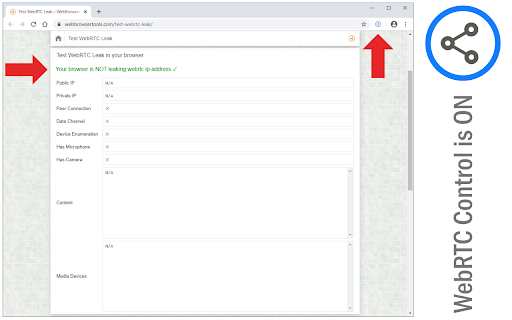
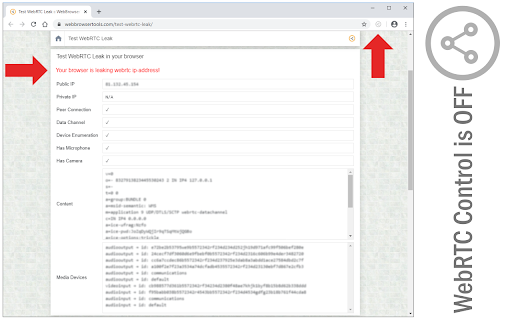
WebRTC Control is positioned as a straightforward utility to manage WebRTC API access within the browser. It functions as a toggle to prevent IP address leaks that can occur even when using a VPN, providing protection against real IP exposure.

Inferred product pattern

Single-purpose privacy utility targeting network configuration.

Review-backed pain points

The most significant pain point is the total lack of a whitelist or site-specific exclusion list, forcing users to toggle the entire extension off to use sites that require WebRTC. Performance issues, including high CPU usage after extended runtimes, were also noted.

Observed feature gaps

Absence of a per-site whitelist feature, granular site exclusions, and potential compatibility issues with common video playback services.

Tags
WebRTCPrivacyIP ProtectionNetwork SecurityBrowser Extension
Target users

- Privacy-conscious users

- VPN users

- Security-focused web users

Primary use cases

- Blocking WebRTC IP leaks

- Disabling media stream track access

- Preventing browser-level network leaks

Positive themes

- Effectively blocks WebRTC as verified by leak testing sites

- Simple one-click toggling interface

Negative themes

- Lack of per-site whitelist/exception management

- Can break functionality on specific websites

- Reports of inconsistent efficacy across different sites

- Concerns regarding excessive permissions

Observed friction

- Performance complaints detected

- Privacy complaints detected

- No pricing friction identified; the product is free.

Evidence boundary: Evidence derived from a mix of user reviews highlighting utility success in tests versus frustration over functional site breakage and feature limitations. Review sample includes reports from several years, spanning different browser versions, which may not reflect the current codebase efficacy.
Complaint summaries
Review-backed complaint signals grouped by operational area.

Support

Users expressed frustration over lack of features (whitelisting) and unexpected permission requirements rather than direct support failures.

Reliability

Some users report that the extension stops working effectively over time or breaks site functionality, with one report of high CPU usage after prolonged browser sessions.

Privacy

Users raised concerns about 'site access' permissions, questioning why a privacy-focused tool requires access to all site data.

Access & pricing

- Free usage observed

- No account requirement observed

- Free plan or free usage claimed

Store listing facts

Listing assets

- Screenshots: 4

- Videos: 1

- Languages: 1

Trust signals

- Developer contact

- Official website

Store metadata

- Version: 0.3.4

- Size: 55.17KiB

- Last updated:

Store description excerpt
Short excerpt from the public Chrome Web Store listing; full copy is available on the official store page.
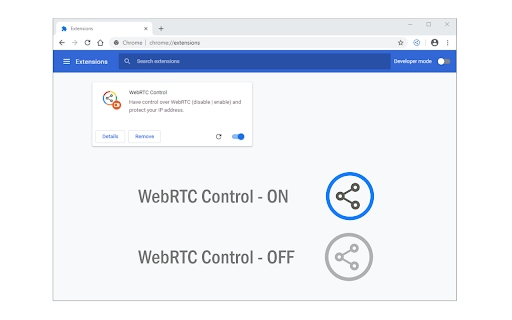
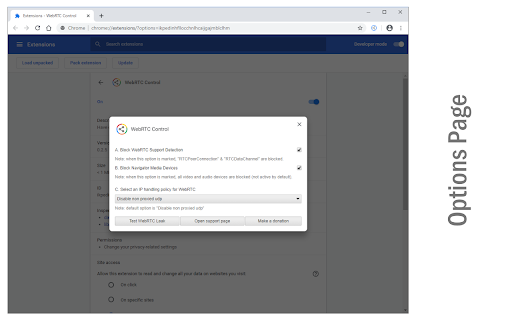
WebRTC Control is an extension that brings you control over WebRTC API in your browser. The toolbar icon serves as a toggle button that enables you to quickly disable or enable the add-on (note: the icon will change color once you click on it). This addon does not a have toolbar popup UI. When WebRTC is enabled in your browser, your real IP address will be exposed to the public (even if you're using a masking service such as VPN). But preventing WebRTC leaks helps you protect your IP address. WebRTC Control add-on will also disable the following WebRTC components (see add-on options page): a. navigator.getUserMedia b. window.MediaStreamTrack c. window.RTCPeerConnection d. window.RTCSessionDescription To report bugs, please visit the extension's homepage (https://mybrowseraddon.com/webrtc-control.html) and fill the bug report form.

Listing SEO keywords

Search intent keywords
Keyword signals for evaluating how users may discover, compare, or search for this extension category.

Core discovery

disable WebRTCprevent WebRTC leakhide IP address ChromeWebRTC block extension

Comparison

WebRTC Control alternativebest WebRTC blocker

Problem

WebRTC leak detectedhow to stop WebRTC leaks

Alternative

VPN WebRTC leak fixbrowser privacy tools

Similar extensions

Jump to related discovery paths:

FAQ

What is WebRTC Control mainly used for?
This extension allows users to enable or disable WebRTC components, including navigator.getUserMedia and window.RTCPeerConnection. It is designed to act as a security layer for users concerned about their IP address visibility during web browsing.
What market signals stand out?
Established adoption with moderate review base. Last known update: 08/09/2025.
What should builders compare before entering this space?
Compare install concentration, rating quality, update recency, screenshots, developer portfolio, listing claims, and review-backed friction signals.
Is this page review-backed?
Backed by review samples. This page combines store metadata with selected review signals, while raw store metrics remain visible for comparison.

Screenshots

WebRTC Control screenshot

Links

Website: mybrowseraddon.com

Videos: Watch

Recommended Chrome extensions

Related listings from the same category, trending peers, and the same publisher portfolio.

Browse developer