Font Inspector icon

Font Inspector Chrome Extension Analysis

Developer & Designer Tools

Chrome extension ID: kgekdppfhdacjmnogfkklnljiglcphip

Font Inspector is a Chrome extension that allows users to click on web elements to see detailed typography information. It provides a popup interface containing CSS font properties and tab information like URL and dimensions.

Developer:MeryDev
Version:0.2.0
Size:28.17KiB
Last updated:

Overview

Installs

10K+

Rating

3.1

10 reviews

Languages

1 locales

Includes English

Market analysis

Review-backed positioning, friction, and market signals for this Chrome extension.

Backed by review samples

Macro category

Developer & Designer Tools

Pricing friction

Low review signal

Complaint intensity

Moderate review signal

Listing & review signals
Observed signals from store listing text and review samples.

Listing positioning

The product is positioned as a quick utility for inspecting HTML elements to retrieve font data. It promises an in-page UI that reveals font size, style, color, and family, alongside tab-specific metadata.

Inferred product pattern

A utility-driven developer tool focused on CSS and typography inspection via an overlay UI.

Review-backed pain points

Users report the UI panel is unreadable, cannot be moved to prevent blocking content, and can go off-screen when the browser window is not maximized.

Observed feature gaps

Reviewers suggested adding a fixed-position or full-height popup and an option to filter properties to reduce panel length.

Tags
Font InspectorWeb DevelopmentTypography ToolDesign Inspection
Target users

- Frontend Developers

- UI/UX Designers

- Web Designers

Primary use cases

- Inspecting website typography

- Verifying design implementation

- Checking responsive web font properties

Positive themes

- Effective for peer reviewing frontend development

- Quickly verifies if design matches implementation

Negative themes

- Poor/unreadable UI

- Inflexible popup positioning

- Information overload/excessive scrolling

Observed friction

- No pricing information or friction observed.

Evidence boundary: Analysis based on the store description and a small sample of user reviews highlighting UI/UX friction. The review sample size is very small (10 reviews total), which may not represent the full user base.
Complaint summaries
Review-backed complaint signals grouped by operational area.

Support

No support complaints observed.

Reliability

One user reported the UI failing to appear when the toolbar icon was clicked.

Privacy

No privacy complaints observed.

Access & pricing

- No clear monetization signal

- No account requirement observed

- No clear pricing signal

Store listing facts

Listing assets

- Screenshots: 2

- Videos: 0

- Languages: 1

Trust signals

- Privacy policy

- Developer contact

- Official website

Store metadata

- Version: 0.2.0

- Size: 28.17KiB

- Last updated:

Store description excerpt
Short excerpt from the public Chrome Web Store listing; full copy is available on the official store page.
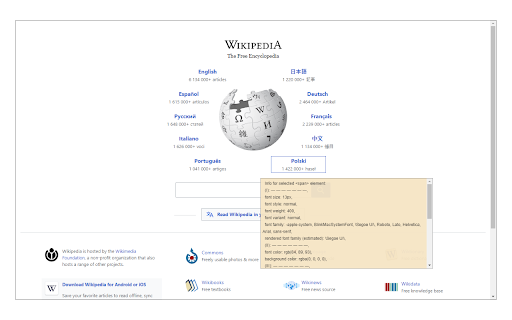
Font Inspector is an extension that helps you easily inspect all fonts within a website. To start working with this addon, simply click on the toolbar icon once to open the in-page UI. Then, click on any HTML element that you want to see the font info. Please note that, as long as the UI is open, no links (or other functions) on the page will work. The in-page UI has several pieces of information related to the selected font such as font size, style, color, family, etc. Besides, there is information about the current tab such as id, width, height, title, and URL. If you click on the toolbar icon or press the escape button on your keyboard, the in-page UI will disappear and all the links within the page work as normal. To report bugs, please fill the bug report form on the addon's homepage (https://mybrowseraddon.com/font-inspector.html).

Listing SEO keywords

Search intent keywords
Keyword signals for evaluating how users may discover, compare, or search for this extension category.

Core discovery

font inspectorinspect font on websiteweb typography toolcss font checker

Comparison

Serifio

Problem

unreadable font infofont inspector ui issuesfont popup off screen

Alternative

font inspector chrome extensiontypography inspector

Similar extensions

Jump to related discovery paths:

FAQ

What is Font Inspector mainly used for?
Font Inspector is a Chrome extension that allows users to click on web elements to see detailed typography information. It provides a popup interface containing CSS font properties and tab information like URL and dimensions.
What market signals stand out?
Visible niche traction with limited review base. Last known update: 12/20/2025.
What should builders compare before entering this space?
Compare install concentration, rating quality, update recency, screenshots, developer portfolio, listing claims, and review-backed friction signals.
Is this page review-backed?
Backed by review samples. This page combines store metadata with selected review signals, while raw store metrics remain visible for comparison.

Screenshots

Font Inspector screenshot

Links

Recommended Chrome extensions

Related listings from the same category, trending peers, and the same publisher portfolio.

Browse developer
Download All Images icon

Download All Images

MeryDev

Easily save images with a wide range of customization features, such as file size, dimensions, and image type.

Installs

200K+

Rating

4.3

Tab Auto Refresh icon

Tab Auto Refresh

MeryDev

Automatically refresh tabs based on custom time intervals

Installs

100K+

Rating

4.2

Window Resizer icon

Window Resizer

Ionuț Botizan

Resize the browser window to emulate various screen resolutions.

Installs

700K+

Rating

4.3

Tag Assistant Companion icon

Tag Assistant Companion

Google

The Tag Assistant Companion extension works with Tag Assistant to help troubleshoot installation of gtag.js and Google Tag Manager.

Installs

600K+

Rating

3.1

Talend API Tester - Free Edition icon

Talend API Tester - Free Edition

Qlik

Visually interact with REST, SOAP and HTTP APIs.

Installs

600K+

Rating

4.8

TikTok Pixel Helper icon

TikTok Pixel Helper

TikTok For Business

The TikTok Pixel Helper is a plug-in that monitors whether your TikTok Pixel is functioning properly.

Installs

600K+

Rating

2.6

Google Analytics Debugger icon

Google Analytics Debugger

Google Analytics

Prints useful information to the JavaScript console by enabling the debug version of the Google Analytics Javascript.

Installs

600K+

Rating

4.2

Detailed SEO Extension icon

Detailed SEO Extension

ahrefsseotoolbar

Get SEO insights at the click of a button to any website you're currently on. Built by full-time SEO's for daily analysis.

Installs

500K+

Rating

4.9

CSS Peeper icon

CSS Peeper

CSS Peeper

Inspect website styles in seconds. Supercharge your workflow, and save hours of work.

Installs

500K+

Rating

4.1

Salesforce Inspector Reloaded icon

Salesforce Inspector Reloaded

Thomas Prouvot

Productivity tools for Salesforce administrators and developers to inspect data and metadata directly from the Salesforce UI.

Installs

500K+

Rating

4.8