
Studiehjälp Chrome Extension Analysis
Tab & Bookmark ProductivityChrome extension ID: dkfojjekcoafkcoepfamfkjcndchmmol
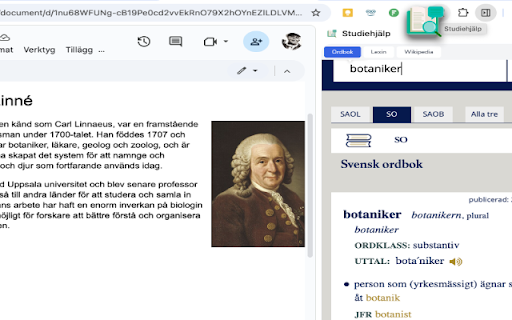
Studiehjälp is a Chrome extension that provides a side panel containing bookmarks to the Swedish Academy Dictionary, Lexin, and Wikipedia. It allows users to perform spelling checks and research without leaving their primary workspace.
Overview
Installs
379
Rating
★ —
0 reviews
Languages
1 locales
Includes svenska
Market analysis
Review-backed positioning, friction, and market signals for this Chrome extension.
Macro category
Tab & Bookmark Productivity
Pricing friction
Low review signal
Complaint intensity
Low review signal
Listing positioning
The product is positioned as a productivity aid for students to maintain focus by integrating essential reference tools into the Chrome side panel. It emphasizes reducing tab-switching by providing direct access to dictionaries and Wikipedia while promoting academic integrity.
Inferred product pattern
Localized resource aggregator for educational productivity.
Review-backed pain points
Review-backed data is not available.
Observed feature gaps
The tool is limited to acting as a wrapper for external links rather than offering native dictionary or research functionality.
- Swedish students
- Swedish language learners
- Academic researchers
- Quick spelling and word lookups
- Reference research via Wikipedia
- Maintaining focus during school assignments
- review-backed data is not available
- review-backed data is not available
- No pricing information provided; appears to be a free utility.
Support
Review-backed data is not available.
Reliability
Review-backed data is not available.
Privacy
Review-backed data is not available.
- Free usage observed
- No account requirement observed
- Free plan or free usage claimed
Store listing facts
- Screenshots: 2
- Videos: 1
- Languages: 1
- Developer contact
- Version: 0.6
- Size: 59.81KiB
- Last updated:
Listing SEO keywords
Core discovery
Comparison
Problem
Alternative
Similar extensions
Jump to related discovery paths:
FAQ
Screenshots
Links
Videos: Watch