Converter for Excel icon

Converter for Excel Chrome Extension Analysis

Automation & Workflow Efficiency

Chrome extension ID: geenipmnncdadogjkpolcjpehkiohlej

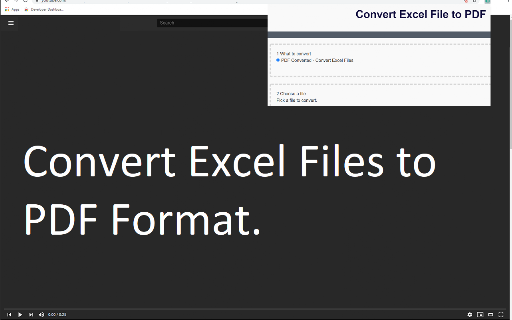
Converter for Excel is a Chrome extension designed to transform XLS, XLSX, and CSV files into PDF documents. It utilizes a context menu-based workflow to trigger conversion tasks for files accessed within the browser.

Version:3.0.0
Size:1.78MiB
Last updated:

Overview

Installs

50K+

Rating

3.9

206 reviews

Languages

38 locales

Includes Deutsch, English, Filipino, Indonesia...

Market analysis

Review-backed positioning, friction, and market signals for this Chrome extension.

Backed by review samples

Macro category

Automation & Workflow Efficiency

Pricing friction

Low review signal

Complaint intensity

Moderate review signal

Listing & review signals
Observed signals from store listing text and review samples.

Listing positioning

The extension positions itself as a simple utility for converting Excel spreadsheets to PDF format. It emphasizes ease of use through a right-click context menu integration for browser-based files.

Inferred product pattern

Single-function conversion utility relying on browser context menu integration.

Review-backed pain points

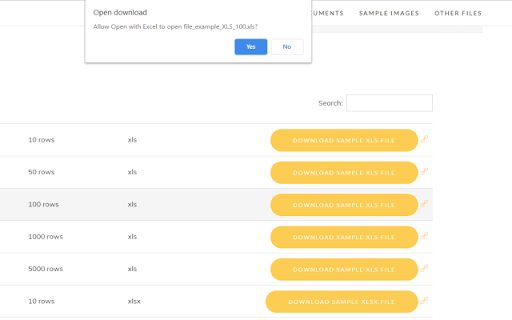
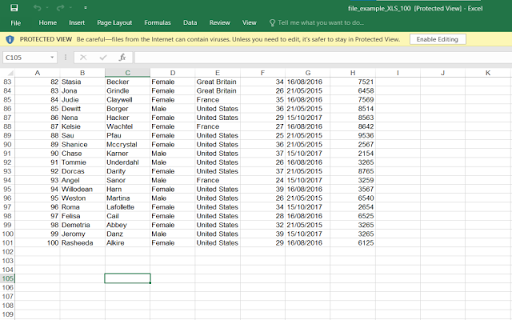
Users express significant confusion between the extension name ('Converter for Excel') and its function, with some expecting it to open files in Excel rather than convert them to PDF. Other users report the tool fails to detect files or is altogether non-functional.

Observed feature gaps

The extension lacks intuitive interface design, with users complaining about the need to consult tutorials repeatedly. It also struggles with Google Drive integration and local file recognition.

Tags
Excel To PDFFile ConverterDocument Management
Target users

- Office workers

- Students

- Users working with browser-based spreadsheets

Primary use cases

- Converting Excel documents to PDF

- Managing spreadsheet file formats via browser context menu

Positive themes

- Functional for specific conversion workflows

Negative themes

- Functional confusion regarding intended use

- Failure to detect local files

- Redundant features

- UI/UX concerns requiring repetitive tutorials

Observed friction

- Performance complaints detected

- No specific pricing friction reported; complaints focus on utility and functional failure.

Evidence boundary: Evidence is derived from 206 user ratings and select text reviews focusing on functional failures and UX design flaws. Review data includes multi-lingual feedback and historical reports which may not reflect the current version's state.
Complaint summaries
Review-backed complaint signals grouped by operational area.

Support

Users report the tool is non-functional or unintuitive, with no evidence of effective support intervention.

Reliability

Multiple reports of the extension failing to perform conversions or recognize local/Drive files.

Privacy

No privacy complaints found.

Access & pricing

- No clear monetization signal

- No account requirement observed

- Free plan or free usage claimed

Store listing facts

Listing assets

- Screenshots: 4

- Videos: 0

- Languages: 38

Trust signals

- Developer contact

- Official website

Store metadata

- Version: 3.0.0

- Size: 1.78MiB

- Last updated:

Store description excerpt
Short excerpt from the public Chrome Web Store listing; full copy is available on the official store page.
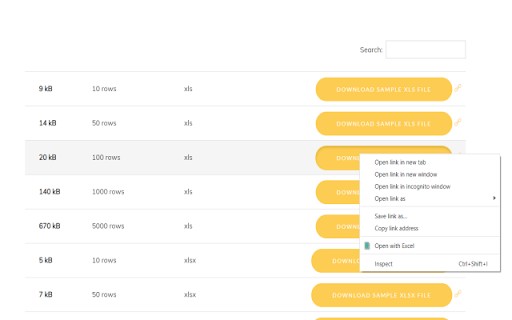
Convert your Microsoft Excel spreadsheets to PDF today Want to convert Microsoft Excel spreadsheets into PDF format? You can do so now after you install our software extension. To begin using our software extension, here are the steps you need to do. Install our software extension "Converter for Excel" Once you install our software, please refresh all your existing Chrome Tabs/close Chrome browser and restart Chrome browser. Choose the XLS/XLSX/CSV file link you wish into PDF to convert via the right click context menu button. Its that simple, just use the right click context menu to choose our extension when you want to convert a Excel spreadsheet to PDF. Disclaimer: Please note this extension is NOT made by Google and is made by an independent development team. All copyrights belong to their respective owners. Google doesn’t endorse or sponsor this Chrome extension. This extension is…

Listing SEO keywords

Search intent keywords
Keyword signals for evaluating how users may discover, compare, or search for this extension category.

Core discovery

Excel to PDF converterChrome extension for Excelconvert XLSX to PDF

Comparison

Excel to PDF onlinebest file converter extension

Problem

extension not workingcannot convert excelfile not found error

Alternative

PDF converter chromefree document converter

Similar extensions

Jump to related discovery paths:

FAQ

What is Converter for Excel mainly used for?
Converter for Excel is a Chrome extension designed to transform XLS, XLSX, and CSV files into PDF documents. It utilizes a context menu-based workflow to trigger conversion tasks for files accessed within the browser.
What market signals stand out?
Visible niche traction with moderate review base. Last known update: 08/23/2022.
What should builders compare before entering this space?
Compare install concentration, rating quality, update recency, screenshots, developer portfolio, listing claims, and review-backed friction signals.
Is this page review-backed?
Backed by review samples. This page combines store metadata with selected review signals, while raw store metrics remain visible for comparison.

Screenshots

Converter for Excel screenshot

Links

Recommended Chrome extensions

Related listings from the same category, trending peers, and the same publisher portfolio.

Browse education
Split Screen for Google Chrome icon

Split Screen for Google Chrome

Free Software Extensions

You can easily split and separate tabs, split interface layout, and resize tabs by columns and rows. Multi-monitor support

Installs

300K+

Rating

3.7

Auto Admit for Google Meet icon

Auto Admit for Google Meet

Free Software Extensions

Automatically admit join requests from external guests to Google Meet

Installs

100K+

Rating

4.2

Tasks for Canvas – now supporting Blackboard, D2L Brightspace icon

Tasks for Canvas – now supporting Blackboard, D2L Brightspace

BetterCampus

A better to-do list sidebar for Canvas, Blackboard, and D2L Brightspace.

Installs

800K+

Rating

4.7

ProctorExam Activity Sharing icon

ProctorExam Activity Sharing

ProctorExam BV

Lets you share your browsing activity when taking an online exam on ProctorExam - https://www.proctorexam.com

Installs

800K+

Rating

1.6

eJOY AI Dictionary icon

eJOY AI Dictionary

ejoy-english.com

Your ultimate knowledge and English learning tool to discover the world and upskill yourself. Translate video, websites and PDF.

Installs

700K+

Rating

4.8

Voice In - Speech-To-Text Dictation icon

Voice In - Speech-To-Text Dictation

Dictanote

Use dictation to type in 10k+ sites in 50+ languages. VoiceIn transcribes your speech to text in real time.

Installs

600K+

Rating

4.4

Translate for Chrome -Translator, Dictionary icon

Translate for Chrome -Translator, Dictionary

Translator App.

Translate words, phrases or text on any webpage. Full page translator and dictionary, text to speech (TTS) using Google Translate.

Installs

600K+

Rating

4.7

オクリンクプラス Webページスクリーンショット機能 icon

オクリンクプラス Webページスクリーンショット機能

ベネッセコーポレーション

オクリンクプラスのカードにWebページのスクリーンショットを挿入し、リンクを埋め込むことができます!

Installs

500K+

Rating

3.0

GPTZero: AI Detection & Writing Replay icon

GPTZero: AI Detection & Writing Replay

chrome-extension-publisher

Bring AI detection, citation checks, live essay feedback, and writing replays directly into Google Docs and your workflow.

Installs

400K+

Rating

4.7

Google Meet Attendance List icon

Google Meet Attendance List

MeetList

Easiest way to save the attendance list for your meetings or lectures

Installs

400K+

Rating

4.7